TcxCustomTreeList.AddNode(TcxTreeListNode,TcxTreeListNode,Pointer,TcxTreeListNodeAttachMode) Method
Creates a new node at the target position or moves an existing node to a new position.
Declaration
function AddNode(ANode: TcxTreeListNode; ARelative: TcxTreeListNode; AData: Pointer; AttachMode: TcxTreeListNodeAttachMode): TcxTreeListNode; virtual;Parameters
| Name | Type | Description |
|---|---|---|
| ANode | TcxTreeListNode | The target node. You can pass |
| ARelative | TcxTreeListNode | Specifies the parent for the added node ( You can pass |
| AData | Pointer | Allows you to associate a custom object with the target node ( Note TcxCustomTreeList descendants do not manage objects associated using the |
| AttachMode | TcxTreeListNodeAttachMode | The moved or created node’s position at the target hierarchy level ( |
Returns
| Type | Description |
|---|---|
| TcxTreeListNode | The moved or created (if |
Remarks
Call the AddNode function to create nodes in unbound data access mode. The TcxTreeList control sorts all nodes once a new node is added if sorting is active.
Code Example: Create and Populate Unbound Tree List Controls
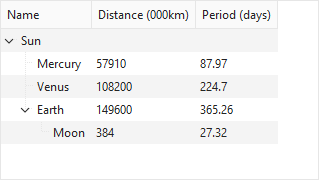
The following code example creates a TcxTreeList control with three columns and populates it with nodes arranged into a tree-like hierarchy (in unbound mode):
uses
  cxTL;  // Declares the TcxTreeList control and related types
// ...

var
  ATreeList: TcxTreeList;
  ABand: TcxTreeListBand;
  AColumn: TcxTreeListColumn;
  ARootNode, ANode, AChildNode: TcxTreeListNode;
begin
  ATreeList := TcxTreeList.Create(Self);  // Creates a TcxTreeList control
  ATreeList.Parent := Self;  // Associates the created control with the parent form
  ATreeList.BeginUpdate;  // Initiates the following batch operation
  try
    ATreeList.Align := alClient;
    // Create a band and three columns
    ABand := ATreeList.Bands.Add;
    ABand.Caption.Text := 'General Information';
    AColumn := ATreeList.CreateColumn(ABand);
    AColumn.Caption.Text := 'Name';
    AColumn := ATreeList.CreateColumn(ABand);
    AColumn.Caption.Text := 'Distance (000km)';
    AColumn := ATreeList.CreateColumn(ABand);
    AColumn.Caption.Text := 'Period (days)';
    // Create all nodes and assign values
    ARootNode := ATreeList.Add;
    ARootNode.Values[0] := 'Sun';
    ANode := ATreeList.AddNode(nil, ARootNode, nil, tlamAddChild);
    ANode.Values[0] := 'Mercury';
    ANode.Values[1] := 57910;
    ANode.Values[2] := 87.97;
    ANode := ATreeList.AddNode(nil, ARootNode, nil, tlamAddChild);
    ANode.Values[0] := 'Venus';
    ANode.Values[1] := 108200;
    ANode.Values[2] := 224.7;
    ANode := ATreeList.AddNode(nil, ARootNode, nil, tlamAddChild);
    ANode.Values[0] := 'Earth';
    ANode.Values[1] := 149600;
    ANode.Values[2] := 365.26;
    AChildNode := ANode.AddChild;
    AChildNode.Values[0] := 'Moon';
    AChildNode.Values[1] := 384;
    AChildNode.Values[2] := 27.32;
    ARootNode.Expand(True);  // Expands all nodes starting from the root level
  finally
    ATreeList.EndUpdate;  // Calls EndUpdate regardless of the batch operation's success
  end;
  ATreeList.ApplyBestFit;  // Adjusts column width to fit all captions and content in full
end;
Other Node Creation Options in Unbound Mode
You can also call the following methods to create nodes in unbound mode:
- TcxTreeList.Add
- Creates a node and adds it after the last node at the specified node’s nesting level.
- TcxTreeList.AddChild
- Creates a node and appends it as a child of the specified node.
- TcxTreeList.AddChildFirst
- Creates a node and adds it before the first child node of the specified node.
- TcxTreeList.AddFirst
- Creates a new node with the default settings and adds it before the first node at the root level.
- TcxTreeList.Insert
- Creates a new node and inserts it after the specified node.
- TcxTreeList.InsertEx
- Inserts a new or existing node after the specified node.
- TcxTreeListNode.AddChild
- Creates a node and inserts it as the last item in the next level of the node hierarchy.
- TcxTreeListNode.AddChildFirst
- Creates a node and inserts it as the first item in the next level of the node hierarchy.