TcxCustomTreeList.CreateColumn(TcxTreeListBand) Method
Creates a new column.
Declaration
function CreateColumn(ABand: TcxTreeListBand = nil): TcxTreeListColumn; virtual;Parameters
| Name | Type | Description |
|---|---|---|
| ABand | TcxTreeListBand | Optional. The parent band for the created column. If you omit this parameter, the created column is assigned to the first visible band or to the first band in the control’s band collection. If the control is empty, the |
Returns
| Type | Description |
|---|---|
| TcxTreeListColumn | The created column. |
Remarks
Call the CreateColumn function to create a column in the Tree List control. All created columns are accessible through the Columns property.
Code Example: Create and Populate Unbound Tree List Controls
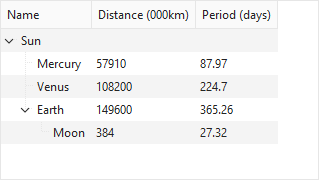
The following code example creates a TcxTreeList control with three columns and populates it with nodes arranged into a tree-like hierarchy (in unbound mode):
uses
  cxTL;  // Declares the TcxTreeList control and related types
// ...

var
  ATreeList: TcxTreeList;
  ABand: TcxTreeListBand;
  AColumn: TcxTreeListColumn;
  ARootNode, ANode, AChildNode: TcxTreeListNode;
begin
  ATreeList := TcxTreeList.Create(Self);  // Creates a TcxTreeList control
  ATreeList.Parent := Self;  // Associates the created control with the parent form
  ATreeList.BeginUpdate;  // Initiates the following batch operation
  try
    ATreeList.Align := alClient;
    // Create a band and three columns
    ABand := ATreeList.Bands.Add;
    ABand.Caption.Text := 'General Information';
    AColumn := ATreeList.CreateColumn(ABand);
    AColumn.Caption.Text := 'Name';
    AColumn := ATreeList.CreateColumn(ABand);
    AColumn.Caption.Text := 'Distance (000km)';
    AColumn := ATreeList.CreateColumn(ABand);
    AColumn.Caption.Text := 'Period (days)';
    // Create all nodes and assign values
    ARootNode := ATreeList.Add;
    ARootNode.Values[0] := 'Sun';
    ANode := ATreeList.AddNode(nil, ARootNode, nil, tlamAddChild);
    ANode.Values[0] := 'Mercury';
    ANode.Values[1] := 57910;
    ANode.Values[2] := 87.97;
    ANode := ATreeList.AddNode(nil, ARootNode, nil, tlamAddChild);
    ANode.Values[0] := 'Venus';
    ANode.Values[1] := 108200;
    ANode.Values[2] := 224.7;
    ANode := ATreeList.AddNode(nil, ARootNode, nil, tlamAddChild);
    ANode.Values[0] := 'Earth';
    ANode.Values[1] := 149600;
    ANode.Values[2] := 365.26;
    AChildNode := ANode.AddChild;
    AChildNode.Values[0] := 'Moon';
    AChildNode.Values[1] := 384;
    AChildNode.Values[2] := 27.32;
    ARootNode.Expand(True);  // Expands all nodes starting from the root level
  finally
    ATreeList.EndUpdate;  // Calls EndUpdate regardless of the batch operation's success
  end;
  ATreeList.ApplyBestFit;  // Adjusts column width to fit all captions and content in full
end;
See Also