Generate Spreadsheet Documents Based on Data-Aware Templates (Mail Merge)
- 2 minutes to read
The data-aware Spreadsheet control (TdxSpreadSheetReportDesigner) allows you to generate spreadsheet documents based on templates with placeholders bound to dataset fields.
Tip
The Spreadsheet control is designed for simple usage scenarios. For advanced report generation and Business Intelligence/data analysis, we recommend that you use our ExpressReports and ExpressDashboards Suites (available as part of the VCL Subscription +). These advanced solutions include both the powerful report generator and customizable print preview, BI dashboard designer and viewer available both at design- and runtime, smart/AI functions, non-GUI/service-based document generation, and much more.

Mail Merge functionality can replace the source template with a generated spreadsheet document or display it in a separate Spreadsheet control depending on the destination passed as the Build procedure parameter. The procedure always excludes all cells outside the report section boundaries from the generated spreadsheet document:

A document template always includes a detail section with placeholder fields corresponding to bound dataset fields and (optionally) header and/or footer sections repeated in all generated documents (captions, logos, etc.). In addition to these sections, master-detail document templates include at least one nested detail section:

A section within a document template can include simple and formatted cell values, formula expressions, comments and floating containers, like any other spreadsheet document. In addition, template sections can include dedicated placeholder fields that correspond to dataset fields from one or more datasets bound using the DataBinding property. A placeholder is a cell with a formula expression that includes a dedicated document template function you can use like any other registered function.

The Spreadsheet control includes the Field Chooser that lists a tree-like structure populated with fields from bound datasets. Users can drag-and-drop these fields to cells within document template sections to create placeholder cells. Corresponding document template formula expressions are created automatically.
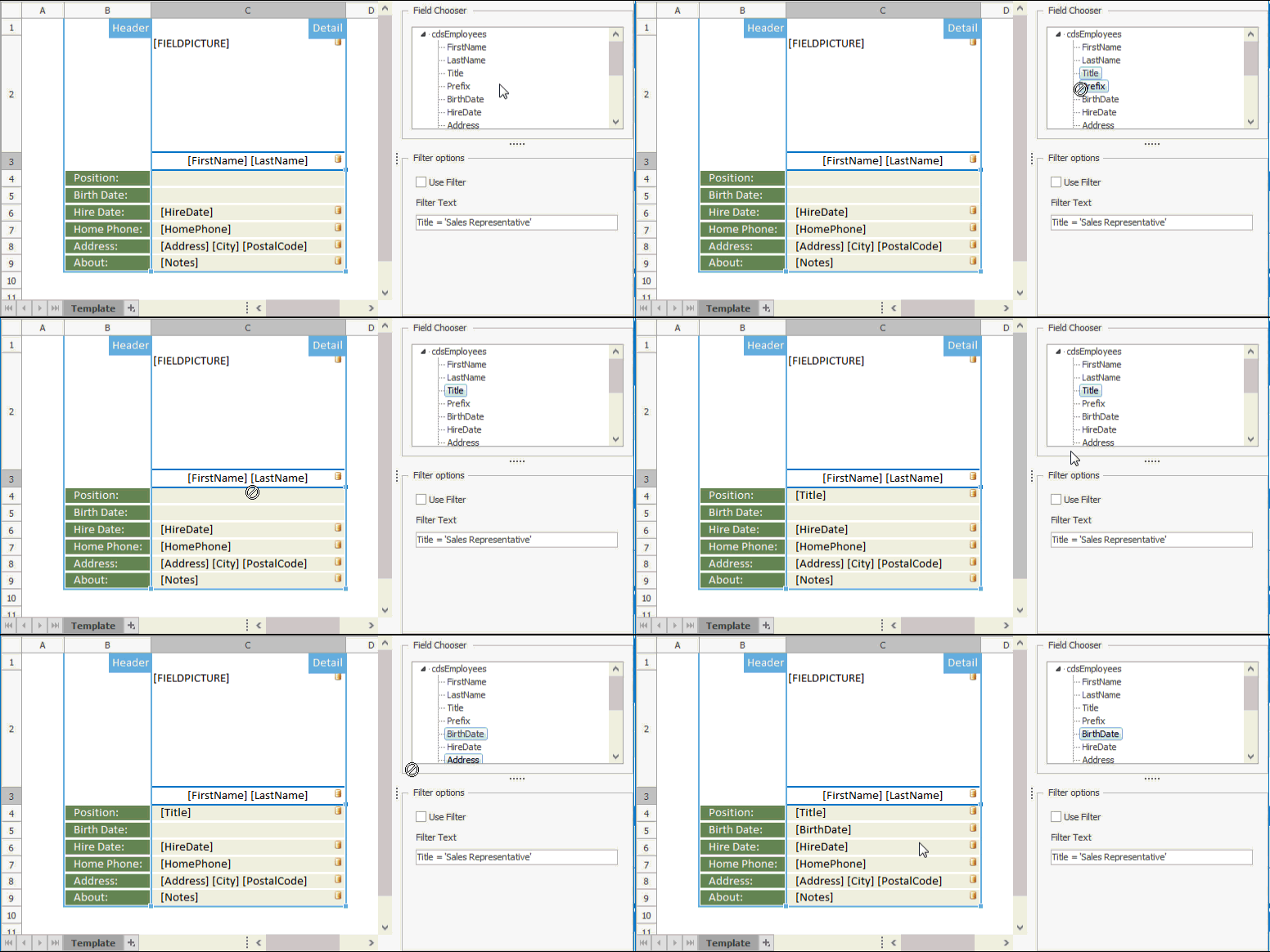
You can either display the Field Chooser as a separate floating form or host it within a specific control (the TcxGroupBox control, for example). To accomplish this goal, assign the host control to the Field Chooser’s Site property.

Once the document template is ready, call the Build procedure and pass the target Spreadsheet control as a parameter. Depending on the Options.ReportMode property value, the procedure can build grouped and/or multi-level reports on multiple worksheets, or separate documents (if you specify additional target controls as report destinations within an OnNewDocument event handler).