AIChatControl.AppearanceResourcesOverride Property
Gets or sets a dictionary that overrides individual chat colors. This is a dependency property.
Namespace: DevExpress.AIIntegration.Wpf.Chat
Assembly: DevExpress.AIIntegration.Wpf.Chat.v26.1.dll
NuGet Package: DevExpress.AIIntegration.Wpf.Chat
Declaration
Property Value
| Type | Default | Description |
|---|---|---|
| ResourceDictionary | null | A ResourceDictionary that maps DevExpress Design System CSS variable names (string keys) to |
Remarks
The active DevExpress theme includes a set of chat colors. The dictionary you assign to AppearanceResourcesOverride is applied on top of that set. The control iterates keys in your dictionary and pushes each Brush to the hosted chat as a CSS custom property. Keys you do not specify keep their theme values, so you only declare the colors you want to change.
Note
Appearance customization through AppearanceResourcesOverride works only with color themes (theme palettes), not with classic themes. Refer to the following help topic for the list of themes that support palettes: Themes that Contain Palettes.
Example
The following code snippet overrides multiple chat colors:
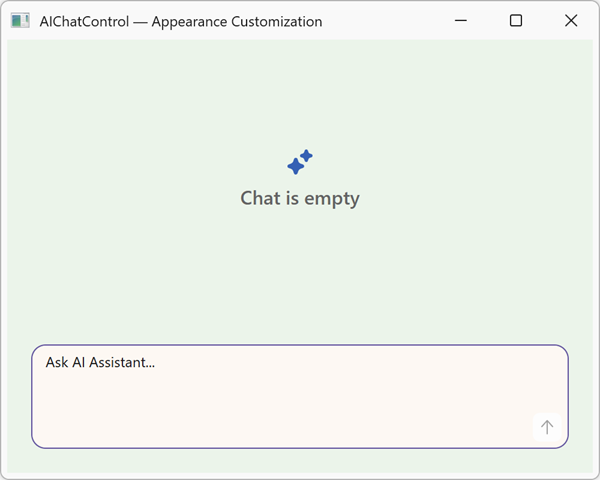
<dxaichat:AIChatControl x:Name="aiChatControl" UseStreaming="True">
    <dxaichat:AIChatControl.AppearanceResourcesOverride>
        <ResourceDictionary>
            <!-- Message list background -->
            <SolidColorBrush x:Key="{x:Static dxaichat:ChatColorKey.SurfaceNeutralDefaultRest}" Color="#FFF8F2"/>
            <!-- User message bubble background -->
            <SolidColorBrush x:Key="{x:Static dxaichat:ChatColorKey.SurfacePrimaryDeepRest}" Color="#E7EFF9"/>
            <!-- Assistant message bubble background -->
            <SolidColorBrush x:Key="{x:Static dxaichat:ChatColorKey.SurfaceNeutralSubduedRest}" Color="#E8F5E9"/>
            <!-- Primary text color -->
            <SolidColorBrush x:Key="{x:Static dxaichat:ChatColorKey.ContentNeutralDefaultRest}" Color="#161616"/>
            <!-- Send button background (resting / pressed) -->
            <SolidColorBrush x:Key="{x:Static dxaichat:ChatColorKey.SurfacePrimaryDefaultRest}" Color="#6750A4"/>
            <SolidColorBrush x:Key="{x:Static dxaichat:ChatColorKey.SurfacePrimaryDefaultActive}" Color="#4F378B"/>
            <!-- Send button icon -->
            <SolidColorBrush x:Key="{x:Static dxaichat:ChatColorKey.ContentNeutralDefaultStaticDarkRest}" Color="#FFFFFF"/>
            <!-- Submit area / suggestion card border -->
            <SolidColorBrush x:Key="{x:Static dxaichat:ChatColorKey.BorderNeutralDefaultRest}" Color="#6750A4"/>
            <!-- Error message bubble background -->
            <SolidColorBrush x:Key="{x:Static dxaichat:ChatColorKey.SurfaceDangerDeepRest}" Color="#FBE9E7"/>
        </ResourceDictionary>
    </dxaichat:AIChatControl.AppearanceResourcesOverride>
</dxaichat:AIChatControl>
Raw string keys work the same way and are useful for variables not specified as constants:
<dxaichat:AIChatControl x:Name="aiChatControl" UseStreaming="True">
    <dxaichat:AIChatControl.AppearanceResourcesOverride>
        <ResourceDictionary>
            <!-- Message list background -->
            <SolidColorBrush x:Key="--dxds-color-surface-neutral-default-rest" Color="#FFF8F2"/>
            <!-- User message bubble background -->
            <SolidColorBrush x:Key="--dxds-color-surface-primary-deep-rest" Color="#E7EFF9"/>
            <!-- Assistant message bubble background -->
            <SolidColorBrush x:Key="--dxds-color-surface-neutral-subdued-rest" Color="#E8F5E9"/>
            <!-- Primary text color -->
            <SolidColorBrush x:Key="--dxds-color-content-neutral-default-rest" Color="#161616"/>
            <!-- Send button background (resting / pressed) -->
            <SolidColorBrush x:Key="--dxds-color-surface-primary-default-rest" Color="#6750A4"/>
            <SolidColorBrush x:Key="--dxds-color-surface-primary-default-active" Color="#4F378B"/>
            <!-- Send button icon -->
            <SolidColorBrush x:Key="--dxds-color-content-neutral-default-static-dark-rest" Color="#FFFFFF"/>
            <!-- Submit area / suggestion card border -->
            <SolidColorBrush x:Key="--dxds-color-border-neutral-default-rest" Color="#6750A4"/>
            <!-- Error message bubble background -->
            <SolidColorBrush x:Key="--dxds-color-surface-danger-deep-rest" Color="#FBE9E7"/>
        </ResourceDictionary>
    </dxaichat:AIChatControl.AppearanceResourcesOverride>
</dxaichat:AIChatControl>
Refer to the following help topic for additional information: AI Chat Control