AIChatControl.EmptyStateTemplate Property
Gets or sets a template that customizes the message area displayed before the conversation starts. This is a dependency property.
Namespace: DevExpress.AIIntegration.Wpf.Chat
Assembly: DevExpress.AIIntegration.Wpf.Chat.v26.1.dll
NuGet Package: DevExpress.AIIntegration.Wpf.Chat
Declaration
Property Value
| Type | Description |
|---|---|
| RenderFragment | The template applied to the empty message area. |
Remarks
You can modify empty area text or template displayed when a chat has yet to start.
Use one of the following properties:
- EmptyStateText - Specifies the empty area message.
EmptyStateTemplate- Specifies a template (RenderFragment) used to customize the empty area.
Note
If both EmptyStateText and EmptyStateTemplate properties are set, the chat control uses the EmptyStateTemplate and ignores the EmptyStateText.
Customize Empty Area Text
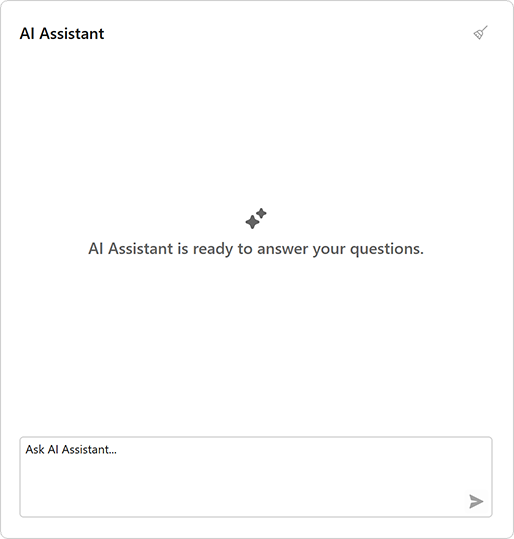
<dxaichat:AIChatControl x:Name="aiChatControl"
                EmptyStateText="AI Assistant is ready to answer your questions."
                HorizontalAlignment="Stretch"
                VerticalAlignment="Stretch"
                Margin="10">
</dxaichat:AIChatControl>
Customize Empty Area Appearance
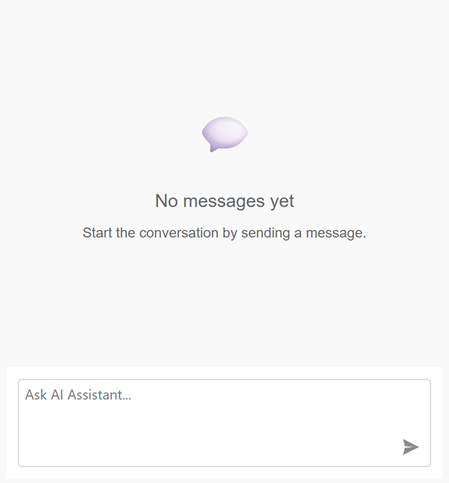
using Microsoft.AspNetCore.Components;

public MainWindow() {
    InitializeComponent();
    aiChatControl.EmptyStateTemplate = MyEmptyStateTemplate;
}

RenderFragment MyEmptyStateTemplate = builder => {
    builder.OpenComponent<EmptyArea>(0);
    builder.CloseComponent();
};
The EmptyArea.razor file:
<style>
    .emptyarea-box {
        display: flex;
        flex-direction: column;
        align-items: center;
        justify-content: center;
        height: 100%;
        color: #666;
        font-family: sans-serif;
        text-align: center;
        padding: 40px;
    }
    .emptyarea-icon {
        font-size: 48px;
        margin-bottom: 16px;
    }
    .emptyarea-title {
        font-size: 18px;
        font-weight: 500;
    }
    .emptyarea-description {
        font-size: 14px;
        margin-top: 8px;
    }
</style>

<div class="emptyarea-box">
    <div class="emptyarea-icon">
        💬
    </div>
    <div class="emptyarea-title">
        No messages yet
    </div>
    <div class="emptyarea-description">
        Start the conversation by sending a message.
    </div>
</div>
Refer to the following help topic for additional information: AI Chat Control
See Also