TdxStatusBarPanel.PanelStyleClass Property
Specifies a reference to the panel style class that defines panel appearance and functionality.
Declaration
property PanelStyleClass: TdxStatusBarPanelStyleClass read; write;Property Value
| Type | Description |
|---|---|
| TdxStatusBarPanelStyleClass | The class-reference to the panel style class. Refer to the following section for a complete list of available status bar panel types: Available Status Bar Panel Types. |
Remarks
Use the PanelStyleClass property to switch between available panel types. To configure panel-type specific settings, use the PanelStyle property.
Available Status Bar Panel Types
| PanelStyleClass Value | Panel Type | Description |
|---|---|---|
| TdxStatusBarContainerPanelStyle | Container Panel | Allows you to embed controls into the status bar panel. |
| TdxStatusBarKeyboardStatePanelStyle | Keyboard State Panel | Displays keyboard modifier key states. |
| TdxStatusBarStateIndicatorPanelStyle | State Indicator Panel | Displays simple colored indicators. |
| TdxStatusBarTextPanelStyle | Text Panel | Displays simple labels or messages. |
| TdxStatusBarToolbarPanelStyle | Toolbar Panel | Allows you to embed a toolbar into the parent TdxRibbonStatusBar control. |
Code Examples
Create Three Status Bar Panels
The following code example creates indicator, text label, and keyboard status panels in a TdxStatusBar control:
uses
  dxStatusBar;  // Declares the TdxStatusBar control and related types
// ...

procedure TMyForm.FormCreate(Sender: TObject);
var
  ATextPanel, AIndicatorPanel, AKeyboardPanel: TdxStatusBarPanel;
  AIndicators: TdxStatusBarStateIndicators;
  AKeyboardPanelStyle: TdxStatusBarKeyboardStatePanelStyle;
begin
  dxStatusBar1.Panels.BeginUpdate;  // Initiates the following batch change
  try
    // Create and configure an indicator panel
    AIndicatorPanel := dxStatusBar1.Panels.Add;
    AIndicatorPanel.PanelStyleClass := TdxStatusBarStateIndicatorPanelStyle;
    AIndicators := TdxStatusBarStateIndicatorPanelStyle(AIndicatorPanel.PanelStyle).Indicators;
    AIndicators.Add.IndicatorType := sitRed;  // Creates a red indicator
    // Create and configure a text panel
    ATextPanel := dxStatusBar1.Panels.Add;
    ATextPanel.PanelStyleClass := TdxStatusBarTextPanelStyle;
    (ATextPanel.PanelStyle as TdxStatusBarTextPanelStyle).Font.Style := [fsBold];
    ATextPanel.Text := 'Disconnected';  // Defines a status message for the created text panel
    ATextPanel.Fixed := False;  // Disables panel width limitations
    // Create and configure a keyboard status panel
    AKeyboardPanel := dxStatusBar1.Panels.Add;
    AKeyboardPanel.PanelStyleClass := TdxStatusBarKeyboardStatePanelStyle;
    AKeyboardPanelStyle := AKeyboardPanel.PanelStyle as TdxStatusBarKeyboardStatePanelStyle;
    // Hide the scroll lock status
    AKeyboardPanelStyle.KeyboardStates := [dxksCapsLock, dxksNumLock, dxksInsert];
  finally
    dxStatusBar1.Panels.EndUpdate;  // Calls EndUpdate regardless of the batch operation's success
  end;
end;
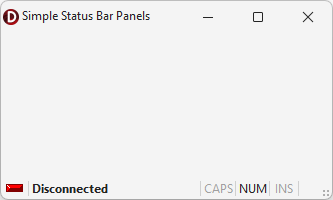
Create and Populate Indicator Panels
The following code example creates an indicator panel in an existing TdxStatusBarPanel component and populates the panel with five different indicators:
uses
  dxStatusBar;  // Declares the TdxStatusBarPanel component and all related types
// ...

var
  AIndicatorPanel: TdxStatusBarPanel;
  AIndicators: TdxStatusBarStateIndicators;
begin
  AIndicatorPanel := dxStatusBar1.Panels.Add;
  AIndicatorPanel.PanelStyleClass := TdxStatusBarStateIndicatorPanelStyle;
  AIndicators := (AIndicatorPanel.PanelStyle as TdxStatusBarStateIndicatorPanelStyle).Indicators;
  AIndicators.BeginUpdate;  // Initiates the following batch change
  try
    AIndicators.Add.IndicatorType := sitRed;
    AIndicators.Add.IndicatorType := sitYellow;
    AIndicators.Add.IndicatorType := sitGreen;
    AIndicators.Add.IndicatorType := sitPurple;
    AIndicators.Add.IndicatorType := sitOff;
  finally
    AIndicators.EndUpdate;  // Calls EndUpdate regardless of the batch operation's success
  end;
end;
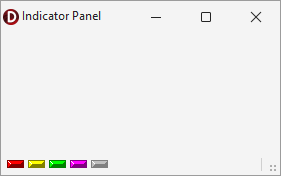
See Also