TdxStatusBarPanels Class
A status bar panel collection.
Declaration
TdxStatusBarPanels = class(
    TCollection
)
Remarks
A status bar panel collection manages panels displayed in a status bar component (a TdxCustomStatusBar descendant instance).
In this topic…
Main API Members
The list below outlines key members of the TdxStatusBarPanels class.
Collection Management APIs
- Add | Insert
- Create new status bar panels and add them to the collection.
- Clear
- Clears the collection.
- Count
- Returns the number of panels in the collection.
- Delete
- Deletes an individual status bar panel in the collection.
- Items
- Provides indexed access to all status bar panels stored in the collection.
General-Purpose API Members
- BeginUpdate | EndUpdate
- Allow you to avoid excessive redraw operations during batch panel changes.
Code Examples
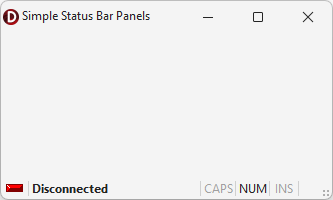
Create Three Status Bar Panels
The following code example creates indicator, text label, and keyboard status panels in a TdxStatusBar control:
uses
  dxStatusBar;  // Declares the TdxStatusBar control and related types
// ...

procedure TMyForm.FormCreate(Sender: TObject);
var
  ATextPanel, AIndicatorPanel, AKeyboardPanel: TdxStatusBarPanel;
  AIndicators: TdxStatusBarStateIndicators;
  AKeyboardPanelStyle: TdxStatusBarKeyboardStatePanelStyle;
begin
  dxStatusBar1.Panels.BeginUpdate;  // Initiates the following batch change
  try
    // Create and configure an indicator panel
    AIndicatorPanel := dxStatusBar1.Panels.Add;
    AIndicatorPanel.PanelStyleClass := TdxStatusBarStateIndicatorPanelStyle;
    AIndicators := TdxStatusBarStateIndicatorPanelStyle(AIndicatorPanel.PanelStyle).Indicators;
    AIndicators.Add.IndicatorType := sitRed;  // Creates a red indicator
    // Create and configure a text panel
    ATextPanel := dxStatusBar1.Panels.Add;
    ATextPanel.PanelStyleClass := TdxStatusBarTextPanelStyle;
    (ATextPanel.PanelStyle as TdxStatusBarTextPanelStyle).Font.Style := [fsBold];
    ATextPanel.Text := 'Disconnected';  // Defines a status message for the created text panel
    ATextPanel.Fixed := False;  // Disables panel width limitations
    // Create and configure a keyboard status panel
    AKeyboardPanel := dxStatusBar1.Panels.Add;
    AKeyboardPanel.PanelStyleClass := TdxStatusBarKeyboardStatePanelStyle;
    AKeyboardPanelStyle := AKeyboardPanel.PanelStyle as TdxStatusBarKeyboardStatePanelStyle;
    // Hide the scroll lock status
    AKeyboardPanelStyle.KeyboardStates := [dxksCapsLock, dxksNumLock, dxksInsert];
  finally
    dxStatusBar1.Panels.EndUpdate;  // Calls EndUpdate regardless of the batch operation's success
  end;
end;
Create and Populate Indicator Panels
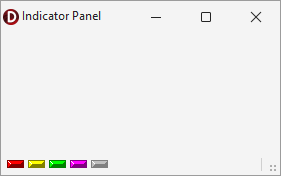
The following code example creates an indicator panel in an existing TdxStatusBarPanel component and populates the panel with five different indicators:
uses
  dxStatusBar;  // Declares the TdxStatusBarPanel component and all related types
// ...

var
  AIndicatorPanel: TdxStatusBarPanel;
  AIndicators: TdxStatusBarStateIndicators;
begin
  AIndicatorPanel := dxStatusBar1.Panels.Add;
  AIndicatorPanel.PanelStyleClass := TdxStatusBarStateIndicatorPanelStyle;
  AIndicators := (AIndicatorPanel.PanelStyle as TdxStatusBarStateIndicatorPanelStyle).Indicators;
  AIndicators.BeginUpdate;  // Initiates the following batch change
  try
    AIndicators.Add.IndicatorType := sitRed;
    AIndicators.Add.IndicatorType := sitYellow;
    AIndicators.Add.IndicatorType := sitGreen;
    AIndicators.Add.IndicatorType := sitPurple;
    AIndicators.Add.IndicatorType := sitOff;
  finally
    AIndicators.EndUpdate;  // Calls EndUpdate regardless of the batch operation's success
  end;
end;
Direct TdxStatusBarPanels Class Reference
The TdxCustomStatusBar.Panels property references a TdxStatusBarPanels object.
Inheritance
TObject
TPersistent
TCollection
TdxStatusBarPanels
See Also