TdxStatusBarStateIndicatorType Enum
Enumerates predefined state indicator colors.
Declaration
TdxStatusBarStateIndicatorType = (
    sitOff,
    sitYellow,
    sitBlue,
    sitGreen,
    sitRed,
    sitTeal,
    sitPurple
);
Members
| Name | Description |
|---|---|
sitOff
|
Gray (default). This option is designed to indicate disabled state for the indicator. |
sitYellow
|
Yellow |
sitBlue
|
Blue |
sitGreen
|
Green |
sitRed
|
Red |
sitTeal
|
Teal |
sitPurple
|
Purple |
Remarks
Use TdxStatusBarStateIndicatorType values to indicate different feature states in a status bar.
Code Example: Create State Indicators
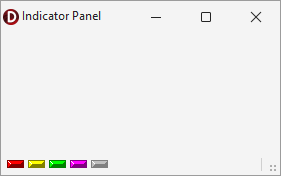
The following code example creates an indicator panel in an existing TdxStatusBarPanel component and populates the panel with five different indicators:
uses
  dxStatusBar;  // Declares the TdxStatusBarPanel component and all related types
// ...

var
  AIndicatorPanel: TdxStatusBarPanel;
  AIndicators: TdxStatusBarStateIndicators;
begin
  AIndicatorPanel := dxStatusBar1.Panels.Add;
  AIndicatorPanel.PanelStyleClass := TdxStatusBarStateIndicatorPanelStyle;
  AIndicators := (AIndicatorPanel.PanelStyle as TdxStatusBarStateIndicatorPanelStyle).Indicators;
  AIndicators.BeginUpdate;  // Initiates the following batch change
  try
    AIndicators.Add.IndicatorType := sitRed;
    AIndicators.Add.IndicatorType := sitYellow;
    AIndicators.Add.IndicatorType := sitGreen;
    AIndicators.Add.IndicatorType := sitPurple;
    AIndicators.Add.IndicatorType := sitOff;
  finally
    AIndicators.EndUpdate;  // Calls EndUpdate regardless of the batch operation's success
  end;
end;
Direct TdxStatusBarStateIndicatorType Type Reference
The TdxStatusBarStateIndicatorItem.IndicatorType property references a TdxStatusBarStateIndicatorType value.
See Also