TdxStatusBarPanel Class
A status bar panel.
Declaration
TdxStatusBarPanel = class(
    TCollectionItem
)
Remarks
A status bar layout includes one or more panels designed to display various information.
Available Status Bar Panel Types
Use the PanelStyle property to switch between the following panel styles/usage scenarios:
- TdxStatusBarContainerPanelStyle
- A panel designed to embed a control (a TControl descendant instance).
- TdxStatusBarKeyboardStatePanelStyle
- Indicates Caps Lock, Num Lock, Scroll Lock, and Insert key states.
- TdxStatusBarStateIndicatorPanelStyle
- A panel that can display simple colored indicators.
- TdxStatusBarTextPanelStyle
- A text label panel.
- TdxStatusBarToolbarPanelStyle
- A panel designed to embed a toolbar. This panel type is designed for the TdxRibbonStatusBar control.
Main API Members
The list below outlines key members of the TdxStatusBarPanel class.
Content & Layout-Related Settings
- BiDiMode
- Allows you to switch between left-to-right and right-to-left panel layouts.
- Fixed
- Specifies if status bar panel width remains unchanged when users resize the parent form.
- PanelStyle
- Provides access to panel type-specific settings.
- PanelStyleClass
- Allows you to switch between available status bar panel types.
- Text
- Allows you to display a message on the status bar panel.
User Interaction Options
- Automation
Provides access to UI Automation and accessibility-related settings.
Tip
Use Automation.Name and Automation.Description, and other API members to specify information visible to third-party assistive tools as UIA node properties.
- OnClick | OnDblClick
- Allow you to execute custom code in response to clicks on the panel.
General-Purpose API Members
- RestoreDefaults
- Restores default panel settings.
- StatusBarControl
- Provides access to the parent status bar control (TdxStatusBar or TdxRibbonStatusBar).
Code Examples
Create Three Status Bar Panels
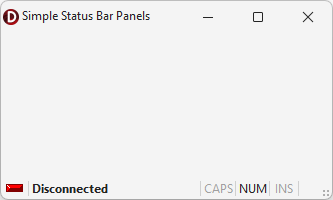
The following code example creates indicator, text label, and keyboard status panels in a TdxStatusBar control:
uses
  dxStatusBar;  // Declares the TdxStatusBar control and related types
// ...

procedure TMyForm.FormCreate(Sender: TObject);
var
  ATextPanel, AIndicatorPanel, AKeyboardPanel: TdxStatusBarPanel;
  AIndicators: TdxStatusBarStateIndicators;
  AKeyboardPanelStyle: TdxStatusBarKeyboardStatePanelStyle;
begin
  dxStatusBar1.Panels.BeginUpdate;  // Initiates the following batch change
  try
    // Create and configure an indicator panel
    AIndicatorPanel := dxStatusBar1.Panels.Add;
    AIndicatorPanel.PanelStyleClass := TdxStatusBarStateIndicatorPanelStyle;
    AIndicators := TdxStatusBarStateIndicatorPanelStyle(AIndicatorPanel.PanelStyle).Indicators;
    AIndicators.Add.IndicatorType := sitRed;  // Creates a red indicator
    // Create and configure a text panel
    ATextPanel := dxStatusBar1.Panels.Add;
    ATextPanel.PanelStyleClass := TdxStatusBarTextPanelStyle;
    (ATextPanel.PanelStyle as TdxStatusBarTextPanelStyle).Font.Style := [fsBold];
    ATextPanel.Text := 'Disconnected';  // Defines a status message for the created text panel
    ATextPanel.Fixed := False;  // Disables panel width limitations
    // Create and configure a keyboard status panel
    AKeyboardPanel := dxStatusBar1.Panels.Add;
    AKeyboardPanel.PanelStyleClass := TdxStatusBarKeyboardStatePanelStyle;
    AKeyboardPanelStyle := AKeyboardPanel.PanelStyle as TdxStatusBarKeyboardStatePanelStyle;
    // Hide the scroll lock status
    AKeyboardPanelStyle.KeyboardStates := [dxksCapsLock, dxksNumLock, dxksInsert];
  finally
    dxStatusBar1.Panels.EndUpdate;  // Calls EndUpdate regardless of the batch operation's success
  end;
end;
Create and Populate Indicator Panels
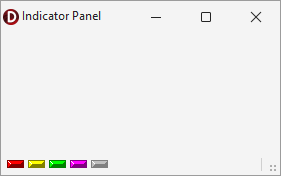
The following code example creates an indicator panel in an existing TdxStatusBarPanel component and populates the panel with five different indicators:
uses
  dxStatusBar;  // Declares the TdxStatusBarPanel component and all related types
// ...

var
  AIndicatorPanel: TdxStatusBarPanel;
  AIndicators: TdxStatusBarStateIndicators;
begin
  AIndicatorPanel := dxStatusBar1.Panels.Add;
  AIndicatorPanel.PanelStyleClass := TdxStatusBarStateIndicatorPanelStyle;
  AIndicators := (AIndicatorPanel.PanelStyle as TdxStatusBarStateIndicatorPanelStyle).Indicators;
  AIndicators.BeginUpdate;  // Initiates the following batch change
  try
    AIndicators.Add.IndicatorType := sitRed;
    AIndicators.Add.IndicatorType := sitYellow;
    AIndicators.Add.IndicatorType := sitGreen;
    AIndicators.Add.IndicatorType := sitPurple;
    AIndicators.Add.IndicatorType := sitOff;
  finally
    AIndicators.EndUpdate;  // Calls EndUpdate regardless of the batch operation's success
  end;
end;
Direct TdxStatusBarPanel Class References
The following public API members reference a TdxStatusBarPanel object:
- TdxCustomStatusBar.GetPanelAt
- Returns the current status bar’s panel that contains the specified point.
- TdxStatusBarPanels.Add
- Creates a new status bar panel and adds it as the last collection item.
- TdxStatusBarPanels.Insert
- Inserts a new panel.
- TdxStatusBarPanels.Items
- Provides indexed access to all status bar panels stored in the collection.
- TdxStatusBarPanelStyle.Owner
- Provides access to the parent status bar panel.