TdxNavBarOfficeNavigationBarOptionsView.UseRibbonArea Property
Specifies if the vertically-arranged Office Navigation Bar control occupies the Ribbon UI area.
Declaration
property UseRibbonArea: Boolean read; write; default False;Property Value
| Type | Default | Description |
|---|---|---|
| Boolean | False |
Remarks
If you use a vertically-oriented Office Navigation Bar as a navigation control for a Ribbon Form, you can set the UseRibbonArea property to True to extend the Office Navigation Bar to the Ribbon UI area.
Note
The UseRibbonArea property has no effect if the Office Navigation Bar is horizontally oriented (default) or not associated with a Ribbon Form.
Available Options
False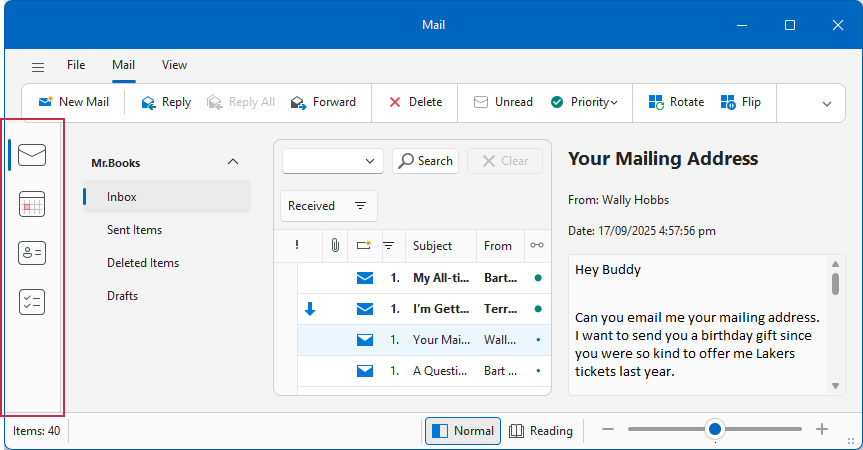
True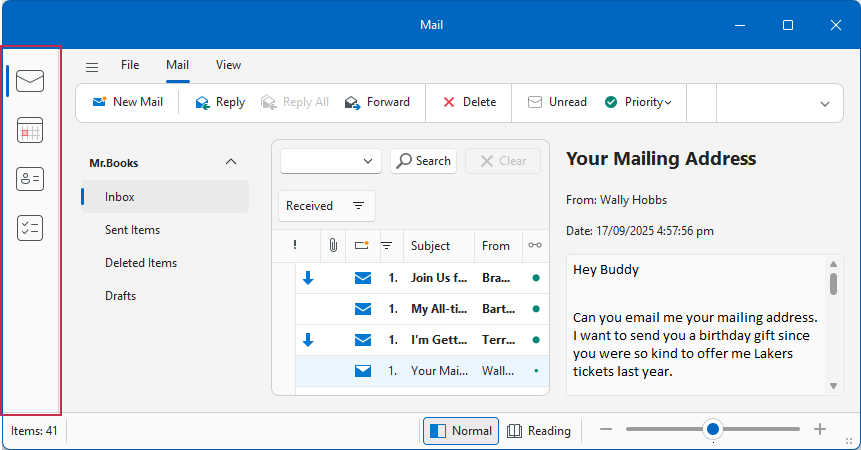
Default Value
The UseRibbonArea property’s default value is False.
See Also