TdxNavBarCustomOfficeNavigationBar Class
The base class for the TdxNavBarOfficeNavigationBar control.
Declaration
TdxNavBarCustomOfficeNavigationBar = class(
    TcxControl,
    IdxSkinSupport,
    IcxMouseTrackingCaller,
    IcxMouseTrackingCaller2,
    IcxMouseTrackingCaller3,
    IdxNavigationClientListener,
    IdxSpecialAlignedControl,
    IdxSpecialAlignedRequestor
)
Remarks
The Office Navigation Bar (TdxNavBarOfficeNavigationBar) control is a navigation panel inspired by Microsoft Outlook®. Office Navigation Bar and Navigation Bar (TdxNavBar) components (used as an Accordion Navigation or Hamburger Menu) can complement each other. Use the ItemProvider property to associate the Office Navigation Bar with a TdxNavBar control.
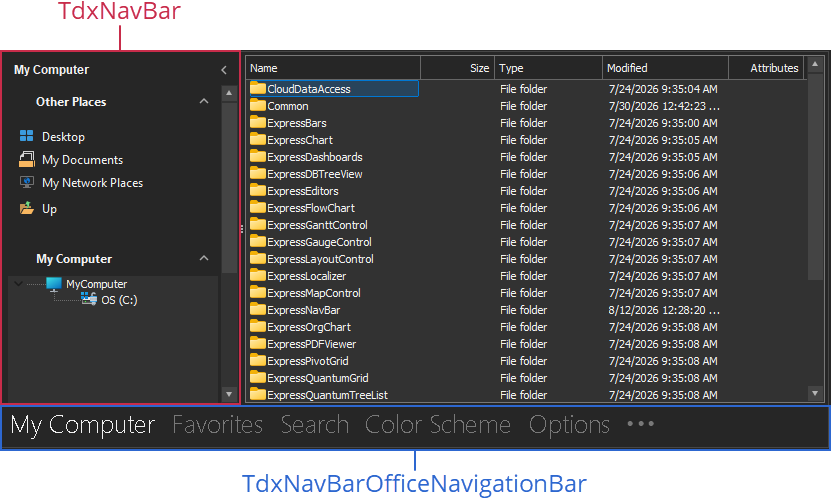
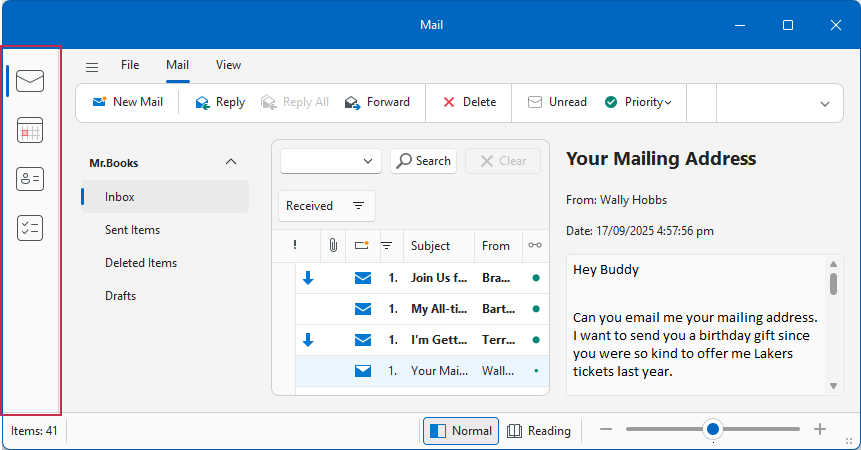
You can arrange the Office Navigation Bar horizontally or vertically. If you use the TdxNavigationBarOfficeNavigationBar component as a vertical side bar for a Ribbon Form, you can set the OptionsView.UseRibbonArea property to True to extend the side bar to the Ribbon UI area.
Main API Members
The list below outlines key members of the TdxNavBarCustomOfficeNavigationBar class.
Appearance Settings
- Images
- Specifies the image source for navigation links.
- LookAndFeel
- Allows you to override global skin and palette settings at the Office Navigation Bar level.
- OptionsView
- Provides access to Office Navigation Bar and navigation link appearance settings.
User Interaction Options
- Automation
Provides access to UI Automation and accessibility-related settings.
Tip
Use Automation.Name and Automation.Description, and other API members to specify information visible to third-party assistive tools as UIA node properties.
- OnSelectionChanged | OnSelectionChanging
- Allow you to respond to navigation link selection.
- OptionsBehavior
- Provides access to general navigation bar behavior settings.
Content & Layout Management Options
- ItemProvider
- Allows you to associate the Office Navigation Bar with a TdxNavBar control that serves as a source of navigation links. Each created navigation link activates the corresponding group in the associated TdxNavBar control.
- Items
- Provides indexed access to the navigation link collection.
- HidePeekForm
- Hides the Peek Form displayed when a user positions the mouse pointer over a navigation link.
- OnQueryPeekFormContent
- Allows you to display a control in a pop-up Peek Form displayed when a user positions the mouse pointer over a navigation link.
- ShowCustomizationForm
- Displays the Office Navigation Bar customization form where users can rearrange navigation links.
- SortedItemCount
- Returns the number of navigation links accessible using the SortedItems property.
- SortedItems
- Provides indexed access to user-sorted navigation links.
General-Purpose API Members
- AutoSize
- Specifies whether Office Navigation Bar dimensions are calculated automatically.
- BeginUpdate | EndUpdate
- Allow you to avoid excessive redraw operations during batch navigation link and appearance changes.
Terminal TdxNavBarCustomOfficeNavigationBar Class Descendant
Do not use the TdxNavBarCustomOfficeNavigationBar class directly. Use the TdxNavBarOfficeNavigationBar control instead.