TdxChartXYSeriesStackedLineView Class
Stores Stacked Line View settings.
Declaration
TdxChartXYSeriesStackedLineView = class(
    TdxChartXYSeriesLineView
)
Remarks
A Line View displays series values as lines and/or points in any combination. Line Views are often used to demonstrate and compare multiple trends on the same diagram.
The TdxChartXYSeriesStackedLineView class implements the Stacked Line View that forms stacked empty areas from series lines on a diagram. Use this View when you need to display multiple series and you need to emphasize the total. To select the Stacked Line View, assign 'StackedLine' to the ViewType property of an XY series.
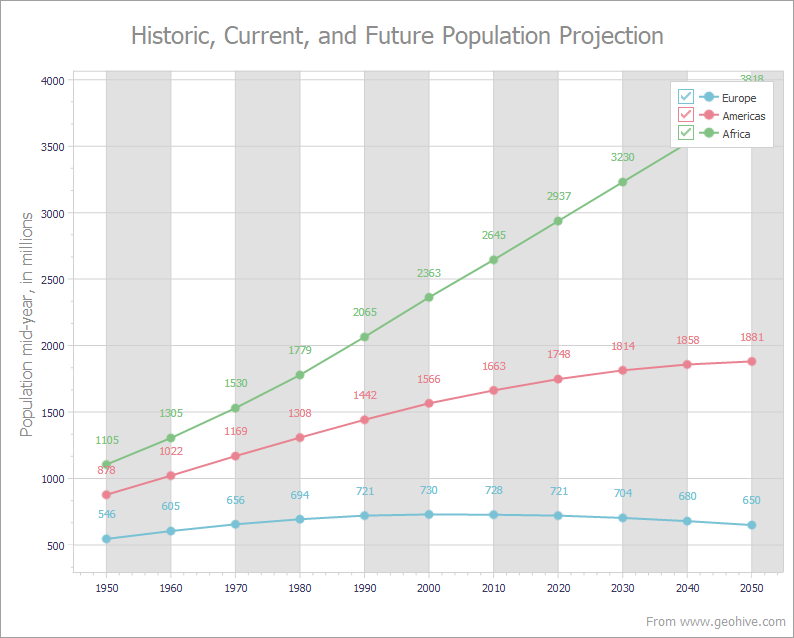
Getting Started
Main API Members
The list below outlines key members of the TdxChartXYSeriesStackedLineView class.
Line View-Specific Settings
- Appearance
- Provides access to general appearance settings.
- Markers
- Allows you to display value markers and change their size, shape, and color.
- Optimization
- Specifies the active performance optimization mode for line drawing.
Common XY Series View API Members
- AxisX | AxisY
Allow you to associate the series View with different argument and value axes in the parent XY diagram.
The Chart control uses the scales of the associated axes to display an XY series.
- GetDescription
- Returns the series View type description.
- GetViewImages
- Returns an image list populated with icons that correspond to all registered series View types.
- GetViewImageIndex
- Returns the index of the icon that corresponds to the current series View type.
- ValueLabels
- Provides access to value label settings.
General-Purpose API Members
- Assign
- Copies compatible settings between Line Views.
- Series
- Provides access to the parent XY series.
Related Compiled Demo
To see line series in action, run the Chart Control demo in the VCL Demo Center installed with compiled DevExpress VCL demos. Click the Line item in the sidebar to display the corresponding demo.
Compiled DevExpress demos ship with source code installed in the Public Documents folder (%PUBLIC%) for all users (default). You can find all project and source code files for the Chart Control demo in the following folder:
%PUBLIC%\Documents\DevExpress VCL Demos\MegaDemos\Product Demos\ExpressChart\
Tip
Project and source code files for all compiled DevExpress VCL Demos are maintained in a public repository hosted on GitHub:
Indirect TdxChartXYSeriesStackedLineView Class References
The TdxChartCustomSeries.View property references the TdxChartXYSeriesStackedLineView class as a TdxChartSeriesCustomView object if the ViewType property of the parent series is set to 'StackedLine'.
You need to cast the returned object to the TdxChartXYSeriesStackedLineView class to access all public API members.
Other Line View Series Classes
- TdxChartXYSeriesFullStackedLineView
- Stores Full-Stacked Line View settings.
- TdxChartXYSeriesLineView
- Stores Line View settings.