PdfPageFacade.AddRedactAnnotation(IEnumerable<PdfOrientedRectangle>, Boolean) Method
Creates a redaction annotation at the specified page area. Allows you to specify whether to use the page coordinate system
Namespace: DevExpress.Pdf
Assembly: DevExpress.Pdf.v25.1.Core.dll
NuGet Package: DevExpress.Pdf.Core
Declaration
public PdfRedactAnnotationFacade AddRedactAnnotation(
    IEnumerable<PdfOrientedRectangle> rectangles,
    bool usePageCoordinateSystem = true
)Parameters
| Name | Type | Description |
|---|---|---|
| rectangles | IEnumerable<PdfOrientedRectangle> | A collection of rectangles that specify a page area where the annotation should be located. |
Optional Parameters
| Name | Type | Default | Description |
|---|---|---|---|
| usePageCoordinateSystem | Boolean | True |
|
Returns
| Type | Description |
|---|---|
| PdfRedactAnnotationFacade | An object that contains redact annotation properties. |
Example
The following code snippet searches for specific words and creates redaction annotations over them:
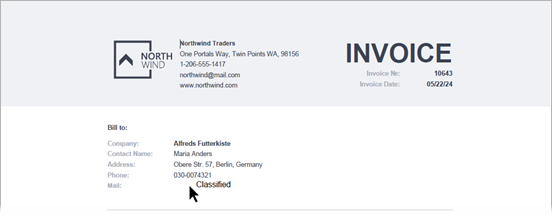
using DevExpress.Pdf;

PdfDocumentProcessor pdfProcessor = new PdfDocumentProcessor();
pdfProcessor.LoadDocument("..\\..\\Invoice.pdf");

PdfDocumentFacade documentFacade = pdfProcessor.DocumentFacade;

PdfTextSearchParameters searchParameters =
  new PdfTextSearchParameters();
searchParameters.CaseSensitive = true;
searchParameters.WholeWords = true;

string[] search = new string[] { "Maria Anders", "030-0074321", "alfredsfutterkiste@mail.com" };
foreach (string word in search)
{
    PdfTextSearchResults results = pdfProcessor.FindText(word, searchParameters);

    // If the text is found, create an annotation
    if (results.Status == PdfTextSearchStatus.Found) {
        var pageIndex = results.Page.GetPageIndex();
        PdfRedactAnnotationFacade redactAnnotation =
            documentFacade.Pages[pageIndex].AddRedactAnnotation(results.Rectangles);
        redactAnnotation.Author = "Jane Doe";

        // Set the redaction annotation appearance
        redactAnnotation.FontColor = new PdfRGBColor(0, 0, 0);
        redactAnnotation.FillColor = new PdfRGBColor(1, 1, 1);
        redactAnnotation.FontName = "Arial";
        redactAnnotation.FontSize = 0; // Enables font auto-size
        redactAnnotation.OverlayText = "Classified";
        redactAnnotation.TextJustification = PdfTextJustification.Centered;
        redactAnnotation.RepeatText = false;
    }
}
// Save the document with the redaction annotation
// and send it for review
pdfProcessor.SaveDocument("output_to_review.pdf");
See Also