MongoDBWizardSettings Class
Contains settings used to customize the Data Source wizard and Query Builder.
Namespace: DevExpress.DataAccess.UI.Wizard
Assembly: DevExpress.DataAccess.v26.1.dll
NuGet Package: DevExpress.DataAccess
Declaration
Related API Members
The following members return MongoDBWizardSettings objects:
Remarks
You can access the MongoDBWizardSettings object and its settings in one of the following ways:
Report Designer Component
When you drop the RibbonReportDesigner component (or the StandardReportDesigner component) onto a form, the End-User Report Designer with a ribbon or standard UI is created.
Use the XRDesignMdiController‘s Properties window to specify MongoDB wizard settings:
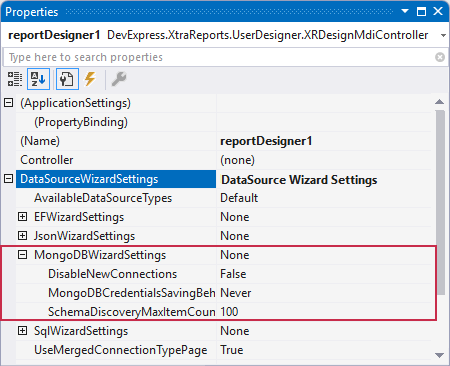
Default End-User Report Designer Form
The following code snippet specifies MongoDB wizard settings when you invoke the End-User Report Designer using the ReportDesignTool class methods:
using DevExpress.XtraReports.UI;
// ...
ReportDesignTool designer = new ReportDesignTool(new XtraReport());
designer.DesignRibbonForm.DesignMdiController.DataSourceWizardSettings.
  MongoDBWizardSettings.SchemaDiscoveryMaxItemCount = 200;
designer.ShowRibbonDesigner();