How to: Add Spell Check Items to the Standard Text Controls' Context Menu
- 2 minutes to read
The following code example shows how to add spell check items for the .NET RichTextBox control’s context menu.
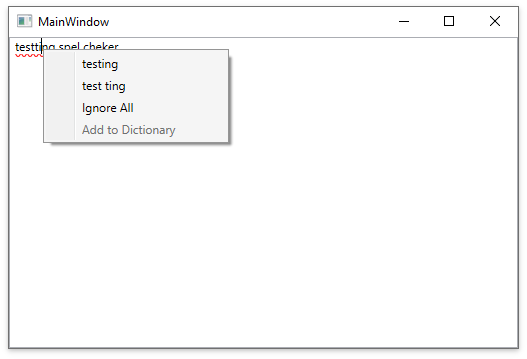
Create Binding to the RichTextEditor’s Context Menu
Create a new MenuItems property in code-behind and bind it to the RichTextBox’s ContextMenu property in XAML, as shown below:
public MainWindow()
{
    DataContext = this;
    InitializeComponent();
}

public ObservableCollection<object> MenuItems { get; } = new ObservableCollection<object>();
<RichTextBox x:Name="richTextBox">
    <RichTextBox.ContextMenu>
        <ContextMenu ItemsSource="{Binding Path=MenuItems}"/>
    </RichTextBox.ContextMenu>
</RichTextBox>
Add SpellChecker Behavior
Add the SpellChecker behavior to the RichTextBox in XAML. Refer to the Configure Spell-Checking Behavior lesson for more information about the SpellChecker behavior and an example on how to add dictionaries.
<RichTextBox x:Name="richTextBox">
    <RichTextBox.ContextMenu>
        <ContextMenu ItemsSource="{Binding Path=MenuItems}"/>
    </RichTextBox.ContextMenu>
    <dxmvvm:Interaction.Behaviors>
        <dxspch:DXSpellChecker Culture="en-US" CheckAsYouType="True"/>
    </dxmvvm:Interaction.Behaviors>
</RichTextBox>
Handle the PreviewMouseRightButtonUp Event
Call the GetErrorOperationCommands method to obtain a list of available commands and assign it to the MenuItems property in the PreviewMouseRightButtonUp event handler. The SpellCheckerCommand.DoCommand method executes the retrieved command.
void RichTextBox_PreviewMouseRightButtonUp(object sender, MouseButtonEventArgs e)
{
    MenuItems.Clear();
    var commands = this.richTextBox.GetErrorOperationCommands(e.GetPosition(this.richTextBox));
    foreach (var command in commands)
    {
        var menuItem = new MenuItem();
        menuItem.Header = command.Caption;
        menuItem.Click += (s, args) => command.DoCommand();
        menuItem.IsEnabled = command.Enabled;
        MenuItems.Add(menuItem);
    }
    if (MenuItems.Count == 0)
        MenuItems.Add(new MenuItem() { Header = "No Error", IsEnabled = false });
}