TcxGridTableView.OnCustomDrawGroupCell Event
Allows you to complement or override built-in group row draw routines.
Declaration
property OnCustomDrawGroupCell: TcxGridTableCellCustomDrawEvent read; write;Remarks
You can handle the OnCustomDrawGroupCell event to change the appearance of individual group rows depending on specific conditions in your application.
Event Occurrence
The OnCustomDrawGroupCell event occurs every time the grid View is about to draw a group row cell.
Performance-Related Recommendations
Since the OnCustomDrawGroupCell event may occur often, the assigned handler must not include time-consuming calculations. Otherwise, the resource-intensive custom draw routine may render the application UI slow and unresponsive.
Important
If you need to rely on data-dependent conditions in an OnCustomDrawGroupCell event handler, we strongly recommend that you use only cached or pre-calculated values instead of complex calculations at the data controller or dataset level.
Event Parameters
The following parameters are available within an OnCustomDrawGroupCell event handler:
Sender- Provides access to the grid Table View that raised the group cell draw event.
ACanvas- Provides access to the processed cell’s canvas. You can call canvas draw routines accessible through this parameter to display custom group cell content.
ViewInfo- Returns information required to draw the processed group cell. For example, you can use the
ViewInfo.Bounds field to identify the boundaries of the cell’s canvas. ADone- Specifies if built-in group cell draw routines are disabled. Assign
Trueto this parameter within anOnCustomDrawGroupCellevent handler to implement the draw routine for the processed cell from scratch.
Refer to the TcxGridTableCellCustomDrawEvent procedural type description for detailed information on all available options.
Code Example: Change Group Row Appearance Based on Content
Built-in draw routines display group rows according to active look & feel settings and other grid View options that affect group row appearance and layout:
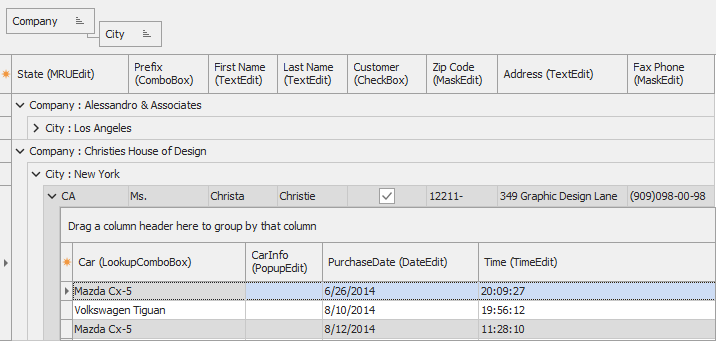
The code example in this topic section demonstrates an OnCustomDrawGroupCell event handler that implements a custom draw routine for group rows. This handler modifies font attributes and changes row background color depending on content:
uses
  cxGrid,  // Declares the TcxGrid control
  cxGridTableView,  // Declares the TcxGridTableView class
  StrUtils;  // Declares the ContainsText function
// ...

procedure TMyForm.cxGrid1TableView1CustomDrawGroupCell(
  Sender: TcxCustomGridTableView; ACanvas: TcxCanvas;
  AViewInfo: TcxGridTableCellViewInfo; var ADone: Boolean);
var
  AString: string;
  ARect: TRect;
begin
  AString := AViewInfo.Text;
  ARect := AViewInfo.Bounds;
  ARect.Left := ARect.Left + AViewInfo.ScaleFactor.Apply(15);
  ARect.Top := ARect.Top + AViewInfo.ScaleFactor.Apply(5);
  if ContainsText(AViewInfo.Text, 'City') then
  begin
    ACanvas.Font.Style := [fsBold, fsItalic];
    ACanvas.FillRect(AViewInfo.Bounds, clWebLightGreen);
  end
  else
  begin
    ACanvas.Font.Color := clWhite;
    ACanvas.Font.Style := [fsBold];
    ACanvas.FillRect(AViewInfo.Bounds, clWebLightCoral);
  end;
  ACanvas.DrawTexT(AString, ARect, 0, True);
  ADone := True;
end;
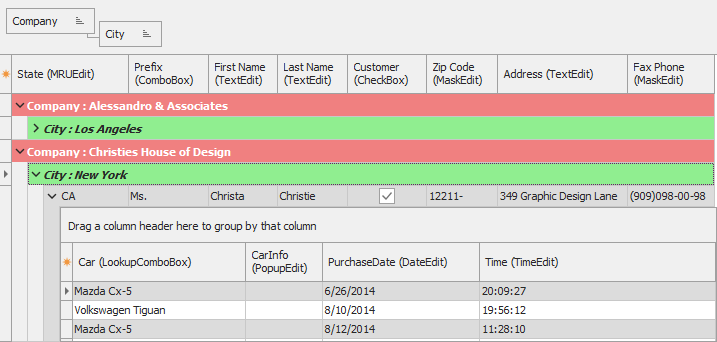
Other Custom Draw Events
- OnCustomDrawCell
- Allows you to override or complement built-in cell draw routines.
- OnCustomDrawColumnHeader
- Occurs every time when a column header is about to be drawn.
- OnCustomDrawFooterCell
- Occurs every time a footer or group footer cell is about to be drawn.
- OnCustomDrawGroupSummaryCell
- Occurs every time a group summary is about to be drawn in a group row.
- OnCustomDrawIndicatorCell
- Occurs when painting an indicator cell within a Table View.
- OnCustomDrawPartBackground
- Allows you to custom draw a View element background.