TcxDateNavigator Class
A standalone date navigator control.
Declaration
TcxDateNavigator = class(
    TcxCustomDateNavigator
)
Remarks
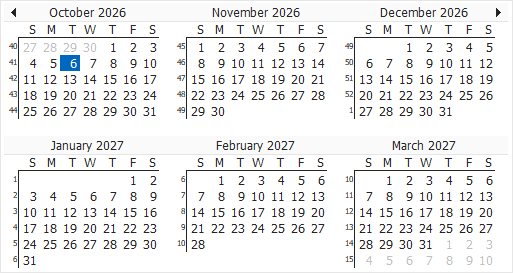
The TcxDateNavigator control is a standalone counterpart of the Date Navigator displayed as part of the TcxScheduler control UI. Users can select individual dates and/or date ranges depending on active settings.
Associated Components and Data Synchronization
You can associate the date navigator control with a TcxScheduler control or a supported scheduler storage component. The date navigator can display user event and holiday data obtained from an associated component.
Tip
You can use the TcxDateNavigator control in addition to or instead of the built-in Date Navigator of the TcxScheduler control.
When the date navigator is associated with a TcxScheduler control using the Scheduler property, content displayed in both controls is synchronized. Navigation between dates in the date navigator displays corresponding content in the associated TcxScheduler control.
UI Automation/Accessibility Support
The date navigator is mapped to a node in the UI Automation tree when the global UI Automation flag (dxUIAutomationEnabled) is enabled.
UI Automation Settings
Use Automation.Name and Automation.Description properties to specify the date navigator name and add optional information that are then used to clarify date navigator purpose for users who rely on third-party assistive tools (such as Microsoft Narrator).
Refer to the TdxAutomationElementSettings class description for detailed information on all available options.
Main API Members
The list below outlines key members of the TcxCustomDateNavigator class.
Appearance Settings
- BorderStyle
- Specifies if the date navigator displays a border.
- Font
- Provides access to font settings.
- HolidayColor
- Specifies the color used to display holidays when the ShowDatesContainingHolidaysInColor property is enabled.
- OnCustomDrawBackground | OnCustomDrawContent | OnCustomDrawDayCaption | OnCustomDrawDayNumber | OnCustomDrawHeader
- Allow you to complement or override individual date navigator draw routines.
- ParentFont
- Specifies if the date navigator imports font settings from its parent control or form.
- ShowDatesContainingEventsInBold
- Specifies if dates containing user events are displayed in Bold.
- ShowDatesContainingHolidaysInColor
- Specifies if holidays are displayed in color (HolidayColor).
- Styles
- Allows you to define individual appearance settings for different date navigator UI elements.
User Interaction Options
- Automation
- Provides access to UI Automation and accessibility-related settings.
- OnPeriodChanged
- Allows you to respond to navigation between periods displayed in the date navigator.
- OnSelectionChanged
- Allows you to execute custom code in response to date selection changes.
- OnShowDateHint
- Allows you to customize individual date hints or prevent them from appearing.
- SelectionIsWeeks
- Specifies if users can select multiple weeks using the date navigator.
- SelectPeriod
- Specifies if users can select multiple dates or a date range.
- UnlimitedSelection
- Specifies if date selection is limited (up to 14 days/up to 6 weeks).
Content-Related APIs
- Date
- Specifies the selected date or the first date in the selected range.
- EventDays
- Returns a collection of days that contain user events.
- FirstDate
- Specifies the first displayed date of a month.
- FirstWeekOfYear
- Specifies the first displayed week of a year.
- LastDate
- Returns the last currently visible date.
- StartOfWeek
- Specifies the first day of the week (system-determined or explicitly specified).
Calendar Layout APIs
- CalcSize
- Calculates date navigator boundaries based on row and column count
- ColCount | RowCount
- Specify the number of rows and columns used to display months in the date navigator.
- ShowWeekNumbers
- Specifies if week numbers are displayed.
General-Purpose API Members
- Assign
- Copies settings between date navigator controls.
- HitTest
- Allows you to identify the UI element at the mouse pointer position.
- LayoutChanged
- Redraws date navigator content on demand.
- Scheduler
- Specifies the associated scheduler control.
- Storage
- Specifies the associated scheduler storage component.