
ExcelFilterOptions Class
Configures Excel-style filter popup behavior across supported DevExpress controls.
Namespace: DevExpress.Utils.Filtering
Assembly: DevExpress.Data.v26.1.dll
NuGet Package: DevExpress.Data
Declaration
Remarks
Use ExcelFilterOptions.Default to specify filter availability and default behavior for Excel-style filter popups.
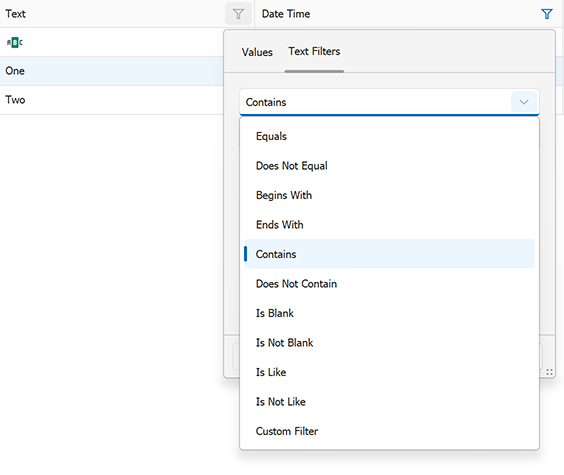
The ExcelFilterOptions class allows you to do the following:
- Control visibility of filter operators (comparison, pattern, aggregate).
- Enable or disable predefined and custom filters.
- Configure date and time filtering behavior.
- Define default filter types per data type.
- Specify the default tab (“Values” or “Filters”).
The following code snippet configures global Excel-style filter behavior:
using DevExpress.Utils.Filtering;

// Set the default filter type for all data types:
ExcelFilterOptions.Default.DefaultFilterType = CustomUIFilterType.GreaterThan;

// Set the default filter type for date values:
ExcelFilterOptions.Default.DefaultDateFilterType = CustomUIFilterType.ThisMonth;

// Set the default filter type for time values:
ExcelFilterOptions.Default.DefaultTimeFilterType = CustomUIFilterType.ThisHour;

// Set the default filter type for text values:
ExcelFilterOptions.Default.DefaultTextFilterType = CustomUIFilterType.Contains;

// Enable comparison operators:
ExcelFilterOptions.Default.ShowComparisons = true;

// Enable condition-based filters:
ExcelFilterOptions.Default.ShowConditionalFilters = true;

// Disable custom (user-defined) filter expressions:
ExcelFilterOptions.Default.ShowCustomFilters = false;

// Set the 'Filters' tab as the default tab in Excel-style filter popups:
ExcelFilterOptions.Default.PreferredTabType = ExcelFilterOptions.TabType.Filters;
Inheritance
Object
ExcelFilterOptions
See Also