How to: Add Custom Buttons to Alert Windows
- 3 minutes to read
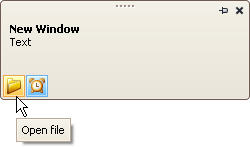
The following example adds two custom buttons to an AlertControl and handles events to process clicks on these buttons.
The first button is a regular button. A click on this button triggers the AlertControl.ButtonClick event.
The second button has checked and unchecked states (AlertButton.Style = AlertButtonStyle.CheckButton). A click on this button triggers the AlertControl.ButtonDownChanged event.
Note
alertControl1 and svgImageCollection1 were added to the form at design time.
The following image shows the resulting alert window:
using DevExpress.XtraEditors;
using DevExpress.XtraBars.Alerter;

namespace DXApplication2 {
    public partial class Form1 : XtraForm {
        public Form1() {
            InitializeComponent();
            CreateCustomButtons();
            // Subscribe to button click events
            alertControl1.ButtonClick += AlertControl1_ButtonClick;
            alertControl1.ButtonDownChanged += AlertControl1_ButtonDownChanged;

            this.Load += Form1_Load;
        }

        private void Form1_Load(object? sender, EventArgs e) {
            // Show an alert window (for demonstration purposes)
            alertControl1.Show(this, "Hello!", "You have 1 unread message.");
        }

        private void CreateCustomButtons() {
            // Create a custom regular button
            AlertButton btn1 = new AlertButton();
            btn1.Hint = "Open file";
            btn1.Name = "buttonOpen";
            btn1.ImageOptions.SvgImage = svgImageCollection1["open"];
            btn1.ImageOptions.SvgImageSize = new Size(16, 16);
            // Create a custom check button
            AlertButton btn2 = new AlertButton();
            btn2.Style = AlertButtonStyle.CheckButton;
            btn2.Down = true;
            btn2.Hint = "Alert On";
            btn2.Name = "buttonAlert";
            btn2.ImageOptions.SvgImage = svgImageCollection1["time"];
            btn2.ImageOptions.SvgImageSize = new Size(16, 16);
            // Add buttons to the AlertControl
            alertControl1.Buttons.Add(btn1);
            alertControl1.Buttons.Add(btn2);
        }

        private void AlertControl1_ButtonDownChanged(object sender, AlertButtonDownChangedEventArgs e) {
            if (e.Button.Name == "buttonAlert")
                MessageBox.Show($"The Alert button is {(e.Button.Down ? "up" : "down")}");
        }

        private void AlertControl1_ButtonClick(object sender, AlertButtonClickEventArgs e) {
            if (e.Button.Name == "buttonOpen")
                MessageBox.Show("The Open button was clicked");
        }
    }
}