RemoveRichEditCommandAction Class
An action that removes a bar item associated with a specific command. This action also deletes all links to this bar item from bars, menus, submenus, and other link holders.
Namespace: DevExpress.Xpf.RichEdit.Menu
Assembly: DevExpress.Xpf.RichEdit.v26.1.dll
NuGet Package: DevExpress.Wpf.RichEdit
Declaration
Remarks
Add a RemoveRichEditCommandAction instance to the PopupMenuShowingEventArgs.Customizations collection to remove command links for the command defined by the RemoveRichEditCommandAction.Id property.
RemoveRichEditCommandAction removes a bar item from the BarManager.Items collection and deletes all links to the bar item from link holders (bars, ribbon, menus, and so on).
Example
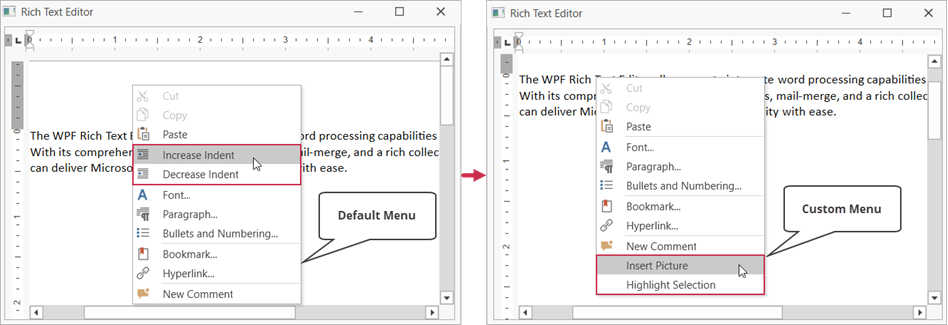
The example below customizes the Text context menu as follows:
- Creates new Highlight Selection and Insert Picture items
- Removes the Increase Indent and Decrease Indent items
<dxre:RichEditControl Name="richTextEditor"
                      PopupMenuShowing="richTextEditor_PopupMenuShowing">
using DevExpress.XtraRichEdit.API.Native;
using DevExpress.Xpf.RichEdit;
using DevExpress.Xpf.Bars;
using DevExpress.Xpf.RichEdit.Menu;
using DevExpress.XtraRichEdit.Commands;
// ...

private void richTextEditor_PopupMenuShowing(object sender, PopupMenuShowingEventArgs e) {
    // Check whether the event is raised for document text.
    if (e.MenuType == RichEditMenuType.Text) {
        // Create a menu item to insert a picture
        // and bind this item to the Rich Text Editor's command.
        e.Customizations.Add(new BarButtonItem() {
            Command = RichEditUICommand.InsertFloatingPicture,
            Content = "Insert Picture",
            CommandParameter = richTextEditor
        });

        // Create a custom menu item to highlight selected text.
        var menuItem = new BarButtonItem() {
            Name = "highlightSelectionItem",
            Content = "Highlight Selection"
        };
        menuItem.ItemClick += MenuItem_ItemClick; ;
        e.Customizations.Add(menuItem);
    }

    // Remove the "Increase Indent" item from the menu.
    e.Customizations.Add(new RemoveRichEditCommandAction() {
        Id = RichEditCommandId.IncreaseIndent
    });

    // Remove the "Decrease Indent" item from the menu.
    e.Customizations.Add(new RemoveRichEditCommandAction() {
        Id = RichEditCommandId.DecreaseIndent
    });
}

private void MenuItem_ItemClick(object sender, ItemClickEventArgs e) {
    var selectedRanges = richTextEditor.Document.Selections;
    foreach (var range in selectedRanges) {
        var charProps = richTextEditor.Document.BeginUpdateCharacters(range);
        charProps.BackColor = System.Drawing.Color.Yellow;
        richTextEditor.Document.EndUpdateCharacters(charProps);
    }
}