EffectProperties.Blur Property
Gets or sets a blur effect.
Namespace: DevExpress.Docs.Office
Assembly: DevExpress.Docs.Core.v26.1.dll
Declaration
Property Value
| Type | Description |
|---|---|
| BlurEffect | A |
Remarks
The BlurEffect class exposes properties that you can use to configure the blur effect:
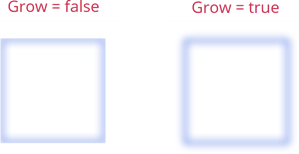
- Grow
Specifies whether the blur effect extends beyond the original bounds of the shape:
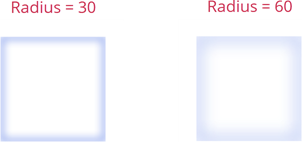
- Radius
Specifies the radius of the blur effect:
The following code snippet applies a blur effect to a shape:
using DevExpress.Docs.Presentation;
using System.Drawing;

namespace PresentationApiSample;

public class Program {
    public static void Main(string[] _) {

        Presentation presentation = new Presentation();
        presentation.Slides.Clear();

        Slide slide = new Slide(SlideLayoutType.Blank);
        presentation.Slides.Add(slide);

        Shape shape1 = new Shape(ShapeType.Rectangle);
        shape1.Outline = new OutlineStyle { Fill = new SolidFill(Color.RoyalBlue), Width = 8 };
        shape1.Fill = new SolidFill(Color.White);
        shape1.X = 100;
        shape1.Y = 100;
        shape1.Width = 300;
        shape1.Height = 300;
        slide.Shapes.Add(shape1);

        ShapeEffectProperties e_properties = new ShapeEffectProperties();
        e_properties.Blur = new BlurEffect {
            Grow = false,
            Radius = 60
        };
        shape1.Effects = e_properties;
    }
}
See Also