MyDetailsController Class
A WindowController descendant that adds the My Details item to the Navigation System, and contains the MyDetails Action.
Namespace: DevExpress.ExpressApp.Security
Assembly: DevExpress.ExpressApp.Security.v26.1.dll
NuGet Package: DevExpress.ExpressApp.Security
Declaration
Remarks
The MyDetailsController Controller ships with the SecuritySystem module. XAF activates it for the main Window (see Window.IsMain) and generates the My Details navigation item.
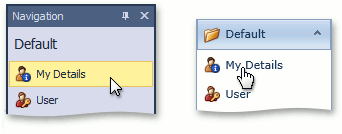
XAF adds this item to the same navigation group as the User object (see IModelClassNavigation.NavigationGroupName) and displays it through the ShowNavigationItemController Controller. When an end-user clicks this item in the navigation control, XAF displays a default Detail View (see IModelClass.DefaultDetailView) with the current User‘s details.
The MyDetailsController class exposes the CanGenerateMyDetailsNavigationItem static field that indicates whether to generate the My Details navigation item. Its value is true by default. To prohibit generating the My Details navigation item, set CanGenerateMyDetailsNavigationItem to false:
using DevExpress.ExpressApp.Security;
// ...
MyDetailsController.CanGenerateMyDetailsNavigationItem = false;
In a Windows Forms application project, add this code to the Main method located in Program.cs file, before invoking the WinApplication.Start method.
In the legacy Security System, users can modify themselves, even if the Write access to the User object is denied, by default. Additionally, users can use the MyDetails Navigation Item when they have no Navigate access to the User object. To change this behavior, you can set the ObjectAccessComparer.AllowModifyCurrentUserObject and ObjectAccessComparer.AllowNavigateToCurrentUserObject properties to false in the Main method of the Windows Forms application. These settings have no effect in the Security System. The required permissions are granted or omitted explicitly (see Client-Side Security (2-Tier Architecture)).
ObjectAccessComparer currentComparer =
    (ObjectAccessComparer)ObjectAccessComparerBase.CurrentComparer;
// Prohibit changing the current user's properties in My Details Detail View
// for users who have no "Write" permission to User object:
currentComparer.AllowModifyCurrentUserObject = false;
// Hide the My Details Navigation Item and Action
// for users who have no "Navigate" permission to User object:
currentComparer.AllowNavigateToCurrentUserObject= false;