Coordinate Systems in PDF Viewer
- 2 minutes to read
The PDF Viewer for WPF uses the following coordinate systems:
Client Coordinate System
The PDF Viewer control uses the client coordinates (measured in pixels) to specify the points’ position. This coordinate system’s starting point is at the top-left corner of the PDF Viewer’s client area. Refer to the Windows Forms Coordinates article for more details.
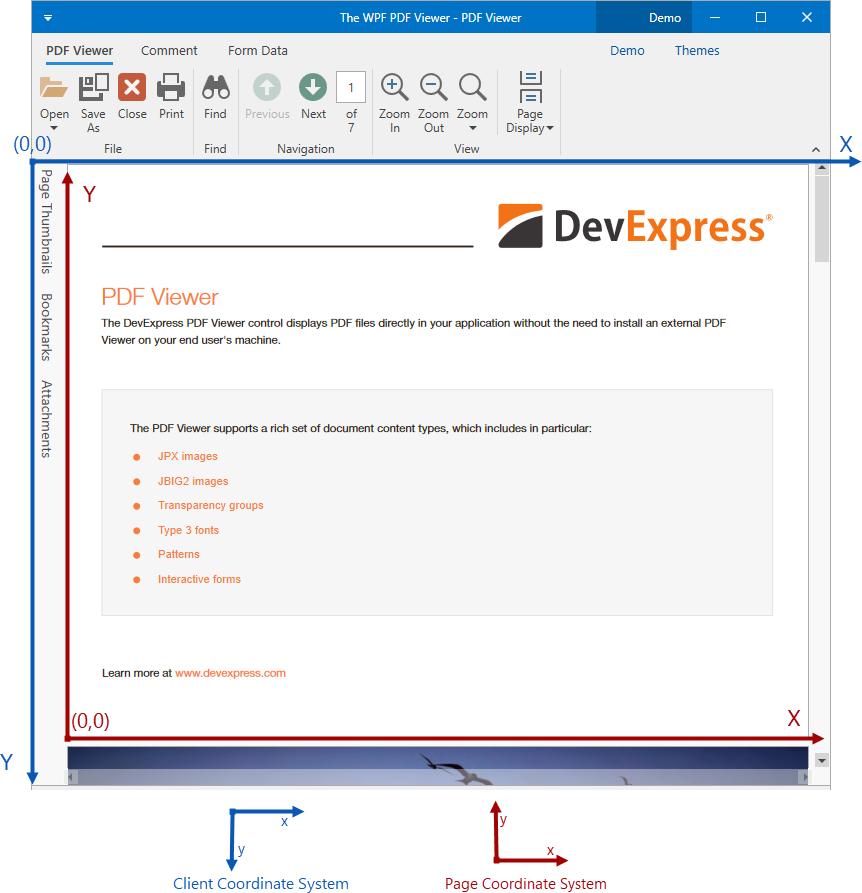
Page Coordinate System
The page coordinate system’s starting point (0,0) is the left-bottom corner of a page. The Y axis is directed from the bottom of the page to the top.
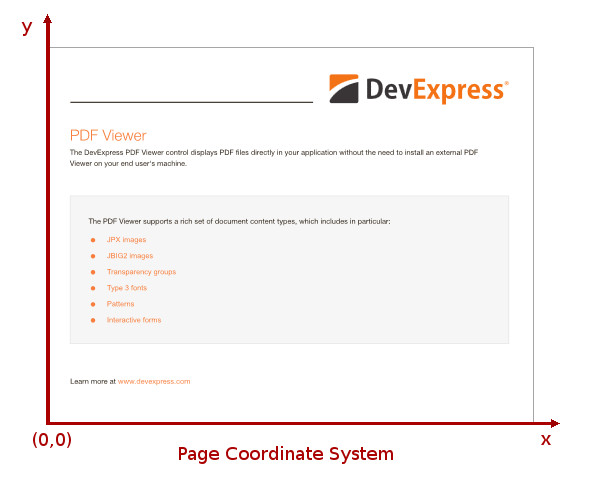
The page coordinate system uses points (1/72 of an inch) as a measurement unit.
Use Coordinate Systems in API
The table below lists methods that work with client and page coordinates, and methods used to convert one coordinate type into another.
Use Client Coordinates | Use Page Coordinates | Convert Coordinates |
|---|---|---|
Convert client coordinates to page coordinates when you need to determine what page was clicked in a document. Refer to the How to: Determine the Page Number of a Clicked Page example for more information.
Tip
You can use the PdfViewerControl.HitTest method to convert between client coordinates to page coordinates. This method returns an PdfHitTestResult object. Check the PdfHitTestResult.DocumentPosition property to obtain the page coordinates and the page number of a hit point.