TdxCustomLayoutControl.EndUpdate(Boolean) Method
Applies all pending changes and redraws the Layout control after a BeginUpdate procedure call.
Declaration
procedure EndUpdate(ANeedPack: Boolean = True);Parameters
| Name | Type | Description |
|---|---|---|
| ANeedPack | Boolean | Optional. Specifies if the built-in performance optimization is enabled: |
Remarks
Every time you change a layout item/group or appearance setting, the Layout control redraws content to reflect the change. Enclose multiple content and appearance changes between BeginUpdate and EndUpdate procedure calls to avoid UI flickering due to excessive redraw operations and improve performance.
BeginUpdate/EndUpdate and Batch Changes
A BeginUpdate procedure call disables notifications and postpones all changes until an EndUpdate call. A subsequent EndUpdate call does the following:
- Re-enables change notifications and corresponding redraw operations
- Applies all changes made after a BeginUpdate call
- Sends corresponding notifications in a batch
- Redraws the Layout control
Note
Ensure that every BeginUpdate procedure call is followed by an EndUpdate or CancelUpdate call, even if an exception occurs. Otherwise, all layout items, groups, and embedded controls remain frozen and unresponsive.
Code Examples
Create Layout Groups and Items
The code example in this section creates a parent TdxLayoutControl and nested layout group populated with four editors separated with auxiliary splitter and empty space layout items. Both the parent form and its nested layout control automatically adjust their dimensions according to group content.
Tip
This code example demonstrates a general layout group management technique useful when you need to maintain multiple groups within the same Layout control.
If your form layout design includes only one group, you can create layout items directly within the root group (TdxCustomLayoutControl.Items).
uses
  dxLayoutControl,  // Declares the TdxLayoutControl class
  dxLayoutContainer, // Declares TdxLayoutGroup and TdxLayoutItem classes
  cxCalendar,  // Declares the TcxDateEdit class
  cxCurrencyEdit, // Declares the TcxCurrencyEdit class
  cxSpinEdit;  // Declares the TcxSpinEdit class
  System.DateUtils; // Declares the Today function
// ...

procedure TMyForm.FormCreate(Sender: TObject);
var
  ALayoutGroup: TdxLayoutGroup;
  ALayoutItem: TdxLayoutItem;
  ACalendar: TcxDateEdit;
  ACurrencyEdit: TcxCurrencyEdit;
  ASpinEdit: TcxSpinEdit;
  AIconPath: string;
  ALayoutControl: TdxLayoutControl;
begin
  AIconPath := 'C:\Program Files (x86)\DevExpress\VCL\ExpressLibrary\Sources\' +
    'Icon Library\SVG Images\Icon Builder\';
  Self.AutoSize := True;  // Enables automatic form size adjustment
  // Create a layout control for the current form
  ALayoutControl := TdxLayoutControl.Create(Self);
  ALayoutControl.Parent := Self;
  ALayoutControl.BeginUpdate;  // Initiates the following batch change
  try
    ALayoutControl.AutoSize := True;  // Enables automatic layout control size adjustment
    // Create a parent layout group for all UI elements
    ALayoutGroup := ALayoutControl.Items.CreateGroup(TdxLayoutGroup) as TdxLayoutGroup;
    ALayoutGroup.CaptionOptions.Text := 'Order';
    // Create and configure a date editor and its container layout item
    ACalendar := TcxDateEdit.Create(Self);
    ACalendar.Properties.Kind := ckDate;
    ACalendar.EditValue := Today;
    ALayoutItem := ALayoutGroup.CreateItemForControl(ACalendar);
    ALayoutItem.CaptionOptions.Text := 'Purchase Date: ';
    ALayoutItem.CaptionOptions.Glyph.LoadFromFile(AIconPath + 'Actions_Calendar.svg');
    ALayoutItem.CaptionOptions.Glyph.SourceWidth := 16;
    ALayoutItem.CaptionOptions.Glyph.SourceHeight := 16;
    // Create and configure a currency editor and its container layout item
    ACurrencyEdit := TcxCurrencyEdit.Create(Self);
    ACurrencyEdit.Value := 0;
    ALayoutItem := ALayoutGroup.CreateItemForControl(ACurrencyEdit);
    ALayoutItem.CaptionOptions.Text := 'Price: ';
    ALayoutItem.CaptionOptions.Glyph.LoadFromFile(AIconPath + 'Business_Money.svg');
    ALayoutItem.CaptionOptions.Glyph.SourceWidth := 16;
    ALayoutItem.CaptionOptions.Glyph.SourceHeight := 16;
    // Create and configure a spin editor and its container layout item
    ASpinEdit := TcxSpinEdit.Create(Self);
    ALayoutItem := ALayoutGroup.CreateItemForControl(ASpinEdit);
    ALayoutItem.CaptionOptions.Text := 'Quantity: ';
    ALayoutItem.CaptionOptions.Glyph.LoadFromFile(AIconPath + 'Shopping_ShoppingCart.svg');
    ALayoutItem.CaptionOptions.Glyph.SourceWidth := 16;
    ALayoutItem.CaptionOptions.Glyph.SourceHeight := 16;
    ALayoutGroup.CreateItem(TdxLayoutSeparatorItem); // Creates a separator layout item
    // Create an empty space item and specify its height
    (ALayoutGroup.CreateItem(TdxLayoutEmptySpaceItem) as TdxLayoutEmptySpaceItem).Height := 20;
    // Create and configure a currency editor and its container layout item below the empty space
    ACurrencyEdit := TcxCurrencyEdit.Create(Self);
    ACurrencyEdit.Properties.ReadOnly := True;
    ACurrencyEdit.Value := 0;
    ALayoutItem := ALayoutGroup.CreateItemForControl(ACurrencyEdit);
    ALayoutItem.CaptionOptions.Text := 'Payment Amount: ';
  finally
    ALayoutControl.EndUpdate;  // Calls EndUpdate regardless of the batch operation's success
  end;
end;
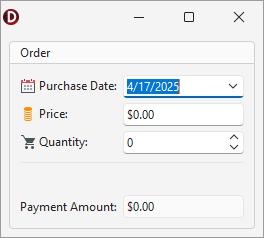
Clear a Layout Group
The following code example demonstrates a procedure that deletes all nested groups and items within the target layout group:
uses
  dxLayoutControl,  // Declares the TdxLayoutControl class
  dxLayoutContainer; // Declares TdxLayoutGroup and TdxLayoutItem classes
// ...

procedure TMyForm.ClearGroup(ALayoutControl: TdxLayoutControl; ALayoutGroup: TdxLayoutGroup);
var
  AItem: TdxCustomLayoutItem;
  I: Integer;
begin
  if (ALayoutControl = nil) or (ALayoutGroup = nil) then Exit;
  if not ALayoutControl.Container.IsUpdateLocked then  // Checks the control state (for recursive calls)
    ALayoutControl.BeginUpdate;  // Initiates the following batch change
  try
    for I := ALayoutGroup.Count - 1 downto 0 do  // Iterates through all nested groups and items
    begin
      AItem := ALayoutGroup.Items[I];
      if (AItem is TdxLayoutItem) and ((AItem as TdxLayoutItem).Control <> nil) then
        (AItem as TdxLayoutItem).Control.Free  // Deletes the current non-group item
      else
        if AItem is TdxLayoutGroup then  // If the current item is a nested group
          ClearGroup(ALayoutControl, (AItem as TdxLayoutGroup));  // Calls ClearGroup recursively
    end;
    // Delete auxiliary layout items
    for I := ALayoutGroup.Count - 1 downto 0 do // Iterates through remaining auxiliary layout items
      ALayoutGroup.Items[I].Free;
  finally
    if ALayoutControl.Container.IsUpdateLocked then  // Checks the control state (for recursive calls)
      ALayoutControl.EndUpdate;  // Calls EndUpdate regardless of the batch operation's success
  end;
end;