XRShape Class
A control that allows you to embed simple graphic elements into a report.
Namespace: DevExpress.XtraReports.UI
Assembly: DevExpress.XtraReports.v26.1.dll
NuGet Package: DevExpress.Reporting.Core
Declaration
Remarks
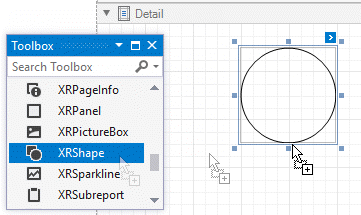
Drag the XRShape control from the DX.26.1: Report Controls Toolbox tab and drop it onto the report to add a shape.
Expand the control’s smart tag to access its main settings.
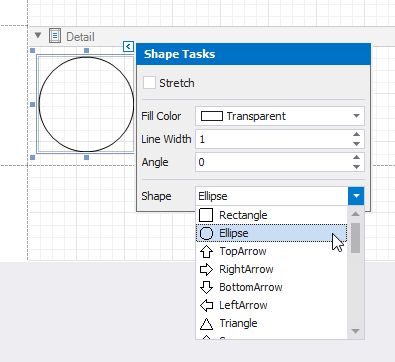
-
Specifies whether to stretch a shape when its size is changed.
-
Specifies the color used to fill a shape.
-
Specifies the width of the shape’s outline.
-
Specifies the angle by which the shape’s image is rotated.
-
Specifies the type of a shape.
The following sections describe the available shape types in detail.
Arrow

The following properties are specific to the Arrow shape type:
-
Specifies the relative height of the arrow (in percent). The returned value should be from 0 to 100.
-
Specifies the relative width of the arrow (in percent). The returned value should be from 0 to 100.
-
Specifies the relative roundness of the arrow (in percent). The returned value should be from 0 to 100.
This example demonstrates how to create the XRShape Arrow type control, and set its basic properties.
Tip
Online Example: How to insert a shape control into a report
using System;
using System.Drawing;
using System.Windows.Forms;
using DevExpress.XtraReports.UI;
using DevExpress.XtraPrinting.Shape;
//...

private void button1_Click(object sender, EventArgs e) {
    XtraReport1 report = new XtraReport1();

    // Create a shape control.
    XRShape shape = new XRShape();

    // Set the shape's type to Arrow.
    shape.Shape = new ShapeArrow();

    // Adjust the Arrow shape's main properties.
    shape.Angle = 90;
    shape.Width = 200;
    shape.Height = 200;
    shape.ForeColor = Color.Brown;
    shape.FillColor = Color.Beige;
    shape.Stretch = false;

    // Adjust the Arrow shape's specific properties.
    ((ShapeArrow)shape.Shape).ArrowHeight = 50;
    ((ShapeArrow)shape.Shape).ArrowWidth = 50;
    ((ShapeArrow)shape.Shape).Fillet = 20;

    // Preview the report.
    report.Detail.Controls.Add(shape);
    ReportPrintTool pt = new ReportPrintTool(report);
    pt.ShowPreviewDialog();
}
Brace
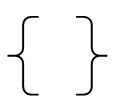
The following properties are specific to the Brace shape type:
-
Specifies the length of a brace’s tip.
-
Specifies the length of a brace’s tail.
-
Specifies the relative roundness of the brace (in percent). The returned value should be from 0 to 100.
This example demonstrates how to create the XRShape Brace type control, and set its basic properties.
Tip
Online Example: How to insert a shape control into a report
using System;
using System.Drawing;
using System.Windows.Forms;
using DevExpress.XtraReports.UI;
using DevExpress.XtraPrinting.Shape;
//...

private void button1_Click(object sender, EventArgs e) {
    XtraReport1 report = new XtraReport1();

    // Create a shape control.
    XRShape shape = new XRShape();

    // Set the shape's type to Brace.
    shape.Shape = new ShapeBrace();

    // Adjust the Brace shape's main properties.
    shape.Angle = 180;
    shape.Width = 200;
    shape.Height = 200;
    shape.ForeColor = Color.Brown;
    shape.Stretch = false;

    // Adjust the Brace shape's specific properties.
    ((ShapeBrace)shape.Shape).TipLength = 20;
    ((ShapeBrace)shape.Shape).TailLength = 20;
    ((ShapeBrace)shape.Shape).Fillet = 50;

    // Preview the report.
    report.Detail.Controls.Add(shape);
    ReportPrintTool pt = new ReportPrintTool(report);
    pt.ShowPreviewDialog();
}
Bracket

The following properties are specific to the Bracket shape type:
-
Specifies the length of a bracket’s tip.
This example demonstrates how to create the XRShape Bracket type control, and set its basic properties.
Tip
Online Example: How to insert a shape control into a report
using System;
using System.Drawing;
using System.Windows.Forms;
using DevExpress.XtraReports.UI;
using DevExpress.XtraPrinting.Shape;
//...

private void button1_Click(object sender, EventArgs e) {
    XtraReport1 report = new XtraReport1();

    // Create a shape control.
    XRShape shape = new XRShape();

    // Set the shape's type to Bracket.
    shape.Shape = new ShapeBracket();

    // Adjust the Bracket shape's main properties.
    shape.Angle = 180;
    shape.Width = 200;
    shape.Height = 200;
    shape.ForeColor = Color.Brown;
    shape.Stretch = false;

    // Adjust the Bracket shape's specific properties.
    ((ShapeBracket)shape.Shape).TipLength = 20;

    // Preview the report.
    report.Detail.Controls.Add(shape);
    ReportPrintTool pt = new ReportPrintTool(report);
    pt.ShowPreviewDialog();
}
Cross

The following properties are specific to the Cross shape type:
-
Specifies the horizontal line width of a cross (in percent). The returned value should be from 0 to 100.
-
Specifies the vertical line width of a cross (in percent). The returned value should be from 0 to 100.
-
Specifies the relative roundness of the cross (in percent). The returned value should be from 0 to 100.
This example demonstrates how to create the XRShape Cross type control, and set its basic properties.
Tip
Online Example: How to insert a shape control into a report
using System;
using System.Drawing;
using System.Windows.Forms;
using DevExpress.XtraReports.UI;
using DevExpress.XtraPrinting.Shape;
//...

private void button1_Click(object sender, EventArgs e) {
    XtraReport1 report = new XtraReport1();

    // Create a shape control.
    XRShape shape = new XRShape();

    // Set the shape's type to Cross.
    shape.Shape = new ShapeCross();

    // Adjust the Cross shape's main properties.
    shape.Angle = 90;
    shape.Width = 200;
    shape.Height = 200;
    shape.ForeColor = Color.Brown;
    shape.FillColor = Color.Beige;
    shape.Stretch = false;

    // Adjust the Cross shape's specific properties.
    ((ShapeCross)shape.Shape).HorizontalLineWidth = 50;
    ((ShapeCross)shape.Shape).VerticalLineWidth = 50;
    ((ShapeCross)shape.Shape).Fillet = 20;

    // Preview the report.
    report.Detail.Controls.Add(shape);
    ReportPrintTool pt = new ReportPrintTool(report);
    pt.ShowPreviewDialog();
}
Ellipse

This example demonstrates how to create the XRShape Ellipse type control, and set its basic properties.
Tip
Online Example: How to insert a shape control into a report
using System;
using System.Drawing;
using System.Windows.Forms;
using DevExpress.XtraReports.UI;
using DevExpress.XtraPrinting.Shape;
//...

private void button1_Click(object sender, EventArgs e) {
    XtraReport1 report = new XtraReport1();

    // Create a shape control.
    XRShape shape = new XRShape();

    // Set the shape's type to Ellipse.
    shape.Shape = new ShapeEllipse();

    // Adjust the Ellipse shape's main properties.
    shape.Angle = 90;
    shape.Width = 200;
    shape.Height = 200;
    shape.ForeColor = Color.Brown;
    shape.FillColor = Color.Beige;
    shape.Stretch = false;

    // Preview the report.
    report.Detail.Controls.Add(shape);
    ReportPrintTool pt = new ReportPrintTool(report);
    pt.ShowPreviewDialog();
}
Line
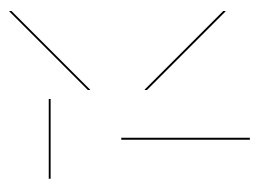
This example demonstrates how to create the XRShape Line type control, and set its basic properties.
Tip
Online Example: How to insert a shape control into a report
using System;
using System.Drawing;
using System.Windows.Forms;
using DevExpress.XtraReports.UI;
using DevExpress.XtraPrinting.Shape;
//...

private void button1_Click(object sender, EventArgs e) {
    XtraReport1 report = new XtraReport1();

    // Create a shape control.
    XRShape shape = new XRShape();

    // Set the shape's type to Line.
    shape.Shape = new ShapeLine();

    // Adjust the Line shape's main properties.
    shape.Angle = 45;
    shape.Width = 200;
    shape.Height = 200;
    shape.ForeColor = Color.Brown;
    shape.Stretch = false;

    // Preview the report.
    report.Detail.Controls.Add(shape);
    ReportPrintTool pt = new ReportPrintTool(report);
    pt.ShowPreviewDialog();
}
Polygon
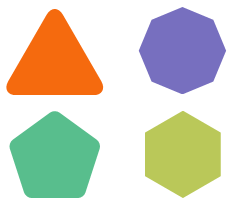
The following properties are specific to the Polygon shape type:
-
Specifies the number of sides for a polygon.
-
Specifies the relative roundness of a polygon (in percent). The returned value should be from 0 to 100.
This example demonstrates how to create the XRShape Polygon type control, and set its basic properties.
Tip
Online Example: How to insert a shape control into a report
using System;
using System.Drawing;
using System.Windows.Forms;
using DevExpress.XtraReports.UI;
using DevExpress.XtraPrinting.Shape;
//...

private void button1_Click(object sender, EventArgs e) {
    XtraReport1 report = new XtraReport1();

    // Create a shape control.
    XRShape shape = new XRShape();

    // Set the shape's type to Polygon.
    shape.Shape = new ShapePolygon();

    // Adjust the Polygon shape's main properties.
    shape.Angle = 90;
    shape.Width = 200;
    shape.Height = 200;
    shape.ForeColor = Color.Brown;
    shape.FillColor = Color.Beige;
    shape.Stretch = false;

    // Adjust the Polygon shape's specific properties.
    ((ShapePolygon)shape.Shape).NumberOfSides = 7;
    ((ShapePolygon)shape.Shape).Fillet = 5;

    // Preview the report.
    report.Detail.Controls.Add(shape);
    ReportPrintTool pt = new ReportPrintTool(report);
    pt.ShowPreviewDialog();
}
Rectangle

The following properties are specific to the Rectangle shape type:
-
Specifies the relative roundness of the rectangle (in percent). The returned value should be from 0 to 100.
This example demonstrates how to create the XRShape Rectangle type control, and set its basic properties.
Tip
Online Example: How to insert a shape control into a report
using System;
using System.Drawing;
using System.Windows.Forms;
using DevExpress.XtraReports.UI;
using DevExpress.XtraPrinting.Shape;
//...

private void button1_Click(object sender, EventArgs e) {
    XtraReport1 report = new XtraReport1();

    // Create a shape control.
    XRShape shape = new XRShape();

    // Set the shape's type to Rectangle.
    shape.Shape = new ShapeRectangle();

    // Adjust the Rectangle shape's main properties.
    shape.Angle = 90;
    shape.Width = 200;
    shape.Height = 200;
    shape.ForeColor = Color.Brown;
    shape.FillColor = Color.Beige;
    shape.Stretch = false;

    // Adjust the Rectangle shape's specific properties.
    ((ShapeRectangle)shape.Shape).Fillet = 20;

    // Preview the report.
    report.Detail.Controls.Add(shape);
    ReportPrintTool pt = new ReportPrintTool(report);
    pt.ShowPreviewDialog();
}
Star
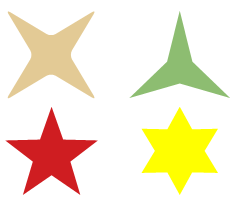
The following properties are specific to the Star shape type:
-
Specifies the concavity level (in percent) between two neighboring start points. The returned value should be from 0 to 100.
-
Specifies the number of points in the star.
-
Specifies the relative roundness of the star points (in percent). The returned value should be from 0 to 100.
This example demonstrates how to create the XRShape Star type control, and set its basic properties.
Tip
Online Example: How to insert a shape control into a report
using System;
using System.Drawing;
using System.Windows.Forms;
using DevExpress.XtraReports.UI;
using DevExpress.XtraPrinting.Shape;
//...

private void button1_Click(object sender, EventArgs e) {
    XtraReport1 report = new XtraReport1();

    // Create a shape control.
    XRShape shape = new XRShape();

    // Set the shape's type to Star.
    shape.Shape = new ShapeStar();

    // Adjust the Star shape's main properties.
    shape.Angle = 90;
    shape.Width = 200;
    shape.Height = 200;
    shape.ForeColor = Color.Brown;
    shape.FillColor = Color.Beige;
    shape.Stretch = false;

    // Adjust the Star shape's specific properties.
    ((ShapeStar)shape.Shape).Concavity = 50;
    ((ShapeStar)shape.Shape).StarPointCount = 7;
    ((ShapeStar)shape.Shape).Fillet = 5;

    // Preview the report.
    report.Detail.Controls.Add(shape);
    ReportPrintTool pt = new ReportPrintTool(report);
    pt.ShowPreviewDialog();
}