Cross-IDE Template Kit
- 13 minutes to read
The DevExpress Template Kit covers a broader range of usage scenarios when compared to our Project Template Gallery. New project templates support hybrid app development and new technologies (Blazor Hybrid, .NET MAUI, and MVVM).

The DevExpress Template Kit is available as a VSIX extension based on dotnet CLI. It is available for Visual Studio 2022, Visual Studio Code (VS Code), and Rider on Windows, with plans to expand support additional operating systems in the future.
The DevExpress Unified Component Installer automatically adds the DevExpress Template Kit as a Visual Studio extension. If you do not use the installer or are working in VS Code or JetBrains Rider, you can install the DevExpress Template Kit manually:
Note
The DevExpress Template Kit includes project templates for .NET 8+ (C# and VB.NET).
Install and Run the Project Wizard for Visual Studio
In Visual Studio, select Extensions → Manage Extensions… to run Extension Manager. Type DevExpress Template Kit for Visual Studio in the search box and click Install (close Visual Studio and follow the instructions in the VSIX installer):

To run the Project Wizard, follow the steps below:
- In Visual Studio, select File → New → Project…
- In the Create a new project window, select DevExpress 26.1 Template Kit and click Next.
Click Create Project. Configure project parameters:
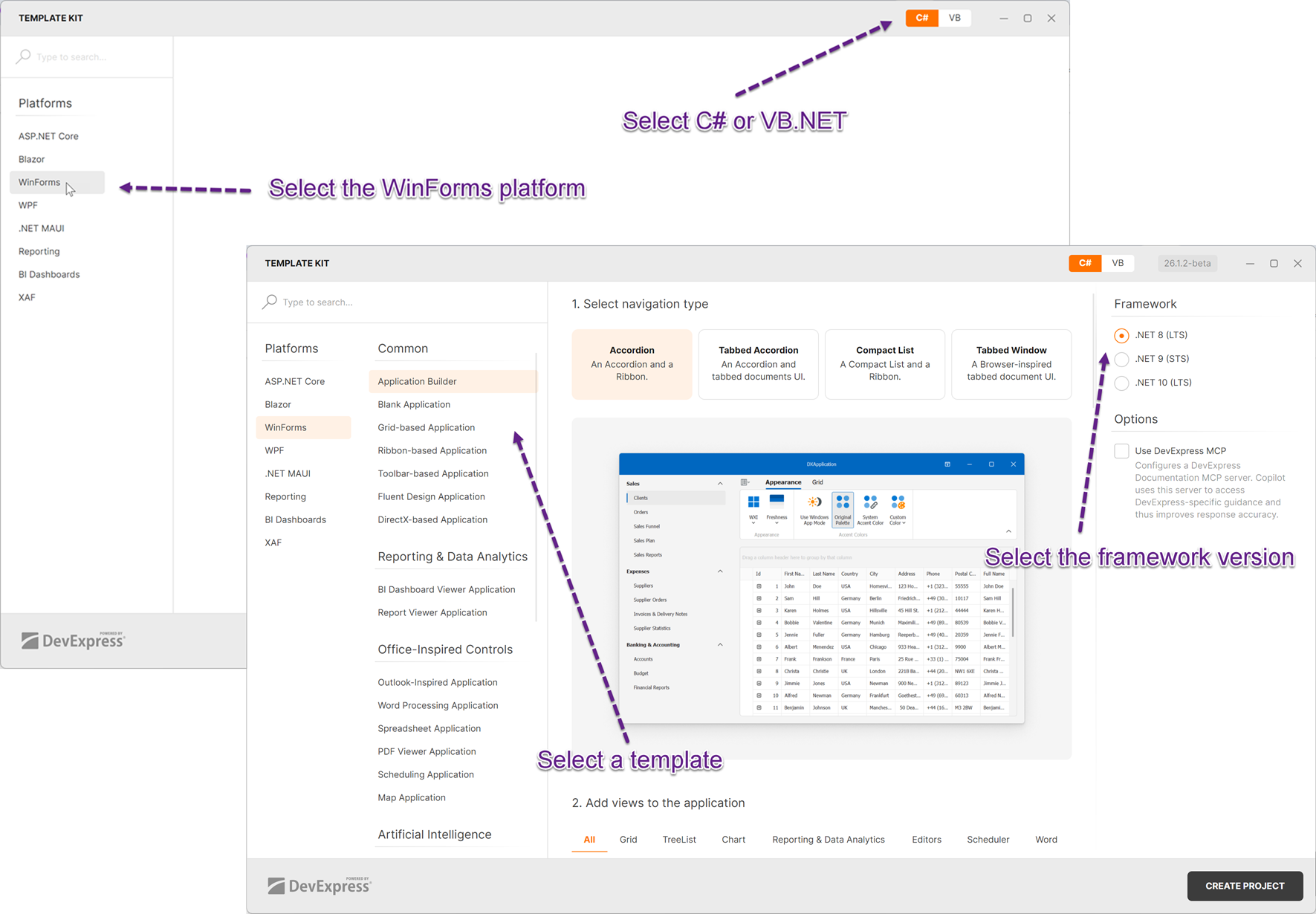
Install and Run the Project Wizard for Visual Studio Code
In Visual Studio Code, open the Extensions tab, type DevExpress Template Kit for VS Code in the search box, and click Install. For more information about extension management, see Extension Marketplace.

To run the Project Wizard, follow the steps below:
In the Explorer tab, click the New DevExpress Project button:
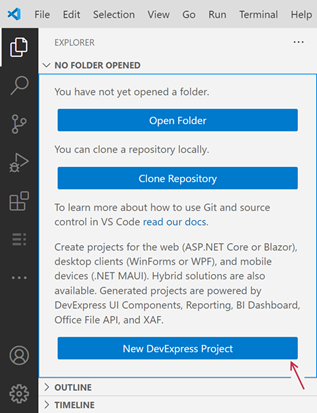
Specify the project name and press Enter:

- Select a project location and click the Select Folder button.
Click Create Project. Configure project parameters:
Install and Run the Project Wizard for JetBrains Rider
Install the DevExpress Template Kit plugin for JetBrains Rider from the JetBrains Marketplace: DevExpress Template Kit.
To create a new project, follow the steps below:
- Click the New Solution button.
Select DevExpress Template Kit in the Other category and click Create.
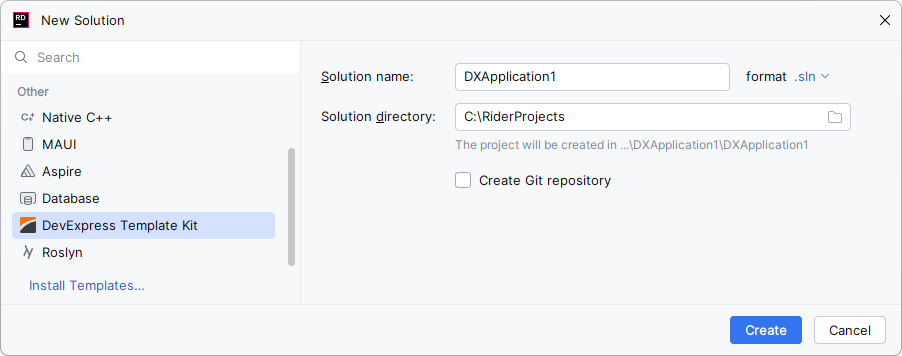
Configure project parameters:
Build the Project
Install DevExpress component packages to build your project. You can use the DevExpress Unified Component Installer that adds a local NuGet feed to your machine.
CLI Project Templates
You can also use a command line interface (CLI) to access project templates and create various DevExpress-powered projects for WinForms.
Install DevExpress CLI Templates
Execute the following command to install DevExpress WinForms project templates from nuget.org:
dotnet new install DevExpress.Win.ProjectTemplates
If you get the “NU1101: Unable to find package DevExpress.Win.ProjectTemplates” error, check whether the nuget.org source is enabled. To get a list of sources with their status information, call the dotnet nuget list source command. To enable a source, call the dotnet nuget enable source <source name> command.
If you are new to NuGet, visit the following page for more information about package management prerequisites: An Introduction to NuGet.
Create a WinForms Project
To create a new DevExpress-powered project, execute the following command:
dotnet new <template short name>
For example, the command below creates a blank WinForms project called DxWinFormsTestApp in the current directory:
dotnet new dx.win -n DxWinFormsTestApp
Tip
Use the following parameters to see available command options: -? | -h | --help.
dotnet new dx.win --help.
See the following topic for additional information: dotnet new command - Options.
Project Templates
The following project templates are available in the DevExpress.Win.ProjectTemplates NuGet package. All WinForms project templates support DevExpress Skins.
Common
- Application Builder
dx.win.appbuilderCreates a modular (multi-view) WinForms application with pre-built navigation system. The Application Builder operates as an interactive wizard:
- Step 1: Choose the primary navigation system for your application.
- Step 2: Select DevExpress controls. The template automatically creates separate views for each selected UI control.
- Blank Application
dx.win| Parameter:mvvm-readyCreates a desktop (WinForms) application with a single empty form (XtraForm) with DevExpress themes/styles.
- Grid-based Application
dx.win.grid| Parameter:mvvm-readyCreates a desktop (WinForms) application with a Ribbon UI-based form that hosts a Data Grid control for browsing and editing data.
- Ribbon-based Application
dx.win.ribbon| Parameter:mvvm-readyCreates a desktop (WinForms) application with an empty form featuring the Ribbon UI.
- Toolbar-based Application
dx.win.toolbar| Parameter:mvvm-readyCreates a desktop (WinForms) application with an empty form featuring the toolbar/menu UI.
- Fluent Design Application
dx.win.fluent| Parameter:mvvm-readyCreates a desktop (WinForms) application with a Fluent Design form that features an adaptive layout and an integrated hamburger menu with DirectX-based visual effects.
- DirectX-based Application
dx.win.directx| Parameter:mvvm-readyCreates a desktop (WinForms) application with an empty form that enables DirectX (for enhanced performance on high resolution displays) for DevExpress controls that support this rendering engine. You can use HTML & CSS templates to paint the form’s title bar, borders, and content area.
Office-Inspired Controls
- Outlook-Inspired Application
dx.win.outlookCreates a desktop (WinForms) application with a Ribbon UI-based form with a Data Grid control. The Grid is switched to the Tile View and mimics Microsoft 365 Outlook’s Compact View option.
- Word Processing Application
dx.win.wordCreates a desktop (WinForms) application with an integrated Rich Text Editor and Ribbon UI. The application mimics Microsoft Word for editing DOCX/RTF files.
- Spreadsheet Application
dx.win.excelCreates a desktop (WinForms) application with an integrated Spreadsheet control and Ribbon UI. The application mimics Microsoft Excel for editing XLSX/CSV files.
- PDF Viewer Application
dx.win.pdfCreates a desktop (WinForms) application with a form that hosts a PDF Viewer component and provides PDF-specific actions using the Ribbon UI.
- Scheduling Application
dx.win.schedulingCreates a desktop (WinForms) application with an integrated calendar/scheduler, navigation bar, and Ribbon UI.
- Map Application
dx.win.mapCreates a desktop (WinForms) application with a form that contains a Map Control for browsing terrain data retrieved from map services, and provides map-specific commands using the Ribbon UI.
Reporting & Data Analytics
- BI Dashboard Viewer Application
dx.win.dashboardCreates a desktop (WinForms) application with a BI Dashboard Viewer that visualizes key metrics from a sample data source.
- Report Viewer Application
dx.win.reportingCreates a desktop (WinForms) application with a Report Viewer that displays a pre-built tabular report.
Artificial Intelligence
- AI Chat Application
dx.win.aichatParameter:
--ai-provider| Values:azureopenai,openai,ollamaCreates a WinForms chat app that integrates the DevExpress AI Chat Control. Optionally integrates the DevExpress MCP Server for DevExpress-specific guidance by adding an mcp.json configuration file to the application.
Supported AI providers:
- Azure OpenAI
- OpenAI
- Ollama
- AI Chat RAG Application
dx.win.aichatragParameter:
--ai-provider| Values:azureopenai,openai,ollamaParameter:
--vectorstore| Values:sqlite,inmemoryCreates a desktop WinForms application with the DevExpress AI Chat Control and built-in Retrieval-Augmented Generation (RAG) for document-grounded conversations:
- Uses local document data for context-aware answers.
- Scans the user’s Documents folder and indexes PDF, DOCX, TXT, RTF, and HTML files.
- Extracts, embeds, and semantically searches document text.
- Stores vectors in In-Memory (rebuilds each run) or SQLite (persistent database).
- Merges retrieved content with user prompts to improve accuracy.
- Optionally integrates the DevExpress MCP Server for DevExpress-specific guidance.
Hybrid & Enterprise Development
- Blazor Hybrid WinForms Application
dx.win.hybrid.blazorCreates a hybrid desktop (WinForms) application with a BlazorWebView-powered form and DevExpress themes/styles. The application supports Dependency Injection (DI) and integrates the DevExpress Blazor Data Grid control (requires a subscription that includes Blazor UI components).
- JavaScript Hybrid WinForms Application
dx.win.hybrid.jsCreates a hybrid desktop (WinForms) application with a HybridWebView-powered form and DevExpress themes/styles. The application supports Dependency Injection (DI) and integrates the DevExtreme JavaScript (JS) HTML Editor (requires a subscription that includes DevExtreme).
- HTML Hybrid WinForms Application
dx.win.hybrid.htmlCreates a hybrid desktop (WinForms) application with a list and detail forms powered by the DevExpress HTML & CSS engine and reusable UI Templates. The rendering and templating engines allow you to make advanced UI customizations in HTML format, and customize the appearance of UI elements using CSS styles (size, padding, and layout options).
- Middle-Tier Security Application
dx.win.middletierCreates a desktop (WinForms) application with a secured data layer powered by ASP.NET Core WebAPI, EF Core and XAF’s Middle-Tier Application Server (requires the DevExpress Universal subscription). With this additional layer of protection (authentication, authorization, and encryption), desktop UI clients cannot access database connection information or modify database tables directly. Developers can also maintain an existing data context (DbContext) and business logic while establishing remote/secure connections to an RDBMS-based data store.
- OData-based Application
dx.win.odataCreates a desktop (WinForms) application with a secure data layer powered by ASP.NET Core OData, EF Core, and XAF’s Backend Web API Service (requires the Universal subscription). With this additional layer of protection (authentication, authorization, and encryption), desktop UI clients cannot access database connection information or modify database tables directly.
- MVVM Application
dx.win.mvvm| Parameter:use-community-toolkitCreates a desktop (WinForms) application with a separate presentation layer, entity model, and business logic. The application supports Dependency Injection (DI), Model-View-ViewModel (MVVM), and Repository architectural patterns. MVVM integration is powered by the DevExpress MVVM Framework or Microsoft CommunityToolkit.Mvvm.
- Shared WinForms & .NET MAUI Application
dx.win.mauiCreates both desktop (WinForms) and mobile (.NET MAUI for iOS/Android) applications with a shared presentation and data layer (entity model, business logic, and data service). The application supports Dependency Injection (DI) and Model-View-ViewModel (MVVM) architectural patterns.
Navigation & Document Layout
- Tabbed MDI Application
dx.win.mdiCreates a desktop (WinForms) application with a Tabbed MDI. The application is based on the TabForm, which lets you incorporate tabs and custom buttons into or below the form title bar. At runtime, end users have the ability to drag tabs from the main form to create separate forms.
- Modular Application
dx.win.modular| Parameter:ui-type/view-typeCreates a desktop (WinForms) application with one form that represents a single module of a standard three-module application (navigation screen, collection browser screen, and single entity editor screen). Any module can be designed differently depending on the selected UI type. After the project has been created, you can add missing application modules by right-clicking your project and selecting “Add DevExpress Item”.
- Tile Application
dx.win.tileui.navigationCreates a desktop (WinForms) application with a tile-based UI that features a hub page, a section page, and an item detail page. The application is powered by the Application UI Manager component with a two-level object hierarchy. You can add more pages and implement custom navigation.
- Wizard Application
dx.win.tileui.wizardCreates a desktop (WinForms) application with a tile-based UI and a wizard control.
Parameters
mvvm-ready- Break down the UI and business logic into separate View and ViewModel layers.
use-community-toolkit- Build all ViewModels using the CommunityToolkit.Mvvm library.
ui-type- OutlookUI
- The navigation module features the Single Document Interface (SDI) and provides navigation capabilities using NavBarControl (on the left) and OfficeNavigationBar (at the bottom). Individual modules are displayed by the NavigationFrame container, and are switched using an animation effect.
- TabbedMDI
- The navigation module features the Tabbed Multiple Document Interface (MDI) and provides navigation capabilities using AccordionControl (on the left). Individual modules are presented by the DocumentManager with a Tabbed View enabled. Use the DocumentManager’s smart tag menu to switch to the following Document Manager Views (after module generation): Windows UI, Widget UI, or Native MDI.
- HybridUI
- The tile-based navigation module provides a touch-friendly UX. Individual modules are displayed by the NavigationFrame container, and are switched using an animation effect.
view-type- NavigationContainer
- A top-level container that implements navigation between different modules.
- BusinessObject
- A UI for editing a business object (based on the LayoutControl).
- BusinessObjectCollection
- A UI for editing a data source or a list of items (based on the GridControl).
Item Templates
In Visual Studio, right-click a project in the Solution Explorer window, and select Add | New Item to open the ‘Add New Item’ dialog. Find and select the DevExpress Template Kit 26.1.5 to add a DevExpress item based on a template.
Forms
- Form
dx.win.formCreates an empty form with DevExpress Application Themes/Skins support.
- DirectX Form
dx.win.directxformCreates a DevExpress DirectX-powered form. This form optimizes performance in High DPI environments and supports HTML / CSS Markup.
- Fluent Design Form
dx.win.fluentformCreates a DevExpress Fluent Design Form. This form replicates the Microsoft Fluent Design UI and integrates a Hamburger menu.
- Ribbon Form
dx.win.ribbonformCreates a new DevExpress form with an integrated Ribbon Control.
- Splash Screen
dx.win.splashformCreates a DevExpress splash screen window with a predefined content template.
- Tabbed MDI Form
dx.win.mdiformCreates a DevExpress Tabbed UI Form based on the MDI model. Each child form is displayed as a tabbed page with its own content container.
- Toolbar Form
dx.win.toolbarformCreates a DevExpress Form with the following UI elements: main menu, toolbar, and status bar.
- Wait Form
dx.win.waitformCreates a DevExpress form that displays a wait indicator. Use this form to improve user experience during data loading or other long-running tasks.
- Wizard Form
dx.win.wizardformCreates a DevExpress Form with a tile-based UI and an integrated wizard control.
- Modular Form
dx.win.modularform| Parameters:-ui/--ui-type,-view/--view-typeCreates a DevExpress form that serves as a functional module in a multi-part application. A typical module includes a navigation pane, a data collection view, and a detail editor. The form’s layout adapts to the selected UI type (such as Outlook-style, Tabbed MDI, Hybrid).
User Controls
- User Control
dx.win.usercontrolCreates a User Control with DevExpress Application Themes/Skins support.
- Modular User Control
dx.win.modularusercontrol| Parameters:-ui/--ui-type,-view/--view-typeCreates a DevExpress User Control that serves as a functional module in a multi-part application. A typical module includes a navigation pane, a data collection view, and a detail editor. The form’s layout adapts to the selected UI type (such as Outlook, Tabbed MDI, Hybrid).
Custom Controls
- Custom Data Editor
dx.win.customeditor| Parameters:-painter/--use-painter,-viewinfo/--use-viewinfo,-popupform/--use-popupform,-editor/--dx-base-editorCreates a custom data editor based on the selected DevExpress Data Editor. This template can also generate custom infrastructure classes (Painter and ViewInfo) for the custom editor.
- Custom Data Grid
dx.win.customgrid| Parameters:-painter/--use-painter,-viewinfo/--use-viewinfo,-handler/--use-handler,-viewname/--dx-view-name,-view/--dx-base-viewCreates a DevExpress Data Grid descendant - a custom Data Grid control with the selected view type. Generates all necessary infrastructure classes.
Reporting & Data Analytics
- Dashboard
dx.win.dashboarditemCreates an empty DevExpress Dashboard.
- Report
dx.win.reportitemCreates an empty DevExpress Report.
Common Parameters for Item Templates
-dxns/--dx-item-namespace- The default namespace for a newly created item and its elements.
-mvvm/--mvvm-readyBreaks down the UI and business logic into separate View and ViewModel layers.
Common for Form, DirectX Form, Fluent Form, Ribbon Form, Tabbed MDI Form, and Toolbar Form templates.
Additional Command Line Parameters
-prerelease,--use-prerelease-dx-version- Indicate whether to use a pre-release DevExpress package version in the project.
--framework <TFM>- Specifies the target framework. It expects a target framework moniker (TFM). Examples:
net8.0,net8.0-windows. --dx-version <version>- Specifies the DevExpress package version to be used in the project. Examples:
24.2.3,24.2.*,24.2.*-*.