AIChatControl.MarkdownConvert Event
Allows you to convert Markdown-formatted response text to HTML before the AI Chat Control displays it.
Namespace: DevExpress.AIIntegration.Wpf.Chat
Assembly: DevExpress.AIIntegration.Wpf.Chat.v26.1.dll
NuGet Package: DevExpress.AIIntegration.Wpf.Chat
Declaration
Event Data
The MarkdownConvert event's data class is DevExpress.AIIntegration.Blazor.Chat.WebView.AIChatControlMarkdownConvertEventArgs.
Remarks
To enable Markdown message rendering:
- Set the ContentFormat property to
Markdownto receive responses as Markdown. - Handle the
MarkdownConvertevent to convert markdown text into HTML and make responses more readable, structured, and visually appealing.
Warning
Always sanitize AI-generated content before rendering it in the UI.
The following example enables Markdown message rendering. The example uses the Markdig Markdown processing library to convert Markdown text into HTML.
<dxaichat:AIChatControl
    x:Name="aiChatControl"
    UseStreaming="True"
    ContentFormat="Markdown"
    MarkdownConvert="AiChatControl_MarkdownConvert"
    HorizontalAlignment="Stretch"
    VerticalAlignment="Stretch"
    Margin="10">
</dxaichat:AIChatControl>
using DevExpress.Xpf.Core;
using DevExpress.AIIntegration.Blazor.Chat.WebView;
using Microsoft.AspNetCore.Components;
using Ganss.Xss;
using Markdig;

namespace DXApplication {
    var sanitizer;

    public partial class MainWindow : ThemedWindow {
        public MainWindow() {
            InitializeComponent();
            sanitizer = new HtmlSanitizer();
        }

        void AiChatControl_MarkdownConvert(object sender, AIChatControlMarkdownConvertEventArgs e) {
            // Convert Markdown to HTML.
            string html = Markdown.ToHtml(e.MarkdownText);

            // WARNING: The AI agent's content may be untrusted.
            // Developers must sanitize all HTML before rendering to prevent XSS attacks.
            string safeHtml = sanitizer.Sanitize(html);

            // Assign sanitized HTML for rendering.
            e.HtmlText = (MarkupString)safeHtml;
        }
    }
}
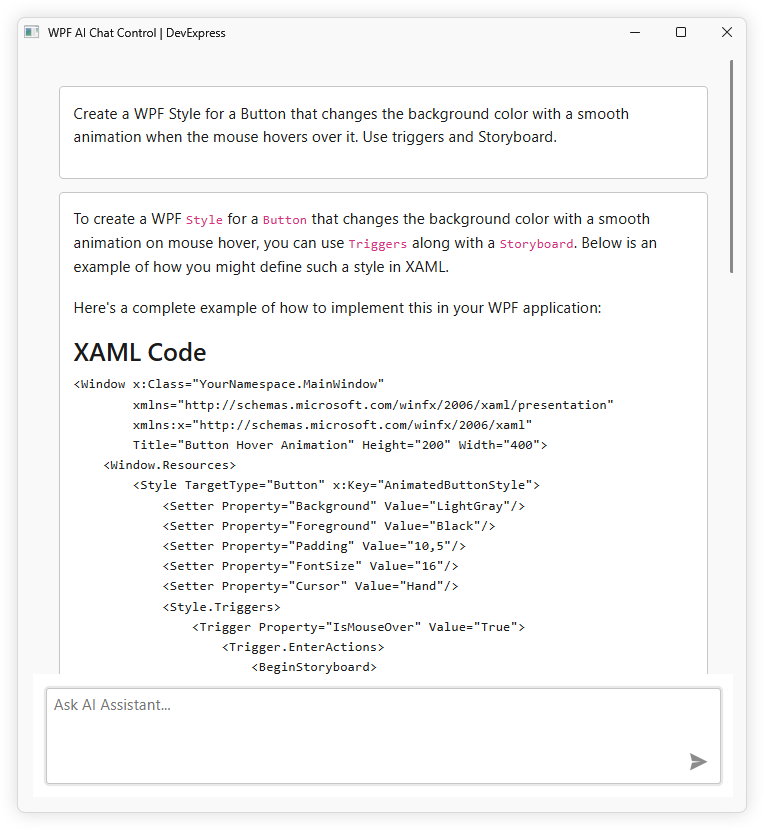
The following screenshot demonstrates the result:
Refer to the following help topic for additional information: AI Chat Control