Aztec Code
- 2 minutes to read
Aztec barcode is a matrix code that uses less space than other matrix barcodes because it does not require a surrounding blank “quiet zone”. Aztec codes are widely used for transport ticketing, logistics, and document workflows. Refer to the following article for more details: Aztec Code.
Examples
Configure Barcode Settings (AztecCodeOptions)
Use the AztecCodeOptions class to configure Aztec Code barcode settings.
The following code snippet creates an Aztec barcode and customizes its options:
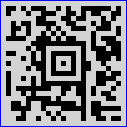
using DevExpress.Docs.Barcode;
using DevExpress.Drawing;

// Create an Aztec Code.
var aztecOptions = new AztecCodeOptions();
aztecOptions.CompactionMode = AztecCodeCompactionMode.Text;
aztecOptions.ErrorCorrectionLevel = AztecCodeErrorCorrectionLevel.Level2;
aztecOptions.ModuleSize = 5;
aztecOptions.BackColor = Color.LightGray;
aztecOptions.ShowText = false;
aztecOptions.Padding = new Padding(5);
aztecOptions.BorderWidth = 1;
aztecOptions.BorderColor = Color.Blue;

using var aztecOptionsStream = new FileStream(Path.Combine(outDir, "barcode_symbology_aztec_barcode.png"), FileMode.Create, FileAccess.Write);
using var aztecOptionsGenerator = new BarcodeGenerator(aztecOptions);
aztecOptionsGenerator.Export("https://example.com/ticket/839201", aztecOptionsStream, DXImageFormat.Png);
Configure Barcode Settings (Fluent API)
Use the AztecCodeOptionsBuilder class to configure Aztec barcode settings with Fluent API.
The following code snippet creates an Aztec barcode in Fluent API patters and customizes its options:
using DevExpress.Docs.Barcode;
using DevExpress.Drawing;
using System.Drawing;

var aztekOptions = AztecCodeOptionsBuilder.Create()
    .WithCompactionMode(AztecCodeCompactionMode.Text)
    .WithErrorCorrectionLevel(AztecCodeErrorCorrectionLevel.Level2)
    .WithModuleSize(5)
    .WithBackColor(Color.LightGray)
    .WithShowText(false)
    .WithPadding(5)
    .WithBorderWidth(1)
    .WithBorderColor(Color.Blue)
    .Build();

var filePath = Path.GetFullPath("aztec_barcode.png");

using var stream = new FileStream(filePath, FileMode.Create);
using var generator = new BarcodeGenerator(aztekOptions);

generator.Export("https://example.com/ticket/839201", stream, DXImageFormat.Png);
Symbology-Specific Options
| Property | Description |
|---|---|
| CompactionMode | Gets or sets the mode used by the barcode to encode barcode data. |
| ErrorCorrectionLevel | Gets or sets how much redundancy is built into the barcode to compensate for calculation errors. |
| Version | Gets or sets the Aztec Code version. |
See Also