Code 128
- 2 minutes to read
Code 128 is a compact, high-density symbology that encodes alphanumeric data. The symbology includes a checksum digit for verification, and the barcode supports character-by-character validation. Code 128 encodes large amounts of data in small spaces and can encode numeric data at double density.
Examples
Configure Barcode Settings (Code128Options)
Use the Code128Options class to configure code 128 barcode settings.
The following code snippet creates an Code 128 barcode and customizes its options:
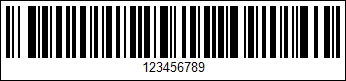
using DevExpress.Docs.Barcode;
using DevExpress.Drawing;
using System.Drawing;

var code128Options = new Code128Options();
code128Options.ShowText = true;
code128Options.Charset = Code128CharacterSet.CharsetB;
code128Options.AddLeadingZero = true;
code128Options.Padding = new Padding(5);
code128Options.BorderWidth = 1;
code128Options.FNC1Substitute = "<FNC1>";
code128Options.FNC2Substitute = "<FNC2>";
code128Options.FNC3Substitute = "<FNC3>";

using var code128OptionsStream = new FileStream(Path.Combine(outDir, "barcode_symbology_code128.png"), FileMode.Create, FileAccess.Write);
using var code128OptionsGenerator = new BarcodeGenerator(code128Options);
code128OptionsGenerator.Export("<FNC1>12345<FNC2>67<FNC3>89", code128OptionsStream, DXImageFormat.Png);
Configure Barcode Settings (Fluent API)
Use the Code128OptionsBuilder class to configure code 128 barcode settings with Fluent API.
The following code snippet creates an Code 128 barcode and customizes its options:
using DevExpress.Docs.Barcode;
using DevExpress.Drawing;
using System.Drawing;

var code128Options = code128OptionsBuilder.Create()
    .WithShowText(true)
    .WithCharset(Code128CharacterSet.CharsetB)
    .WithAddLeadingZero(true)
    .WithPadding(5)
    .WithBorderWidth(1)
    .WithFNC1Substitute("<FNC1>")
    .WithFNC2Substitute("<FNC2>")
    .WithFNC3Substitute("<FNC3>")
    .Build();

using var code128OptionsStream = new FileStream(Path.Combine(outDir, "barcode_symbology_code128.png"), FileMode.Create, FileAccess.Write);
using var code128OptionsGenerator = new BarcodeGenerator(code128Options);

code128OptionsGenerator.Export("<FNC1>12345<FNC2>67<FNC3>89", code128OptionsStream, DXImageFormat.Png);
Symbology-Specific Options
| Property | Description |
|---|---|
| Charset | Gets or sets the barcode charset type. |
| AddLeadingZero | Specifies whether to prepend a leading zero when encoding numeric data in Code Set C (CharsetC). |
| FNC1Substitute | A substring/character that serves as the placeholder for the FNC1 functional character. |
| FNC2Substitute | A substring/character that serves as the placeholder for the FNC2 functional character. |
| FNC3Substitute | A substring/character that serves as the placeholder for the FNC3 functional character. |
| FNC4Substitute | A substring/character that serves as the placeholder for the FNC4 functional character. |
See Also