GS1- Data Matrix
- 2 minutes to read
GS1 Data Matrix uses the Function 1 Symbol Character (FNC1) in the first position to identify GS1 data. This indicator allows scanners to process data according to GS1 system rules.
Examples
Configure Barcode Settings (DataMatrixGS1Options)
Use the DataMatrixGS1Options class to configure GS1 Data Matrix barcode settings.
The following code snippet creates an Data Matrix GS1 barcode and customizes its options:
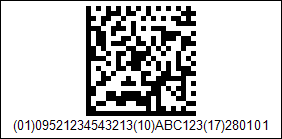
using DevExpress.Docs.Barcode;
using DevExpress.Drawing;
using System.Drawing;

var dmGs1Options = new DataMatrixGS1Options();
dmGs1Options.ModuleSize = 5;
dmGs1Options.CompactionMode = DataMatrixCompactionMode.C40;
dmGs1Options.Padding = new Padding(5);
dmGs1Options.BorderWidth = 1;

using var dmGs1OptionsStream = new FileStream(Path.Combine(outDir, "barcode_symbology_datamatrix_gs1.png"), FileMode.Create, FileAccess.Write);
using var dmGs1OptionsGenerator = new BarcodeGenerator(dmGs1Options);
dmGs1OptionsGenerator.Export("(01)09521234543213(10)ABC123(17)280101", dmGs1OptionsStream, DXImageFormat.Png);
Configure Barcode Settings (Fluent API)
Use the DataMatrixGS1OptionsBuilder class to configure GS1 Data Matrix barcode settings with Fluent API.
The following code snippet creates an Data Matrix GS1 barcode and customizes its options:
using DevExpress.Docs.Barcode;
using DevExpress.Drawing;
using System.Drawing;

var dmGs1Options = DataMatrixGS1OptionsBuilder.Create()
    .WithShowText(true)
    .WithPadding(5)
    .WithBorderWidth(1)
    .Build();

using var dmGs1OptionsStream = new FileStream(Path.Combine(outDir, "barcode_symbology_datamatrix_gs1.png"), FileMode.Create, FileAccess.Write);
using var dmGs1OptionsGenerator = new BarcodeGenerator(dmGs1Options);

dmGs1OptionsGenerator.Export("(01)09521234543213(10)ABC123(17)280101", dmGs1OptionsStream, DXImageFormat.Png);
Symbology-Specific Options
| Property | Description |
|---|---|
| FNC1Substitute | Gets or sets the character that is used as a substitute for the GS1 FNC1 separator in Data Matrix GS1 input data. |
| HumanReadableText | Gets or sets whether GS1 human-readable text is displayed for the Data Matrix barcode. |
See Also