MSI - Plessey
- 2 minutes to read
MSI, also known as Modified Plessey, is a continuous numeric symbology used for retail inventory control. Applications often implement a fixed-length MSI code.
Examples
Configure Barcode Settings (CodeMSIOptions)
Use the CodeMSIOptions class to configure MSI barcode settings.
The following code snippet creates an MSI barcode and customizes its options:
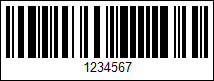
using DevExpress.Docs.Barcode;
using DevExpress.Drawing;
using System.Drawing;

var msiOptions = new CodeMSIOptions();
msiOptions.ShowText = true;
msiOptions.Padding = new Padding(5);
msiOptions.BorderWidth = 1;

using var msiOptionsStream = new FileStream(Path.Combine(outDir, "barcode_symbology_msi_plessey.png"), FileMode.Create, FileAccess.Write);
using var msiOptionsGenerator = new BarcodeGenerator(msiOptions);
msiOptionsGenerator.Export("1234567", msiOptionsStream, DXImageFormat.Png);
Configure Barcode Settings (Fluent API)
Use the CodeMSIOptionsBuilder class to configure MSI barcode settings with Fluent API.
The following code snippet creates an MSI barcode and customizes its options:
using DevExpress.Docs.Barcode;
using DevExpress.Drawing;
using System.Drawing;

var msiOptions = CodeMSIOptionsBuilder.Create()
    .WithShowText(true)
    .WithPadding(5)
    .WithBorderWidth(1)
    .Build();

using var msiOptionsStream = new FileStream(Path.Combine(outDir, "barcode_symbology_msi.png"), FileMode.Create, FileAccess.Write);
using var msiOptionsGenerator = new BarcodeGenerator(msiOptions);

msiOptionsGenerator.Export("1234567", msiOptionsStream, DXImageFormat.Png);
Symbology-Specific Options
| Property | Description |
|---|---|
| Checksum | Gets or sets the checksum type for an MSI barcode. The BarcodeGenerator supports only the Mod 10 (Luhn) checksum algorithm. |
See Also