EAN 8
- 2 minutes to read
EAN-8 is a short EAN barcode for small packages and space-constrained labels. The symbol encodes 8 digits, including a check digit.
Examples
Configure Barcode Settings (EAN8Options)
Use the EAN8Options class to configure EAN-8 barcode settings.
The following code snippet creates an EAN8 barcode and customizes its options:
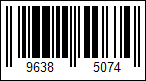
using DevExpress.Docs.Barcode;
using DevExpress.Drawing;
using System.Drawing;

var ean8Options = new EAN8Options();
ean8Options.ShowText = true;
ean8Options.Padding = new Padding(5);
ean8Options.BorderWidth = 1;

using var ean8OptionsStream = new FileStream(Path.Combine(outDir, "barcode_symbology_ean8.png"), FileMode.Create, FileAccess.Write);
using var ean8OptionsGenerator = new BarcodeGenerator(ean8Options);
ean8OptionsGenerator.Export("9638507", ean8OptionsStream, DXImageFormat.Png);
Configure Barcode Settings (Fluent API)
Use the EAN8OptionsBuilder class to configure EAN-8 barcode settings with Fluent API.
The following code snippet creates an EAN8 barcode and customizes its options:
using DevExpress.Docs.Barcode;
using DevExpress.Drawing;
using System.Drawing;

var ean8Options = EAN8OptionsBuilder.Create()
    .WithShowText(true)
    .WithPadding(5)
    .WithBorderWidth(1)
    .Build();

using var ean8OptionsStream = new FileStream(Path.Combine(outDir, "barcode_symbology_ean8.png"), FileMode.Create, FileAccess.Write);
using var ean8OptionsGenerator = new BarcodeGenerator(ean8Options);

ean8OptionsGenerator.Export("9638507", ean8OptionsStream, DXImageFormat.Png);
Symbology-Specific Options
This symbology has no additional options.
See Also