EPC QR Code
- 3 minutes to read
An EPC QR Code (European Payments Council Quick Response Code) is a two-dimensional barcode that initiates a SEPA credit transfer (SCT). The guideline explains EPC QR Code basics and defines the data format: Quick Response Code - Guidelines to Enable the Data Capture for the Initiation of a SEPA Credit Transfer.
Examples
Configure Barcode Settings (QRGS1Options)
Use the QRGS1Options class to configure QR GS1 barcode settings.
The following code snippet creates a QR Code EPC barcode and specifies its settings:
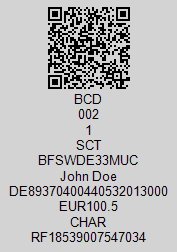
using DevExpress.Docs.Barcode;
using DevExpress.Drawing;
using System.Drawing;

var qrEpcCode = new QRCodeEPCOptions();
qrEpcCode.TransferAmount = 100.50;
qrEpcCode.EPCVersion = EPCVersion.Version2;
qrEpcCode.EPCEncoding = EPCEncoding.UTF_8;
qrEpcCode.BackColor = Color.LightGray;
qrEpcCode.Padding = new Padding(5);
qrEpcCode.BIC = "BFSWDE33MUC";
qrEpcCode.BeneficiaryName = "John Doe";
qrEpcCode.IBAN = "DE89370400440532013000";
qrEpcCode.PaymentReference = "RF18539007547034";
qrEpcCode.TransferPurpose = "CHAR";

var qrEpcStream = new FileStream(Path.Combine(outDir, "barcode_symbology_qrepc_code.png"), FileMode.Create, FileAccess.Write);
using var qrepcodeGenerator = new BarcodeGenerator(qrEpcCode);
qrepcodeGenerator.Export(qrEpcCode.GetStringData(), qrEpcStream, DXImageFormat.Png);
Configure Barcode Settings (Fluent API)
Use the QRGS1OptionsBuilder class to configure QR GS1 barcode settings with Fluent API.
The following code snippet creates a QR Code EPC barcode and specifies its settings:
using DevExpress.Docs.Barcode;
using DevExpress.Drawing;
using System.Drawing;

var qrepc = QRCodeEPCOptionsBuilder.Create()
    .WithTransferAmount(100.50)
    .WithEPCVersion(EPCVersion.Version2)
    .WithEPCEncoding(EPCEncoding.UTF_8)
    .WithBackColor(Color.LightGray)
    .WithPadding(5)
    .WithBIC("BFSWDE33MUC")
    .WithBeneficiaryName("John Doe")
    .WithIBAN("DE89370400440532013000")
    .WithPaymentReference("RF18539007547034")
    .WithTransferPurpose("CHAR")
    .Build();

var qrEpcOptionsStream = new FileStream(Path.Combine(outDir, "barcode_symbology_qrepc_code.png"), FileMode.Create, FileAccess.Write);
using var qrepcGenerator = new BarcodeGenerator(qrepc);
qrepcGenerator.Export(qrepc.GetStringData(), qrEpcOptionsStream, DXImageFormat.Png);
Symbology-Specific Option
| Property | Description |
|---|---|
| BeneficiaryName | Gets or sets the name of the beneficiary. |
| BIC | Gets or sets the BIC (Bank Identifier Code) of the bank account to which the payment is made. |
| EPCEncoding | Get or sets the EPC encoding type. |
| EPCVersion | Gets or sets the EPC version. |
| FrameOptions | Specifies the frame options for the QR Code EPC barcode. |
| IBAN | Gets or sets the IBAN (International Bank Account Number) of the beneficiary. |
| IncludeQuietZone | Specifies whether to include a quiet zone (a margin of empty space) around the code. |
| Information | Gets or sets the additional information to be encoded in the QR code. |
| PaymentReference | Gets or sets the payment reference to be encoded in the QR code. |
| RemittanceInformation | Gets or sets the remittance information to be encoded in the QR code. |
| TransferAmount | Gets or sets the transfer amount to be encoded in the QR code. |
| TransferPurpose | Gets or sets the transfer purpose to be encoded in the QR code. |
| Version | Gets or sets the QR code version. |
Use EPCDataConverter to format data elements for EPC QR Codes.
The frame is used to highlight the function of the codes and to secure the identification. For more information, refer to the following Payment Services Austria (PSA) document: Application of QR-Code for initiating of credit transfers.