Data Matrix (ECC200)
- 2 minutes to read
Data Matrix (ECC200) is a two-dimensional matrix barcode that encodes text or raw data in a grid of cells. The symbol uses an L-shaped finder pattern and a timing pattern to locate, orient, and size the barcode.
Examples
Configure Barcode Settings (DataMatrixOptions)
Use the DataMatrixOptions class to configure Data Matrix barcode settings.
The following code snippet creates an Data Matrix barcode and customizes its options:
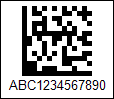
using DevExpress.Docs.Barcode;
using DevExpress.Drawing;
using System.Drawing;

var dmEcc200Options = new DataMatrixOptions();
dmEcc200Options.ModuleSize = 5;
dmEcc200Options.Padding = new Padding(5);
dmEcc200Options.BorderWidth = 1;

using var dmEcc200OptionsStream = new FileStream(Path.Combine(outDir, "barcode_symbology_datamatrix_ecc200.png"), FileMode.Create, FileAccess.Write);
using var dmEcc200OptionsGenerator = new BarcodeGenerator(dmEcc200Options);
dmEcc200OptionsGenerator.Export("ABC1234567890", dmEcc200OptionsStream, DXImageFormat.Png);
Configure Barcode Settings (Fluent API)
Use the DataMatrixOptionsBuilder class to configure Data Matrix barcode settings with Fluent API.
The following code snippet creates an Data Matrix barcode and customizes its options:
using DevExpress.Docs.Barcode;
using DevExpress.Drawing;
using System.Drawing;

var dmEcc200Options = DataMatrixOptionsBuilder.Create()
    .WithShowText(true)
    .WithPadding(5)
    .WithBorderWidth(1)
    .Build();

using var dmEcc200OptionsStream = new FileStream(Path.Combine(outDir, "barcode_symbology_datamatrix.png"), FileMode.Create, FileAccess.Write);
using var dmEcc200OptionsGenerator = new BarcodeGenerator(dmEcc200Options);

dmEcc200OptionsGenerator.Export("ABC1234567890", dmEcc200OptionsStream, DXImageFormat.Png);
Symbology-Specific Options
| Property | Description |
|---|---|
| CompactionMode | Gets or sets the encoding scheme used to encode data in the DataMatrix Code. |
| MatrixSize | Gets or sets the barcode matrix size. |
See Also