PostNet
- 2 minutes to read
PostNet is a USPS barcode that speeds mail sorting and routing. The symbology encodes data in bar heights - bars share a common width but vary in height.
Examples
Configure Barcode Settings (PostNetOptions)
Use the PostNetOptions class to configure PostNet barcode settings.
The following code snippet creates a PostNet barcode with 9 digits and specifies its options:
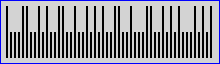
using DevExpress.Docs.Barcode;
using DevExpress.Drawing;
using System.Drawing;

var postnetOptions = new PostNetOptions();
postnetOptions.BackColor = Color.LightGray;
postnetOptions.ShowText = false;
postnetOptions.Padding = new Padding(5);
postnetOptions.BorderWidth = 1;
postnetOptions.BorderColor = Color.Blue;

using var postnetOptionsStream = new FileStream(Path.Combine(outDir, "barcode_symbology_postnet.png"), FileMode.Create, FileAccess.Write);
using var postnetOptionsGenerator = new BarcodeGenerator(postnetOptions);
postnetOptionsGenerator.Export("123456789", postnetOptionsStream, DXImageFormat.Png);
Configure Barcode Settings (Fluent API)
Use the PostNetOptionsBuilder class to configure PostNet barcode settings with Fluent API.
The following code snippet creates a PostNet barcode with 9 digits and specifies its options:
using DevExpress.Docs.Barcode;
using DevExpress.Drawing;
using System.Drawing;

var postNetCode = PostNetOptionsBuilder.Create()
    .WithBackColor(Color.LightGray)
    .WithShowText(false)
    .WithPadding(5)
    .WithBorderWidth(1)
    .WithBorderColor(Color.Blue)
    .Build();

var filePath = Path.GetFullPath("postnet_barcode.png");

using var stream = new FileStream(filePath, FileMode.Create);
using var generator = new BarcodeGenerator(postNetCode);
generator.Export("123456789", stream, DXImageFormat.Png);
Symbology-Specific Options
This symbology has no additional options.
See Also