Industrial 2 of 5
- 2 minutes to read
Industrial 2 of 5 is a low-density numeric symbology introduced in the 1960s. It is used in photo finishing, warehouse sorting, and airline ticket numbering workflows.
Examples
Configure Barcode Settings (Industrial2of5Options)
Use the Industrial2of5Options class to configure Industrial 2 of 5 barcode settings.
The following code snippet creates the Industrial 2 of 5 barcode and customizes its options:
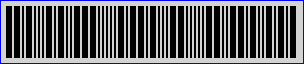
using DevExpress.Docs.Barcode;
using DevExpress.Drawing;
using System.Drawing;

var ind2of5Options = new Industrial2of5Options();
ind2of5Options.CalculateChecksum = true;
ind2of5Options.WideNarrowRatio = 3;
ind2of5Options.BackColor = Color.LightGray;
ind2of5Options.ShowText = false;
ind2of5Options.Padding = new Padding(5);
ind2of5Options.BorderWidth = 1;
ind2of5Options.BorderColor = Color.Blue;

using var ind2of5OptionsStream = new FileStream(Path.Combine(outDir, "barcode_symbology_industrial_2of5.png"), FileMode.Create, FileAccess.Write);
using var ind2of5OptionsGenerator = new BarcodeGenerator(ind2of5Options);
ind2of5OptionsGenerator.Export("12345670", ind2of5OptionsStream, DXImageFormat.Png);
Configure Barcode Settings (Fluent API)
Use the Industrial2of5OptionsBuilder class to configure Industrial 2 of 5 barcode settings with Fluent API.
The following code snippet creates the Industrial 2 of 5 barcode and customizes its options:
using DevExpress.Docs.Barcode;
using DevExpress.Drawing;
using System.Drawing;

var industrialOptions = Industrial2of5OptionsBuilder.Create()
    .WithCalculateChecksum(true)
    .WithWideNarrowRatio(3)
    .WithBackColor(Color.LightGray)
    .WithShowText(false)
    .WithPadding(5)
    .WithBorderWidth(1)
    .WithBorderColor(Color.Blue)
    .Build();

var filePath = Path.GetFullPath("2of5_barcode.png");
{
    using var stream = new FileStream(filePath, FileMode.Create);
    using var generator = new BarcodeGenerator(industrialOptions);
    generator.Export("12345", stream, DXImageFormat.Png);
}
Symbology-Specific Options
| Property | Description |
|---|---|
| CalculateChecksum | Gets or sets whether a check character should be calculated and added to the barcode data. |
| WideNarrowRatio | Specifies the wide bar to narrow bar ratio. |
See Also