Bind Blazor Grid to Server Mode Data Sources
- 13 minutes to read
In Blazor Server applications, you can bind the DevExpress Blazor Grid component to Server Mode data sources. These data sources are designed to reduce memory consumption when working with large data collections.
When bound to a Server Mode data source, the Grid loads data in small portions on demand (instead of the entire dataset). The component delegates all data shaping operations to underlying services (EF Core, XPO, and so on). These services process data more efficiently and enhance overall performance.
You can run the following example to compare in-memory data binding and Server Mode data loading strategies: Server Mode Data Processing
Data Source Types
The Grid includes two types of Server Mode data sources:
- Server Mode Data Source
- A synchronous data source that locks UI and does not respond to user actions while data is retrieved.
- Instant Feedback Data Source
- An asynchronous data source that loads data in a background thread and does not freeze the UI. The Grid displays skeletons and data load indicators while data is retrieved.
The following table lists cross-platform Server Mode data sources compatible with the Blazor Grid:
Data Access Technology | Server Mode Data Source | Instant Feedback Data Source |
|---|---|---|
How to Use Server Mode
Follow these steps to use a Server Mode data source in the Grid:
- Add a reference to a data source namespace (for instance, DevExpress.Data.Linq for EF Core data sources).
- Create a data source instance and configure its parameters.
- Bind the data source instance to the Grid’s Data parameter.
- Implement the IDisposable interface on the Razor page (use the @implements directive). Within the page’s Dispose method, check the data source instance for
nulland dispose of it.
The following sections contain code samples for different data access technologies.
Bind to Data using Entity Framework Core
For the EntityInstantFeedbackSource, you must specify the following data source parameters:
- KeyExpression
- Identifies the key property name in the entity model. If the database does not contain the primary key, you cannot use this database as a Server Mode data source.
- QueryableSource
- Defines a queryable data source from an EF Core data context (for instance, DbSet<T>).
The following example binds the Grid to an EntityInstantFeedbackSource:
@using InstantFeedback.Models;
@using Microsoft.EntityFrameworkCore
@using DevExpress.Data.Linq
@inject IDbContextFactory<NorthwindContext> NorthwindContextFactory
@implements IDisposable

<DxGrid Data="InstantFeedbackSource"
        KeyFieldName="OrderId">
    <Columns>
        <DxGridDataColumn FieldName="ShipName" />
        <DxGridDataColumn FieldName="ShipCity" />
        <DxGridDataColumn FieldName="ShipCountry" />
        <DxGridDataColumn FieldName="Freight" />
        <DxGridDataColumn FieldName="OrderDate" />
        <DxGridDataColumn FieldName="ShippedDate" />
    </Columns>
</DxGrid>
@code {
    EntityInstantFeedbackSource InstantFeedbackSource { get; set; }
    NorthwindContext Northwind { get; set; }

    protected override void OnInitialized() {
        Northwind = NorthwindContextFactory.CreateDbContext();
        InstantFeedbackSource = new EntityInstantFeedbackSource(e => {
            e.KeyExpression = "OrderId";
            e.QueryableSource = Northwind.Orders;
        });
    }
    public void Dispose() {
        InstantFeedbackSource?.Dispose();
        Northwind?.Dispose();
    }
}

Bind to Data using OData
The ODataInstantFeedbackSource includes the following mandatory settings:
- KeyExpression
- Specifies the key property name. To specify multiple columns of a composite key, pass a comma-separated or semicolon-separated list of key column names to this property.
- GetSource
- Handle this event to supply a queryable source connected to an OData service.
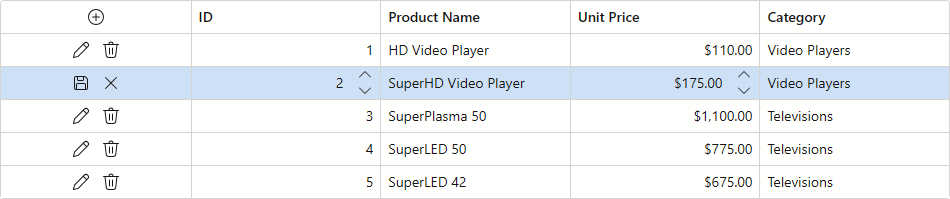
The following code snippet binds the Grid to an ODataInstantFeedbackSource and activates edit operations:
@page "/"
@using InstantFeedback.Models
@using DevExpress.Data.ODataLinq
@implements IDisposable
@rendermode InteractiveServer

<DxGrid EditMode="GridEditMode.EditRow"
        Data="ODataSource"
        KeyFieldName="OrderId"
        ShowFilterRow="true"
        EditModelSaving="OnEditModelSaving"
        DataItemDeleting="OnDataItemDeleting">
    <Columns>
        <DxGridCommandColumn />
        <DxGridDataColumn FieldName="ShipName" />
        <DxGridDataColumn FieldName="ShipCity" />
        <DxGridDataColumn FieldName="ShipCountry" />
        <DxGridDataColumn FieldName="Freight" />
        <DxGridDataColumn FieldName="OrderDate" />
        <DxGridDataColumn FieldName="ShippedDate" />
    </Columns>
</DxGrid>

@code {
    ODataInstantFeedbackSource ODataSource { get; set; }

    protected override void OnInitialized() {
        ODataSource = new ODataInstantFeedbackSource();
        ODataSource.KeyExpression = "OrderId";
        ODataSource.GetSource += (sender, e) => e.Query = new OrdersContext().Orders;
    }

    async Task OnEditModelSaving(GridEditModelSavingEventArgs e) {
        var order = (Order)e.EditModel;
        var context = new OrdersContext();
        if(e.IsNew) {
            context.AddObject("Orders", order);
        }
        else {
            context.AttachTo("Orders", order);
            context.UpdateObject(order);
        }
        await context.SaveChangesAsync();
    }

    async Task OnDataItemDeleting(GridDataItemDeletingEventArgs e) {
        var id = (int)e.Grid.GetDataItemValue(e.DataItem, "OrderId");
        var context = new OrdersContext();
        var order = new Order { OrderId = id };
        context.AttachTo("Orders", order);
        context.DeleteObject(order);
        await context.SaveChangesAsync();
    }

    public void Dispose() {
        ODataSource?.Dispose();
    }
}
Bind to Data using XPO
You must configure the following parameters for the XPInstantFeedbackSource:
- DisplayableProperties
- Lists semicolon-separated property names available for data binding.
- ResolveSession
- Handle this event to supply the XPInstantFeedbackSource with a Session connected to your data store.
- DismissSession
- Handle this event to dispose of the Session created in the
ResolveSessionevent handler.
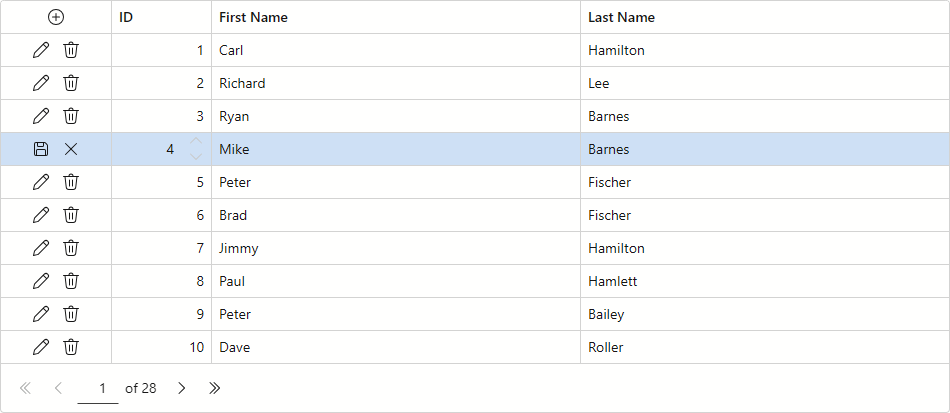
The following code snippet binds the Grid to an XPInstantFeedbackSource and activates edit operations:
@using DevExpress.Xpo;
@inject CustomerService CustomerService
@inject IDataLayer DataLayer
@implements IDisposable

<DxGrid Data="@instantFeedbackSource"
        KeyFieldName="Oid"
        EditMode="GridEditMode.EditRow"
        CustomizeEditModel="Grid_CustomizeEditModel"
        EditModelSaving="Grid_EditModelSaving"
        DataItemDeleting="Grid_DataItemDeleting">
    <Columns>
        <DxGridCommandColumn Width="110px" />
        <DxGridDataColumn Width="100px" FieldName="@nameof(Customer.Oid)" Caption="ID" ReadOnly="true" />
        <DxGridDataColumn FieldName="@nameof(Customer.FirstName)" />
        <DxGridDataColumn FieldName="@nameof(Customer.LastName)" />
    </Columns>
</DxGrid>

@code {

    XPInstantFeedbackSource instantFeedbackSource;
    string properties = $"{nameof(Customer.Oid)};{nameof(Customer.FirstName)};{nameof(Customer.LastName)}";

    protected override Task OnInitializedAsync() {
        instantFeedbackSource = new XPInstantFeedbackSource(typeof(Customer));
        instantFeedbackSource.DisplayableProperties = properties;
        instantFeedbackSource.ResolveSession += InstantFeedbackSource_ResolveSession;
        instantFeedbackSource.DismissSession += InstantFeedbackSource_DismissSession;
        return Task.CompletedTask;
    }

    void InstantFeedbackSource_ResolveSession(object sender, ResolveSessionEventArgs e) {
        e.Session = new Session(DataLayer);
    }

    void InstantFeedbackSource_DismissSession(object sender, ResolveSessionEventArgs e) {
        IDisposable session = e.Session as IDisposable;
        if (session != null)
            session.Dispose();
    }
    void Grid_CustomizeEditModel(GridCustomizeEditModelEventArgs e) {
        var customer = CustomerService.CreateObject();
        e.EditModel = customer;
        if (e.DataItem != null) {
            customer.Oid = (int)e.Grid.GetDataItemValue(e.DataItem, nameof(Customer.Oid));
            customer.FirstName = (string)e.Grid.GetDataItemValue(e.DataItem, nameof(Customer.FirstName));
            customer.LastName = (string)e.Grid.GetDataItemValue(e.DataItem, nameof(Customer.LastName));
        }
    }
    async void Grid_EditModelSaving(GridEditModelSavingEventArgs e) {
        Customer customer = null;
        customer = (Customer)e.EditModel;
        var customerChanges = GetCustomerChanges(customer);
        if (e.IsNew) {
            await CustomerService.Add(customerChanges);
        } else {
            await CustomerService.Update(customer.Oid, customerChanges);
        }
    }
    async void Grid_DataItemDeleting(GridDataItemDeletingEventArgs e) {
        var oid = (int)e.Grid.GetDataItemValue(e.DataItem, nameof(Customer.Oid));
        await CustomerService.Delete(oid);
    }
    private Dictionary<string, object> GetCustomerChanges(Customer obj) {
        var propertiesMapping = new Dictionary<string, object> {
            { nameof(Customer.FirstName), obj.FirstName },
            { nameof(Customer.LastName), obj.LastName },
        };
        return propertiesMapping;
    }
    public void Dispose() {
        if (instantFeedbackSource != null) {
            instantFeedbackSource.ResolveSession -= InstantFeedbackSource_ResolveSession;
            instantFeedbackSource.DismissSession -= InstantFeedbackSource_DismissSession;
            instantFeedbackSource.Dispose();
        }
    }
}
Limitations
Note the following Grid-related limitations when using Server Mode and Instant Feedback data sources:
- These data sources do not work in Blazor WebAssembly applications.
- Cell editing is unavailable.
- Custom sorting/grouping is unavailable.
- Search, filter, sorting, and grouping against display text are unavailable.
- Custom summary calculation is limited. The CustomSummary event fires only once when the SummaryStage event argument is set to
Finalize. - Unbound columns are unavailable if their values are populated via the UnboundColumnData event. Create unbound columns using UnboundExpression instead.
AllPagesmode of the Select All checkbox is unavaialble.- Sorting, filtering, or data grouping during select/deselect all processing cancels the operation.
- To call the SetFocusedDataItemAsync method, you must specify the KeyFieldName/KeyFieldNames property value.
- A data source can be reloaded automatically when it requests a portion of data from a database and finds an inconsistency (for instance, if an external process made changes to the database).
- Actions that affect all Grid rows (for instance, expand all groups) can cause performance issues and UI freezes.
- A second call to the SelectAllAsync/DeselectAllAsync method cancels the operation initiated by a previously called method.
Instant Feedback data sources also have the following specifics:
An Instant Feedback data source loads data asynchronously in small portions (instead of the entire dataset). To ensure correct data operations, you must:
- Call WaitForDataLoadAsync before methods that read Grid data (GetRowValue, GetTotalSummaryValue, and so on).
- Call WaitForRemoteSourceRowLoadAsync before methods that accept a row visible index as a parameter (SelectRow, StartEditRowAsync, and so on).
If a data source’s AreSourceRowsThreadSafe option is set to
false(the default value), you cannot cast a data item and use the {DataItem.FieldName} notation. Call the GetDataItemValue(Object, String) method to obtain the data item’s field value. Note that this method does not provide access to the data source object and you cannot handle events or call methods related to the object.