In-Memory Data Binding in Blazor Grid
- 12 minutes to read
You can bind the DevExpress Blazor Grid component directly to a data collection:
- Assign a C# field to the Data property.
- Populate this field with data in the OnInitialized/OnInitializedAsync lifecycle method. The following data types are supported:
- Array
- DataTable
- IEnumerable<T>, including ICollection<T> and List<T>
- To display data within the Grid, declare DxGridDataColumn objects in the Columns tags.
- Use the DxGridDataColumn.FieldName property to assign data fields to columns. Note that each data column’s FieldName property value must be unique.
The following code snippet binds the Grid to a weather forecast list:
@inject WeatherForecastService ForecastService

<DxGrid Data="@Data">
    <Columns>
        <DxGridDataColumn FieldName="Date" DisplayFormat="D" />
        <DxGridDataColumn FieldName="TemperatureC" Caption="@("Temp. (\x2103)")" Width="120px" />
        <DxGridDataColumn FieldName="TemperatureF" Caption="@("Temp. (\x2109)")" Width="120px" />
        <DxGridDataColumn FieldName="Forecast" />
        <DxGridDataColumn FieldName="CloudCover" />
    </Columns>
</DxGrid>

@code {
    object Data { get; set; }

    protected override async Task OnInitializedAsync() {
        Data = await ForecastService.GetForecastAsync();
    }
}

Limitations
In this data binding mode, the Grid stores all data records in memory. All data processing operations, such as sorting, grouping, and filtering, are executed in the Blazor application. This increases memory consumption and can affect performance when the dataset is large.
For large datasets, use a Server Mode or Queryable data source instead.
Bind to a DataTable
You can bind the Grid component to a DataTable object. Generate/obtain such an object and pass it to the Grid’s Data property:
@using System.Data

<DxGrid Data="@dataTable">
    <Columns>
        <DxGridDataColumn FieldName="Text" Caption="Text Value" />
        <DxGridDataColumn FieldName="Number" Caption="Numeric Value" />
        <DxGridDataColumn FieldName="Date" DisplayFormat="D" Caption="Date-Time Value" />
    </Columns>
</DxGrid>

@code {
    public DataTable dataTable;

    protected override void OnInitialized() {
        dataTable = GetDataTable();
    }
    DataTable GetDataTable() {
        var dataTable = new DataTable();
        dataTable.Columns.Add("Text", typeof(string));
        dataTable.Columns.Add("Number", typeof(int));
        dataTable.Columns.Add("Date", typeof(DateTime));
        for (int i = 0; i < 3; i++) {
            dataTable.Rows.Add(new object[] { $"Text {i}", i, DateTime.Now.AddDays(-i) });
        }
        return dataTable;
    }
}

Bind to a Remote Dataset
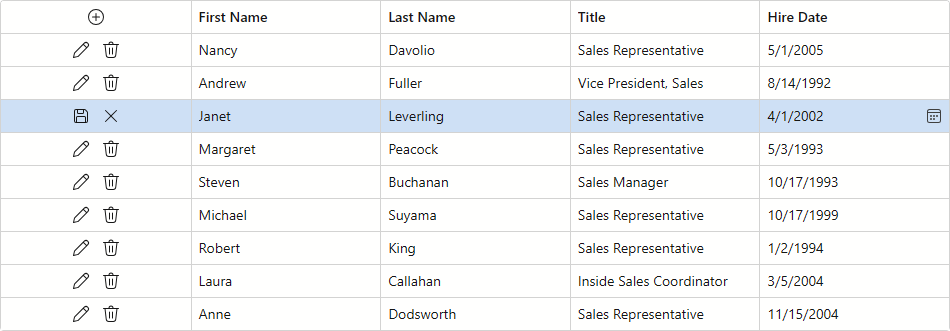
You can load data from a remote data source and assign it directly to the DxGrid.Data property. The following example uses Entity Framework Core to bind the Grid component to a database and enable data editing:
@using Microsoft.EntityFrameworkCore
@inject IDbContextFactory<NorthwindContext> NorthwindContextFactory
@implements IDisposable

<DxGrid Data="Data"
        EditMode="GridEditMode.EditRow"
        EditModelSaving="OnEditModelSaving"
        DataItemDeleting="OnDataItemDeleting"
        KeyFieldName="EmployeeId">
    <Columns>
        <DxGridCommandColumn />
        <DxGridDataColumn FieldName="FirstName" />
        <DxGridDataColumn FieldName="LastName" />
        <DxGridDataColumn FieldName="Title" />
        <DxGridDataColumn FieldName="HireDate" />
    </Columns>
</DxGrid>

@code {
    IEnumerable<Employee> Data { get; set; }
    NorthwindContext Northwind { get; set; }

    protected override async Task OnInitializedAsync() {
        Northwind = NorthwindContextFactory.CreateDbContext();
        Data = await Northwind.Employees.ToListAsync();
    }

    async Task OnEditModelSaving(GridEditModelSavingEventArgs e) {
        var editModel = (Employee)e.EditModel;
        // Apply changes to the data item
        if (!e.IsNew)
            e.CopyChangesToDataItem();
        else {
            editModel.EmployeeId = Data.Max(x => x.EmployeeId) + 1;
            await Northwind.AddAsync(editModel);
        }
        // Post changes to the database.
        await Northwind.SaveChangesAsync();
        // Reload the entire Grid.
        Data = await Northwind.Employees.ToListAsync();
    }

    async Task OnDataItemDeleting(GridDataItemDeletingEventArgs e) {
        // Re-query a data item from the database.
        var dataItem = Northwind.Employees.Find((e.DataItem as Employee).EmployeeId);
        if (dataItem != null) {
            // Remove the data item from the database.
            Northwind.Remove(dataItem);
            await Northwind.SaveChangesAsync();
            // Reload the entire Grid.
            Data = await Northwind.Employees.ToListAsync();
        }
    }

    public void Dispose() {
        Northwind?.Dispose();
    }
}
Bind to a Web API Service
You can use an HttpClient to obtain data from a remote service. Save data to a collection and assign it to the Grid component.
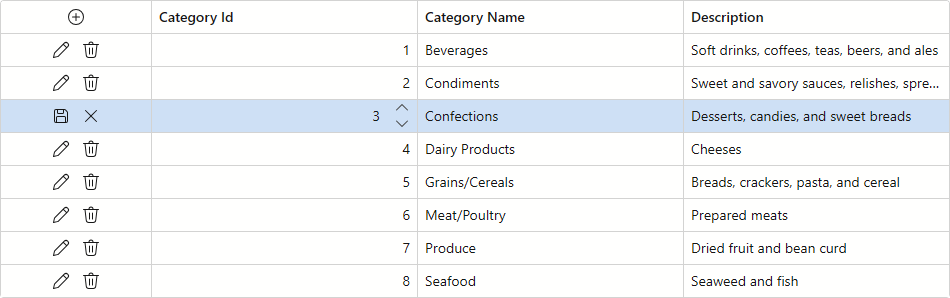
The following code snippet binds the Grid to a Web API service and allows users to create, modify, and delete records:
@using System.Net.Http
@using System.Net.Http.Json
@inject HttpClient Http
@inject WebServicePath wsp
@using DataGridWithWebApiService.Data

<DxGrid Data=@categories
        PagerVisible="false"
        EditModelSaving="OnEditModelSaving"
        DataItemDeleting="OnDataItemDeleting"
        EditMode="GridEditMode.EditRow">
    <Columns>
        <DxGridCommandColumn Width="150px" />
        <DxGridDataColumn FieldName=@nameof(Categories.CategoryId) />
        <DxGridDataColumn FieldName=@nameof(Categories.CategoryName) />
        <DxGridDataColumn FieldName=@nameof(Categories.Description) />
    </Columns>
</DxGrid>

@code {
    List<Categories>? categories;
    string path = "https://localhost:44340/api/";

    protected override async Task OnInitializedAsync() {
        categories = await Http.GetFromJsonAsync<List<Categories>>(path + "categories");
    }
    async Task OnEditModelSaving(GridEditModelSavingEventArgs e) {
        if (e.IsNew) {
            Categories newCategory = new Categories();
            SetNewValues(newCategory, (Categories)e.EditModel);
            await Http.PostAsJsonAsync<Categories>(path + "categories/", newCategory);
            categories = await Http.GetFromJsonAsync<List<Categories>>(path + "categories");
        }
        else {
            var dataItem = (Categories)e.DataItem;
            SetNewValues(dataItem, (Categories)e.EditModel);
            await Http.PutAsJsonAsync(path + "categories/" + dataItem.CategoryId, dataItem);
            categories = await Http.GetFromJsonAsync<List<Categories>>(path + "categories");
        }
    }
    async Task OnDataItemDeleting(GridDataItemDeletingEventArgs e) {
        await Http.DeleteAsync(path + "categories/" + ((Categories)e.DataItem).CategoryId);
        categories = await Http.GetFromJsonAsync<List<Categories>>(path + "categories");
    }
    private void SetNewValues(Categories dataItem, Categories newValues) {
        dataItem.CategoryName = newValues.CategoryName;
        dataItem.Description = newValues.Description;
    }
}
Bind to Observable Data
You can bind the Grid to a data collection that implements the INotifyCollectionChanged or IBindingList interface. For instance, you can use standard ObservableCollection<T> or BindingList<T> objects.
These objects notify the Grid about collection changes such as add, remove, and refresh operations. To notify the Grid when a record value changes, each collection item must also implement INotifyPropertyChanged. The Grid then updates its data automatically.
Note
After you bind a dynamic data collection to the Grid, the collection sends notifications after each change separately. When you make a sequence of modifications (for instance, in a for loop), the Grid is re-rendered after each iteration.
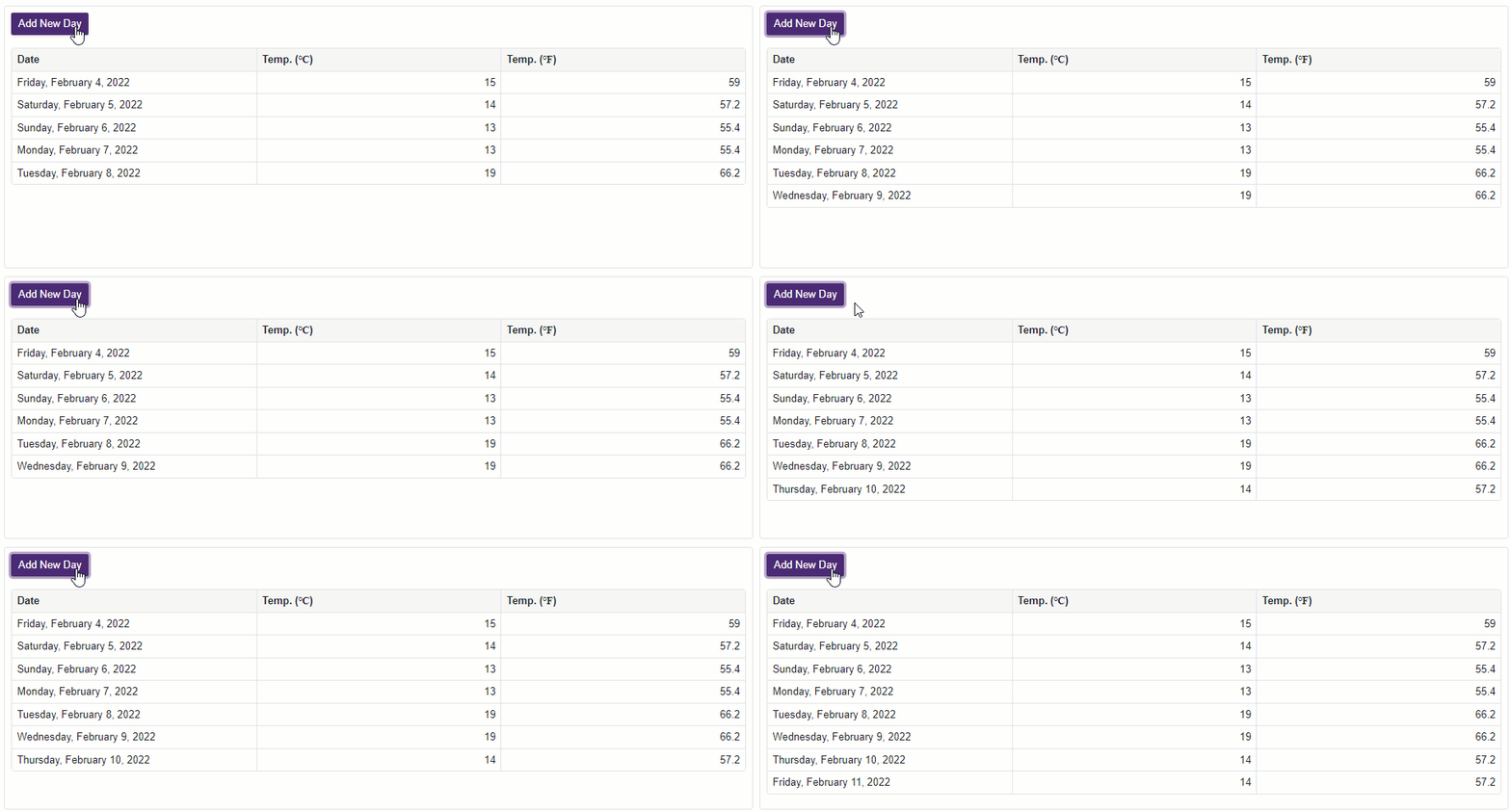
The following sample binds the Grid to an ObservableCollection<T> and adds new items to this collection on button clicks. The INotifyCollectionChanged interface is not implemented because field values of existing items do not change.
@using System.Collections.ObjectModel

<DxButton Text="Add New Day"
          Click="(e) => AddNewForecast()" />

<p/>
<DxGrid Data="@WeatherForecastData">
    <Columns>
        <DxGridDataColumn FieldName="Date" DisplayFormat="D" />
        <DxGridDataColumn FieldName="TemperatureC" Caption="@("Temp. (\x2103)")" />
        <DxGridDataColumn FieldName="TemperatureF" Caption="@("Temp. (\x2109)")" />
    </Columns>
</DxGrid>

@code {
    int DayCount { get; set; } = 0;
    ObservableCollection<WeatherForecast> WeatherForecastData { get; set; }
    static readonly Random Rnd = new Random();

    protected override void OnInitialized() {
        WeatherForecastData = new ObservableCollection<WeatherForecast>();
        foreach (var date in Enumerable.Range(1, 5).Select(i => DateTime.Now.Date.AddDays(i))) {
            AddNewForecast();
        }
    }

    void AddNewForecast() {
        WeatherForecastData.Add(new WeatherForecast() {
            Date = DateTime.Now.Date.AddDays(++DayCount),
            TemperatureC = Rnd.Next(10, 20)
        });
    }
}
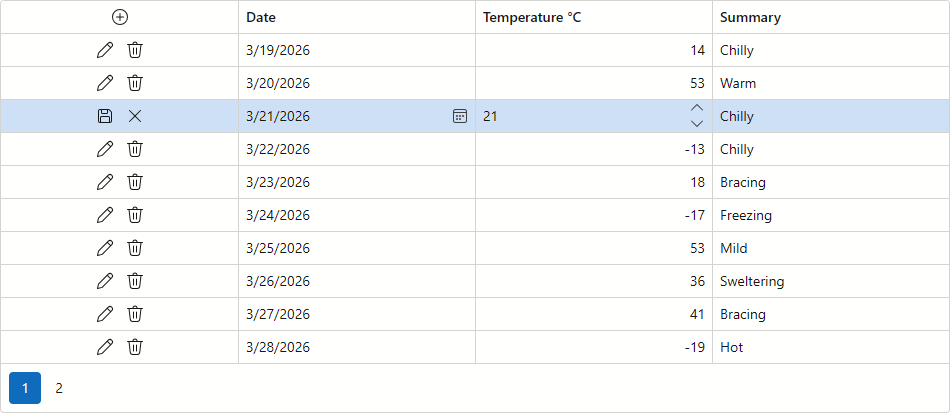
Bind to an ExpandoObject
You can bind the Blazor Grid component to an ExpandoObject collection and use user-defined schemas from external sources as data models (such as JSON files or NoSQL databases). This way, you can introduce CRUD (Create, Read, Update, Delete) operations when your data structure is not defined at compile time.
Follow the steps below to bind the DevExpress Blazor Grid to a dynamic ExpandoObject list and activate CRUD operations:
- Create an
ExpandoObjectcollection and populate it with initial data. - Add
DxGridto the page and bind it to theExpandoObjectlist. - Implement a custom edit model in the CustomizeEditModel event handler.
- Handle the EditModelSaving event to retrieve data from the custom edit model and update the
ExpandoObject. - Handle the DataItemDeleting event to remove an item from the
ExpandoObjectcollection. - Add a custom CellEditTemplate for all data columns. In a template, bind an inline editor to the
ExpandoObjectusingIDictionary<string, object>.
The following example activates edit operations in a DxGrid bound to an ExpandoObject collection:
@using Expando.Services
@using System.Dynamic
@inject WeatherForecastService ForecastService

<DxGrid Data="@forecasts"
        CssClass="mw-1100"
        EditMode="GridEditMode.EditRow"
        EditModelSaving="Grid_EditModelSaving"
        DataItemDeleting="Grid_DataItemDeleting"
        CustomizeEditModel="Grid_CustomizeEditModel">
    <Columns>
        <DxGridCommandColumn />

        <DxGridDataColumn Caption="Date" FieldName="Date">
            <CellEditTemplate>
                @{
                    var editItem = (IDictionary<string, object>)context.EditModel;
                    var date = (DateOnly)editItem["Date"];
                }
                <DxDateEdit Date="@(date)"
                            DateChanged="@((DateOnly newVal) => editItem["Date"] = newVal)"
                            DateExpression="@(() => date)">
                </DxDateEdit>
            </CellEditTemplate>
        </DxGridDataColumn>
        <DxGridDataColumn Caption="Temperature °C" FieldName="TemperatureC">
            <CellEditTemplate>
                @{
                    var editItem = (IDictionary<string, object>)context.EditModel;
                    var temperature = (int)editItem["TemperatureC"];
                }
                <DxSpinEdit Value="@temperature"
                            ValueChanged="@((int newVal) => editItem["TemperatureC"] = newVal)"
                            ValueExpression="@(() => temperature)">
                </DxSpinEdit>
            </CellEditTemplate>
        </DxGridDataColumn>
        <DxGridDataColumn Caption="Summary" FieldName="Summary">
            <CellEditTemplate>
                @{
                    var editItem = (IDictionary<string, object>)context.EditModel;
                    var summary = (string)editItem["Summary"];
                }
                <DxTextBox Text="@summary"
                            TextChanged="@((string newVal) => editItem["Summary"] = newVal)"
                            TextExpression="@(() => summary)">
                </DxTextBox>
            </CellEditTemplate>
        </DxGridDataColumn>
    </Columns>
</DxGrid>

@code {
    private List<ExpandoObject>? forecasts;

    protected override async Task OnInitializedAsync() {
        forecasts = await ForecastService.GetForecastAsyncExpando(DateTime.Now);
    }

    private void Grid_CustomizeEditModel(GridCustomizeEditModelEventArgs e) {
        if (e.IsNew) {
            dynamic forecast = new ExpandoObject();
            forecast.Id = Guid.NewGuid();
            forecast.Date = DateOnly.FromDateTime(DateTime.Now.AddDays(1));
            forecast.TemperatureC = 0;
            forecast.Summary = "";
            e.EditModel = forecast;
        }
    }

    private async Task Grid_EditModelSaving(GridEditModelSavingEventArgs e) {
        if (e.IsNew) {
            forecasts.Add((ExpandoObject)e.EditModel);
        }
        else {
            dynamic editableForecast = (ExpandoObject)e.EditModel;
            dynamic originalForecast = forecasts
                .Cast<dynamic>()
                .First(s => (Guid)s.Id == (Guid)editableForecast.Id);
            originalForecast.Date = editableForecast.Date;
            originalForecast.TemperatureC = editableForecast.TemperatureC;
            originalForecast.Summary = editableForecast.Summary;
        }
    }

    private async Task Grid_DataItemDeleting(GridDataItemDeletingEventArgs e) {
        forecasts.Remove((ExpandoObject)e.DataItem);
    }
}