IModelColumnPivotGridBlazor.PivotFieldArea Property
Specifies the area where the field is displayed.
Namespace: DevExpress.ExpressApp.Blazor.SystemModule
Assembly: DevExpress.ExpressApp.Blazor.v26.1.dll
NuGet Package: DevExpress.ExpressApp.Blazor
Declaration
[DefaultValue(PivotTableArea.Row)]
[ModelBrowsable(typeof(IModelListViewPivotGridBlazorVisibilityCalculator))]
PivotTableArea PivotFieldArea { get; set; }Property Value
| Type | Default | Description |
|---|---|---|
| PivotTableArea | Row | The target area. |
Available values:
| Name | Description |
|---|---|
| Row | A row field. |
| Column | A column field. |
| Filter | A filter field. |
| Data | A data field. |
Remarks
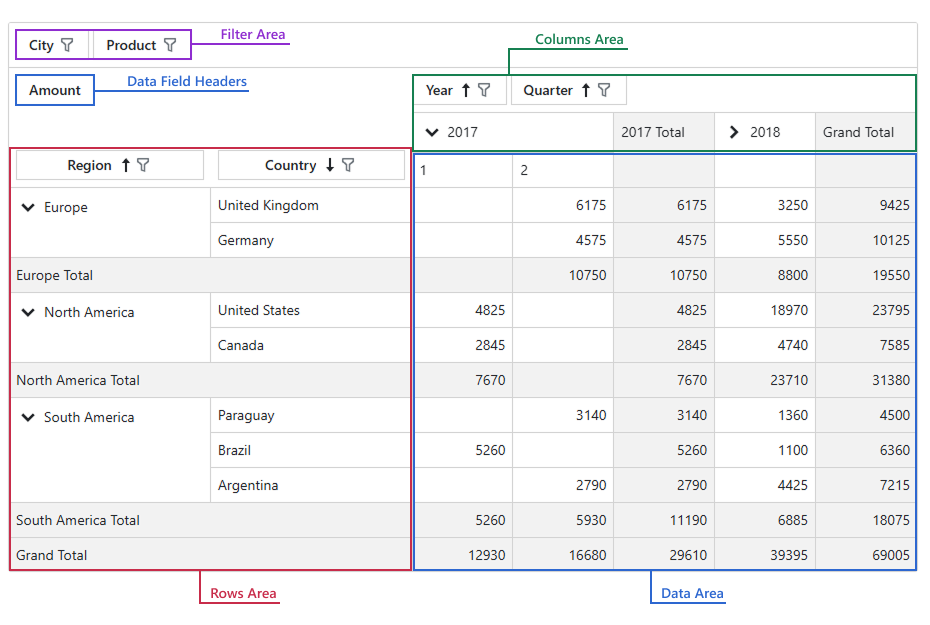
The DxPivotGridListEditor consists of four areas where you or your user can place database fields.
- Rows Area
- Field headers allow users to re-arrange fields and sort or filter data. Unique values from corresponding fields are displayed as row headers.
- Columns Area
- Field headers allow users to re-arrange fields and sort or filter data. Unique values from corresponding fields are displayed as column headers.
- Data Area
- Field headers allow users to re-arrange fields and sort or filter data. Data cells display information from these fields. Each cell value is a summary calculated against the dataset (filtered by corresponding row/column values).
- Filter Area
- Filter fields do not affect data layout. Use field headers to filter data against fields that are not used in row, column, or data areas. Refer to Filter Data for additional information.
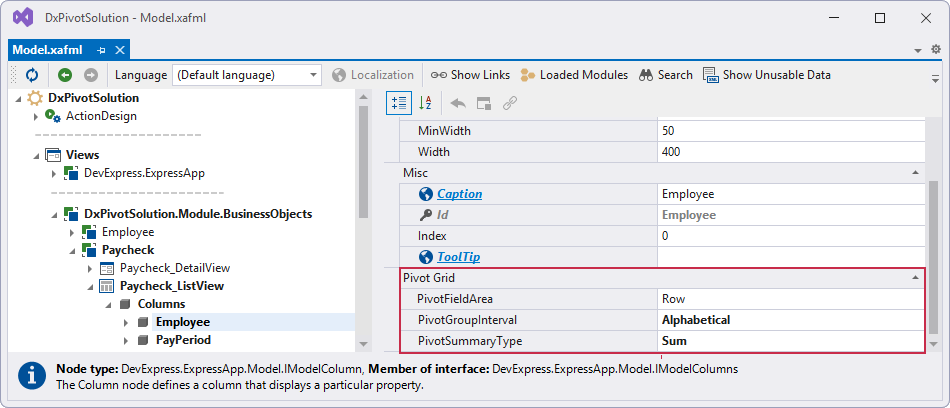
You can specify the PivotFieldArea property in the Model Editor:
- Open the SolutionName.Blazor.Server\Model.xafml file.
- Navigate to the SolutionName | Views | SolutionName.Module.BusinessObjects | ClassName | ClassName_ListView | Columns | FieldName
- Specify column settings for the field in the Pivot Grid section
See Also