IModelColumnPivotGridBlazor.PivotSummaryType Property
Specifies the type of summary function applied to the current data field values.
Namespace: DevExpress.ExpressApp.Blazor.SystemModule
Assembly: DevExpress.ExpressApp.Blazor.v26.1.dll
NuGet Package: DevExpress.ExpressApp.Blazor
Declaration
[DefaultValue(PivotTableSummaryType.Count)]
[ModelBrowsable(typeof(IModelListViewPivotGridBlazorVisibilityCalculator))]
PivotTableSummaryType PivotSummaryType { get; set; }Property Value
| Type | Default | Description |
|---|---|---|
| PivotTableSummaryType | Count | A type of the summary function. The default value is |
Available values:
| Name | Description |
|---|---|
| Count | The number of values. |
| Sum | The sum of the values.
|
| Min | The smallest value. |
| Max | The largest value. |
| Average | The average of the values.
|
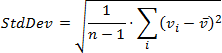
| StdDev | An estimate of the standard deviation of a population, where the sample is a subset of the entire population.
|
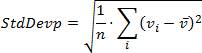
| StdDevp | The standard deviation of a population, where the population is all of the data to be summarized.
|
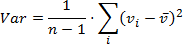
| Var | An estimate of the variance of a population, where the sample is a subset of the entire population.
|
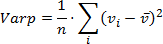
| Varp | The variance of a population, where the population is all of the data to be summarized.
|
| CountDistinct | The number of distinct values. |
| Median | The median of the values. A median is the number separating the higher half of a value range from the lower half. |
| Mode | The mode of the values. A mode is the value that is repeated more often than any other. |


Remarks
Pivot Grid data cells display summaries calculated against data fields. The field’s summary type specifies the aggregate function.
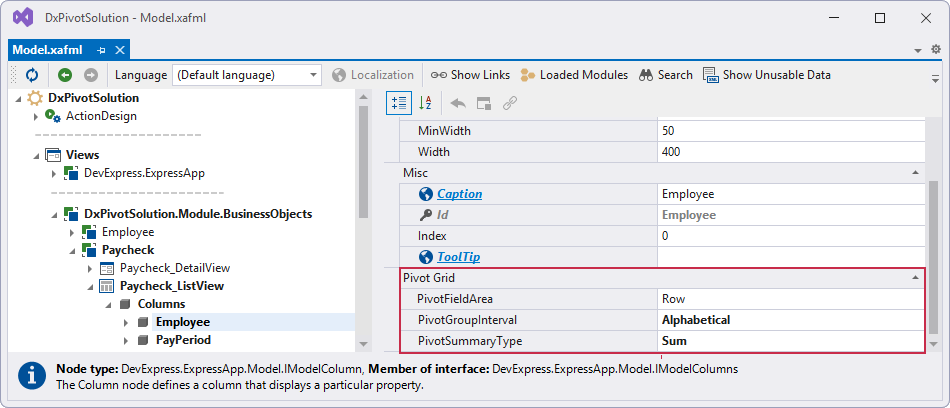
You can specify the PivotSummaryType property in the Model Editor:
- Open the SolutionName.Blazor.Server\Model.xafml file.
- Navigate to the SolutionName | Views | SolutionName.Module.BusinessObjects | ClassName | ClassName_ListView | Columns | FieldName
- Specify column settings for the field in the Pivot Grid section