IModelColumnPivotGridBlazor.PivotGroupInterval Property
Specifies how the Pivot Grid groups values of the current column or row field.
Namespace: DevExpress.ExpressApp.Blazor.SystemModule
Assembly: DevExpress.ExpressApp.Blazor.v26.1.dll
NuGet Package: DevExpress.ExpressApp.Blazor
Declaration
[DefaultValue(PivotTableGroupInterval.Default)]
[ModelBrowsable(typeof(IModelListViewPivotGridBlazorVisibilityCalculator))]
PivotTableGroupInterval PivotGroupInterval { get; set; }Property Value
| Type | Default | Description |
|---|---|---|
| PivotTableGroupInterval | Default | A value that specifies the group interval type. Default property value for date fields is |
Available values:
| Name | Description |
|---|---|
| Default | Groups combine unique field values. |
| Date | This option is in effect only for fields that store date/time values. Field values are grouped by date, but the time is ignored. |
| DateDay | This option is in effect only for fields that store date/time values. Field values are grouped by day. The following groups can be created: 1, 2, 3,…,31. |
| DateDayOfWeek | This option is in effect only for fields that store date/time values. Field values are grouped by day, for example, Sunday, Monday, and Tuesday (the names of the days of the week are determined by the culture). |
| DateDayOfYear | This option is in effect only for fields that store date/time values. Field values are grouped by the number of the day on which they occur in a year. The following groups can be created: 1, 2, 3,…,365 (,366 in a leap year). |
| DateWeekOfMonth | This option is in effect only for fields that store date/time values. Field values are grouped by the number of the week in which they occur in a month. The following groups can be created: 1, 2, 3, 4 and 5. The first week is the week containing the 1st day of the month. |
| DateWeekOfYear | This option is in effect only for fields that store date/time values. Field values are grouped by the number of the day in which they occur in a year. The following groups can be created: 1, 2, 3,…,365 (,366 in a leap year). |
| DateMonth | This option is in effect only for fields that store date/time values. Field values are grouped by month, for example, January, February, March (the names of the months are determined by the culture). |
| DateQuarter | This option is in effect only for fields that store date/time values. Field values are sorted by the quarterly intervals of the year. The following groups can be created: 1, 2, 3 and 4. Each quarter includes three months. |
| DateYear | This option is in effect only for fields that store date/time values. Field values are grouped by the year part. Examples of such groups: 2023, 2024, 2025. |
| YearAge | This option is in effect only for fields that store date/time values. Field values are grouped by the number of full years that have elapsed till the current date. |
| MonthAge | This option is in effect only for fields that store date/time values. Field values are grouped by the number of full months that have elapsed till the current date. |
| WeekAge | This option is in effect only for fields that store date/time values. Field values are grouped by the number of full weeks that have elapsed till the current date. |
| DayAge | This option is in effect only for fields that store date/time values. Field values are grouped by the number of full days that have elapsed before the current date. |
| Alphabetical | Combines field values into categories according to the character that the values start with. |
| Numeric | This option is in effect only for fields that store numeric values. |
| Hour | This option is in effect only for fields that store date/time values. Field values are grouped by hour, regardless of the current date/time. |
| Minute | This option is in effect only for fields that store date/time values. |
| Second | This option is in effect only for fields that store date/time values. Field values are grouped by second, regardless of the current date/time. |
| DateMonthYear | This option is in effect only for fields that store date/time values. Field values are grouped by months and years. Examples of groups: August 2013, September 2014, January 2015, … |
| DateQuarterYear | This option is in effect only for fields that store date/time values. Field values are grouped by the year and quarter. Examples of groups: Q3 2012, Q4 2012, Q1 2013, Q2 2013, … |
| DateHour | This option is in effect only for fields that store date/time values. Field values are grouped by date, including the hour. Examples of such groups: 3/4/2012 0:00, 3/4/2012 1:00, 3/4/2012 2:00, … |
| DateHourMinute | This option is in effect only for fields that store date/time values. Field values are grouped by the date part with the hour and minute values. Examples of groups: 3/4/2012 0:00, 3/4/2012 0:01, 3/4/2012 0:02, … |
| DateHourMinuteSecond | This option is in effect only for fields that store date/time values. Field values are grouped by date and include hour, minute, and second values, for example, 3/4/2012 0:00:00, 3/4/2012 0:00:01, 3/4/2012 0:00:02, … |
| DateWeekYear | This option is in effect only for fields that store date/time values. Field values are grouped by the number of the week in a year in which they occur. The following groups can be created: 1, 2, 3,…,52, 53. |
Remarks
The PivotGroupInterval property specifies how the Pivot Grid groups field values. Available options include Alphabetical, Numeric, and various DateTime options.
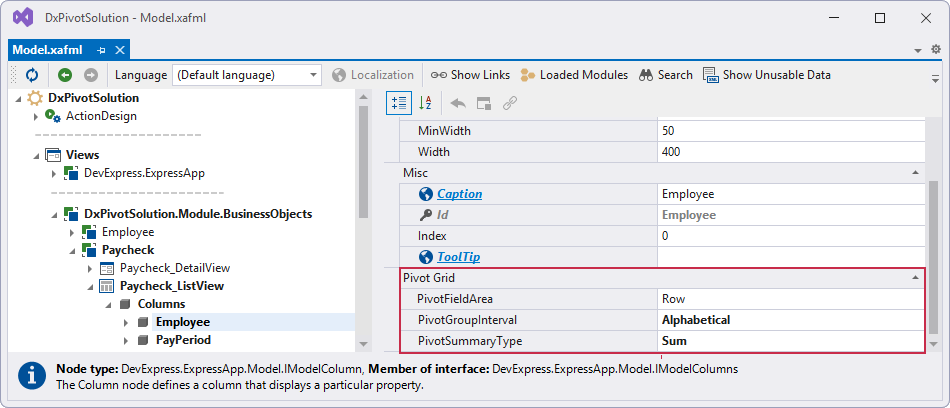
You can specify the PivotGroupInterval property in the Model Editor:
- Open the SolutionName.Blazor.Server\Model.xafml file.
- Navigate to the SolutionName | Views | SolutionName.Module.BusinessObjects | ClassName | ClassName_ListView | Columns | FieldName
- Specify column settings for the field in the Pivot Grid section