Rich Text Editor
- 5 minutes to read
The Rich Text Editor allows you to create, load, edit, print, save, and convert rich-formatted text files.
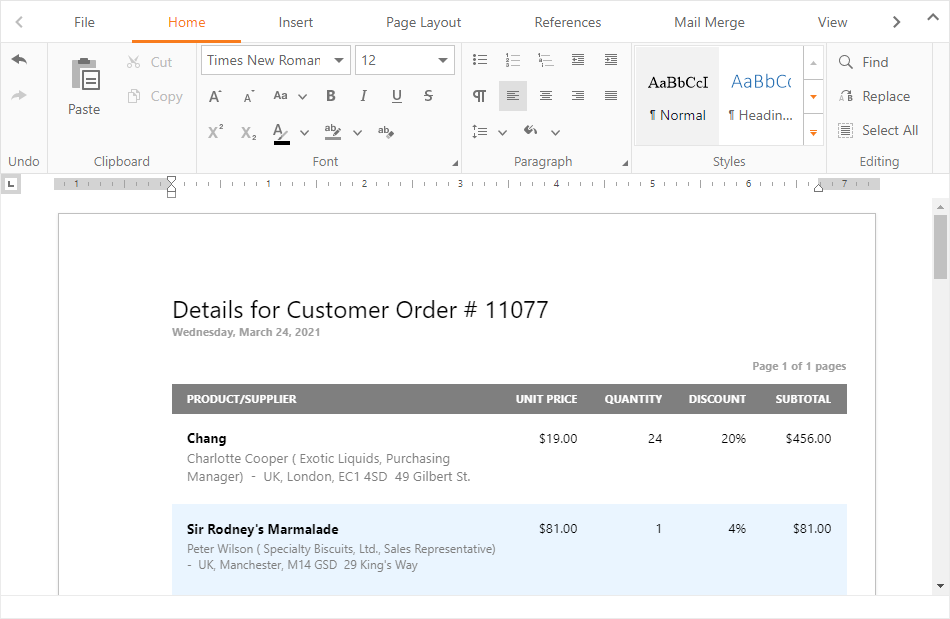
Supported Document Formats
The Rich Text Editor supports the following formats:
- DOC, DOCX, RTF, TXT, ODT, XML
- HTML, MHTML - open/save with limitations
- Export to PDF
Refer to the following section for more information: Supported Document Formats.
Client API
The ASPxClientRichEdit class implements the control’s client functionality and includes the following commonly used properties:
- commands - allows you to create, open, modify, and save a document.
- document - returns information about document content.
- selection - allows you to change the cursor position in a document and select document elements.
Refer to the following section for examples on how to use the client-side API: Common Use Cases.
Server API
Use the ASPxRichEdit class to create and customize the Rich Text Editor on the server side.
Note
You can use our cross-platform and high-performance Word Processing Document API to process documents on the server.
Features
Formatting Features
The Rich Text Editor allows you to perform the following actions:
Create and modify bulleted, numbered and multi-level lists.
Apply paragraph and character-based styles.
Insert images in popular formats: JPEG, JPG, PNG, and GIF.
Create, move, resize and rotate floating objects.
Insert and modify hyperlinks and bookmarks.
Insert and modify tables.
Divide a document into different sections with individual page settings and formatting.
Specify different headers and footers for the first page, odd and even pages, and each section.
Mail Merge
The Mail Merge functionality allows you to generate personalized documents and catalogs from a single template. The Rich Text Editor retrieves data from the bound data source and populates the corresponding fields in a template to create a series of documents.
Field Support
The Rich Text Editor supports fields - special placeholders for non-static data that can change (for instance, a page number or date and time). The control replaces these placeholders with actual data when it renders or prints a document. The DOCVARIABLE field allows you to perform complex merge and substitution operations with documents.
Full-text Search
The Find and Replace feature allows users to locate and modify text in an entire document.
Document Protection
The Rich Text Editor has full support for range permissions. End users can authenticate and edit ranges according to their permissions.
Document and Operation Restrictions
The Rich Text Editor allows you to restrict certain document operations (such as open/save or copy/paste) and document format capabilities (such as character or paragraph formatting) to protect your documents.
UI Customization
The Rich Text Editor has a customizable context menu and Ribbon UI.
Spell Checking
The spell checking feature allows the Rich Text Editor to highlight words with possible errors and list spelling suggestions.
Accessibility
The Rich Text Editor component supports screen reader announcements to help users navigate the document. As users move through content or select objects, the screen reader announces the current text fragment or identifies the selected layout element.
| Text Fragment or Document Element | Shortcut or Trigger | Screen Reader Announcement |
|---|---|---|
| Paragraph | Ctrl + Up Arrow Ctrl + Down Arrow |
Reads the entire paragraph. |
| Line | Up Arrow Down Arrow |
Reads the entire line. |
| Word | Ctrl + Right Arrow Ctrl + Left Arrow |
Reads the current word. |
| Character | Right Arrow Left Arrow |
Reads the current character or symbol. |
| Text selection | Select text or clear selection | Announces the selection change and reads the selected text fragment if it is shorter than 500 characters. If the selected fragment is longer, announces the number of selected characters. |
| Hyperlink | The caret moves to a hyperlink | Announces that the caret entered a hyperlink. Does not read the target address. |
| Move the caret away from a hyperlink | Announces that the caret left a hyperlink. | |
| Image | Move the caret next to an image / select an image | Announces the presence of an image and reads the image’s alternate text or image name (if specified). |
| Table | Move the caret into a table | Announces the number of rows and columns. |
| Move the caret away from a table | Announces that the caret left the table. | |
| Table cell | Move the caret between table cells | Announces the current column and row. Reads cell content. |
Localization
You can localize the Rich Text Editor to multiple languages and cultures.
Unsupported features are listed in the following topic: Unsupported Features.
Demos and Examples
Rich Text Editor demos ship with the DevExpress Unified Component Installer. Refer to the following section for more information on how to install and run Rich Text Editor demos on a local machine: Control Demos.