Demo Locations
You can find DevExpress ASP.NET MVC Extensions demos in the following locations:
The table below lists links to online demos and relative paths to local/GitHub demos:
Category
| ASP.NET Web Forms Demos
|
|---|
Card View
|
- Link to Online Demos
Path to Local Project:
- C#: ~\ASP.NET\CS\ASPxCardViewDemos
- VB: ~\ASP.NET\VB\ASPxCardViewDemos
|
Charting
|
- Link to Online Demos
Path to Local Project:
- C#: ~\ASP.NET\CS\ChartsWebDemo
- VB: ~\ASP.NET\VB\ChartsWebDemo
|
Data Editors
|
- Link to Online Demos
Path to Local Project:
- C#: ~\ASP.NET\CS\ASPxEditorsDemos
- VB: ~\ASP.NET\VB\ASPxEditorsDemos
|
Diagram
|
- Link to Online Demos
Path to Local Project:
- C#: ~\ASP.NET\CS\ASPxDiagramDemos
- VB: ~\ASP.NET\VB\ASPxDiagramDemos
|
Dock and Modal Popups
|
- Link to Online Demos
Path to Local Project:
- C#: ~\ASP.NET\CS\ASPxDockAndPopupsDemos
- VB: ~\ASP.NET\VB\ASPxDockAndPopupsDemos
|
File Manager and File Upload
|
- Link to Online Demos
Path to Local Project:
- C#: ~\ASP.NET\CS\ASPxFileManagerAndUploadDemos
- VB: ~\ASP.NET\VB\ASPxFileManagerAndUploadDemos
|
Gantt
|
- Link to Online Demos
Path to Local Project:
- C#: ~\ASP.NET\CS\ASPxGanttDemos
- VB: ~\ASP.NET\VB\ASPxGanttDemos
|
Gauges
|
- Link to Online Demos
Path to Local Project:
- C#: ~\ASP.NET\CS\ASPxGaugesDemos
- VB: ~\ASP.NET\VB\ASPxGaugesDemos
| |
Grid
|
- Link to Online Demos
Path to Local Project:
- C#: ~\ASP.NET\CS\ASPxGridViewDemos
- VB: ~\ASP.NET\VB\ASPxGridViewDemos
|
HTML Editor
|
- Link to Online Demos
Path to Local Project:
- C#: ~\ASP.NET\CS\ASPxHtmlEditorDemos
- VB: ~\ASP.NET\VB\ASPxHtmlEditorDemos
|
Image and Data Navigation
|
- Link to Online Demos
Path to Local Project:
- C#: ~\ASP.NET\CS\ASPxImageAndDataNavigationDemos
- VB: ~\ASP.NET\VB\ASPxImageAndDataNavigationDemos
|
Multi-Use Site Controls
|
- Link to Online Demos
Path to Local Project:
- C#: ~\ASP.NET\CS\ASPxMultiUseControlsDemos
- VB: ~\ASP.NET\VB\ASPxMultiUseControlsDemos
|
Navigation and Layout
|
- Link to Online Demos
Path to Local Project:
- C#: ~\ASP.NET\CS\ASPxNavigationAndLayoutDemos
- VB: ~\ASP.NET\VB\ASPxNavigationAndLayoutDemos
|
Pivot Grid
|
- Link to Online Demos
Path to Local Project:
- C#: ~\ASP.NET\CS\ASPxPivotGridDemos
- VB: ~\ASP.NET\VB\ASPxPivotGridDemos
|
Reporting
|
- Link to Online Demos
Path to Local Project:
- C#: ~\XtraReports\CS\ReportWebDemo
- VB: ~\XtraReports\VB\ReportWebDemo
|
Rich Text Editor
|
- Link to Online Demos
Path to Local Project:
- C#: ~\ASP.NET\CS\ASPxRichEditDemos
- VB: ~\ASP.NET\VB\ASPxRichEditDemos
|
Scheduling
|
- Link to Online Demos
Path to Local Project:
- C#: ~\ASP.NET\CS\ASPxSchedulerDemos
- VB: ~\ASP.NET\VB\ASPxSchedulerDemos
|
Spell Checker
|
- Link to Online Demos
Path to Local Project:
- C#: ~\ASP.NET\CS\ASPxSpellCheckerDemos
- VB: ~\ASP.NET\VB\ASPxSpellCheckerDemos
|
Spreadsheet
|
- Link to Online Demos
Path to Local Project:
- C#: ~\ASP.NET\CS\ASPxSpreadsheetDemos
- VB: ~\ASP.NET\VB\ASPxSpreadsheetDemos
|
Tree List
|
- Link to Online Demos
Path to Local Project:
- C#: ~\ASP.NET\CS\ASPxTreeListDemos
- VB: ~\ASP.NET\VB\ASPxTreeListDemos
|
Vertical Grid
|
- Link to Online Demos
Path to Local Project:
- C#: ~\ASP.NET\CS\ASPxVerticalGridDemos
- VB: ~\ASP.NET\VB\ASPxVerticalGridDemos
|
Run Demos from the Installation Folder
The DevExpress Unified Component Installer installs demos for each product. Demos are divided into two types: Sample Applications (real-world applications built with a combination of DevExpress controls) and Technical Demos (which highlight the primary features of a particular product).
Run the Demo Center application in one of the following ways:
From the Windows Start menu (All Programs | DevExpress 26.1 | Demo Center 26.1).
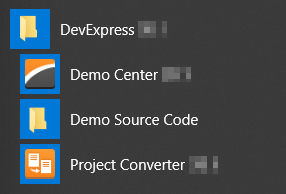
Using the executable file located in the directory where DevExpress products are installed. The default path is C:\Users\Public\Documents\DevExpress Demos 26.1\Components\Components\Bin\DevExpress.DemoCenter.v26.1.exe.
In the Demo Center, click ASP.NET MVC to review available feature-based demos. Run a solution from its corresponding folder to see the source code for a specific demo.
Run GitHub Demos
Clone the current repository:
# HTTPS
git clone https://github.com/DevExpress/demos-web-forms.git
# SSH
git clone git@github.com:DevExpress/demos-web-forms.git
Open a demo solution in your IDE. The IDE will automatically restore required packages.
- Run the application in a supported browser.
See Also