DxPivotGridListEditor.ShowFieldList() Method
Shows the Field List popup window.
Namespace: DevExpress.ExpressApp.Blazor.Editors
Assembly: DevExpress.ExpressApp.Blazor.v26.1.dll
NuGet Package: DevExpress.ExpressApp.Blazor
Declaration
Remarks
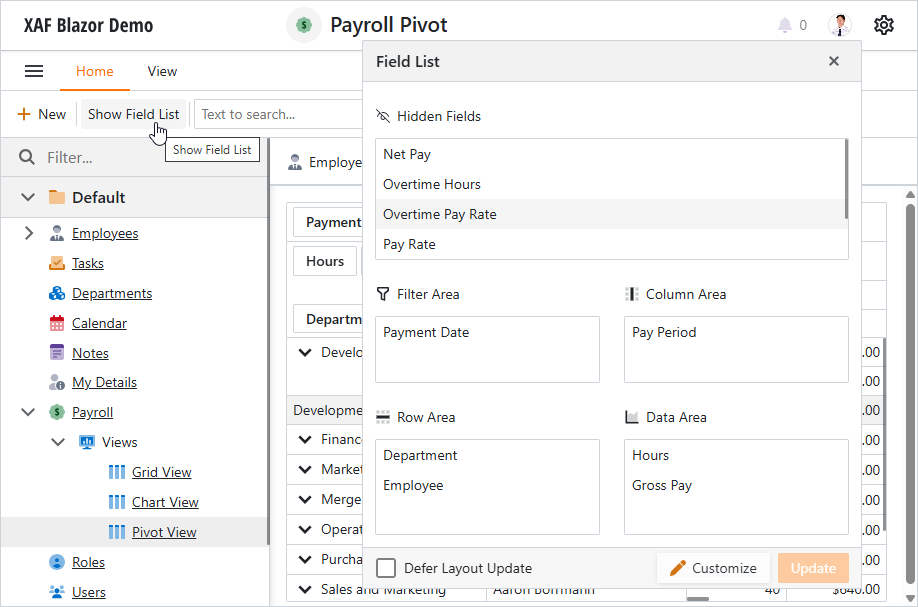
DxPivotGridListEditor includes a Field List that allows users to manage component structure:
- Reorder fields within each area.
- Move fields across different areas.
- Display or hide fields. The Hidden Fields list shows hidden fields.
- Change field sort order.
- Apply field filters.
- Defer layout update.
Users can invoke the Field List via the context menu.
You can call the ShowFieldList method to display the Field List from code.
using DevExpress.ExpressApp;
using DevExpress.ExpressApp.Actions;
using DevExpress.ExpressApp.Blazor.Editors;
using DevExpress.Persistent.Base;
using MainDemo.Module.BusinessObjects;
public class AddFieldListAction : ObjectViewController<ListView, Paycheck> {
    public AddFieldListAction() {
            SimpleAction showFieldListAction = new SimpleAction(this, "Show Field List", PredefinedCategory.View);
            showFieldListAction.Execute += (s, e) => {
                ((DxPivotGridListEditor)View.Editor).ShowFieldList();
            };
    }
}
See Also