ReportDesigner.RegisterControl<T>() Method
Registers a custom control in the Report Designer and adds it to the Toolbox.
Namespace: DevExpress.Xpf.Reports.UserDesigner
Assembly: DevExpress.Xpf.ReportDesigner.v26.1.dll
NuGet Package: DevExpress.Wpf.Reporting
Declaration
Type Parameters
| Name | Description |
|---|---|
| T | The control’s type. |
Remarks
The following example registers a custom control in the Report Designer. This control appears in the Toolbox.
using DevExpress.Xpf.Reports.UserDesigner;
using DevExpress.XtraReports.UI;
using System.Windows;
//...

public class ProgressBar : XRControl { /* ... */ }
//...

public partial class MainWindow : Window {
    public MainWindow() {
        InitializeComponent();
        ReportDesigner.RegisterControl<ProgressBar>();
    }

    private void Window_Loaded(object sender, RoutedEventArgs e) {
        reportDesigner.OpenDocument(new XtraReport());
    }
}
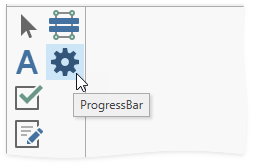
A custom control inherits an icon from a base class. If the base class does not have an icon (e.g., XRControl), the control inherits the default icon (a gear).
You can change the default icon. Use one of the following techniques:
- Call the RegisterControl<T>(ImageSource) method instead of the RegisterControl<T>() method to set a custom ImageSource icon.
Apply the ToolboxSvgImage attribute to the custom control class and call the
RegisterControl<T>()method to set an icon from an assembly.using DevExpress.Xpf.Reports.UserDesigner; using DevExpress.XtraReports.UI; using System.Windows; //... [ToolboxSvgImage("AssemblyName.ImagesFolder.progress_bar.svg, FullAssemblyName")] class ProgressBar : XRControl { ... } //... public partial class MainWindow : Window { public MainWindow() { InitializeComponent(); ReportDesigner.RegisterControl<ProgressBar>(); } private void Window_Loaded(object sender, RoutedEventArgs e) { reportDesigner.OpenDocument(new XtraReport()); } }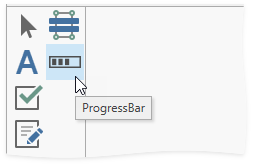
Tip
To unregister a control and remove it from the Toolbox, use the UnregisterControl<T>() method.