Manual Message Processing
- 3 minutes to read
DevExpress Blazor AI Chat allows you to handle messages in code before the component sends them to the AI service. Use this approach to modify user input, inspect attachments and selected resources, call external services, display progress, or replace the default message delivery flow with custom logic.
The main entry point is the DxAIChat.MessageSending event. In the event handler, you can read or modify the outgoing message, append chat history entries, cancel automatic delivery, and send a custom request. The MessageSending event fires when a user submits a message. After the handler finishes, the component sends and displays the message automatically unless you cancel the operation.
The MessageSendingEventArgs object provides access to the outgoing message, attached files and resources, and helper methods that continue or replace the default workflow.
Modify the Outgoing Message
Modify the Text property when you need to normalize user input, remove sensitive data, or prepend instructions before the request is sent.
<DxAIChat MessageSending="OnMessageSending" />

@code {
    private async Task OnMessageSending(MessageSendingEventArgs args) {
        StringBuilder sb = new StringBuilder();
        sb.AppendLine("Hello!");
        sb.AppendLine(args.Text);
        args.Text = sb.ToString();
    }
}
Append Messages to Chat History
Use AppendMessageAsync to add messages to chat history without sending them to the AI service. This approach is useful for system prompts, assistant hints, and supplemental context.
<DxAIChat MessageSending="OnMessageSending" />

@code {
    private async Task OnMessageSending(MessageSendingEventArgs args) {
        await args.Chat.AppendMessageAsync("Translate text to Spanish.", ChatRole.System);
    }
}
Access Attachments and AI Resources
Use Files and Contexts properties to access the collection of AI resources and files attached to the chat message.
<DxAIChat MessageSending="OnMessageSending"
          FileUploadEnabled="true" />

@code {
    private async Task OnMessageSending(MessageSendingEventArgs args) {
        if(args.Files != null) {
            foreach(var file in args.Files)
                Console.WriteLine($"File: {file.Name} ({file.Size} bytes)");
        }
    }
}
Replace the Default Delivery Flow
Set args.Cancel = true to block the built-in message delivery and send a custom request instead. After cancellation, call SendMessageAsync to submit a message.
<DxAIChat MessageSending="PreprocessMessages" />

@code {
    private async Task PreprocessMessages(MessageSendingEventArgs args) {
        args.Cancel = true;
        StringBuilder sb = new StringBuilder();
        sb.AppendLine("Your message:");
        sb.AppendLine(args.Text);
        await args.Chat.SendMessageAsync(sb.ToString());
    }
}
Use this pattern to validate requests, enrich prompts, decide at runtime whether to send a request, or replace the outgoing prompt with content generated in code.
Log User Messages
Handle the MessageSending event to log user messages for diagnostics, telemetry, or audit purposes.
<DxAIChat MessageSending="LogUserMessages"
          FileUploadEnabled="true" />

@code {
    private async Task LogUserMessages(MessageSendingEventArgs args) {
        StringBuilder logMessage = new StringBuilder();
        logMessage.AppendLine($@"User message: ""{args.Text}""");
        if(args.Files != null && args.Files.Count > 0) {
            logMessage.AppendLine($"Attachments: {string.Join(", ", args.Files.Select(f => f.Name))}");
        }
        LogConversationHistory(logMessage.ToString());
    }
}
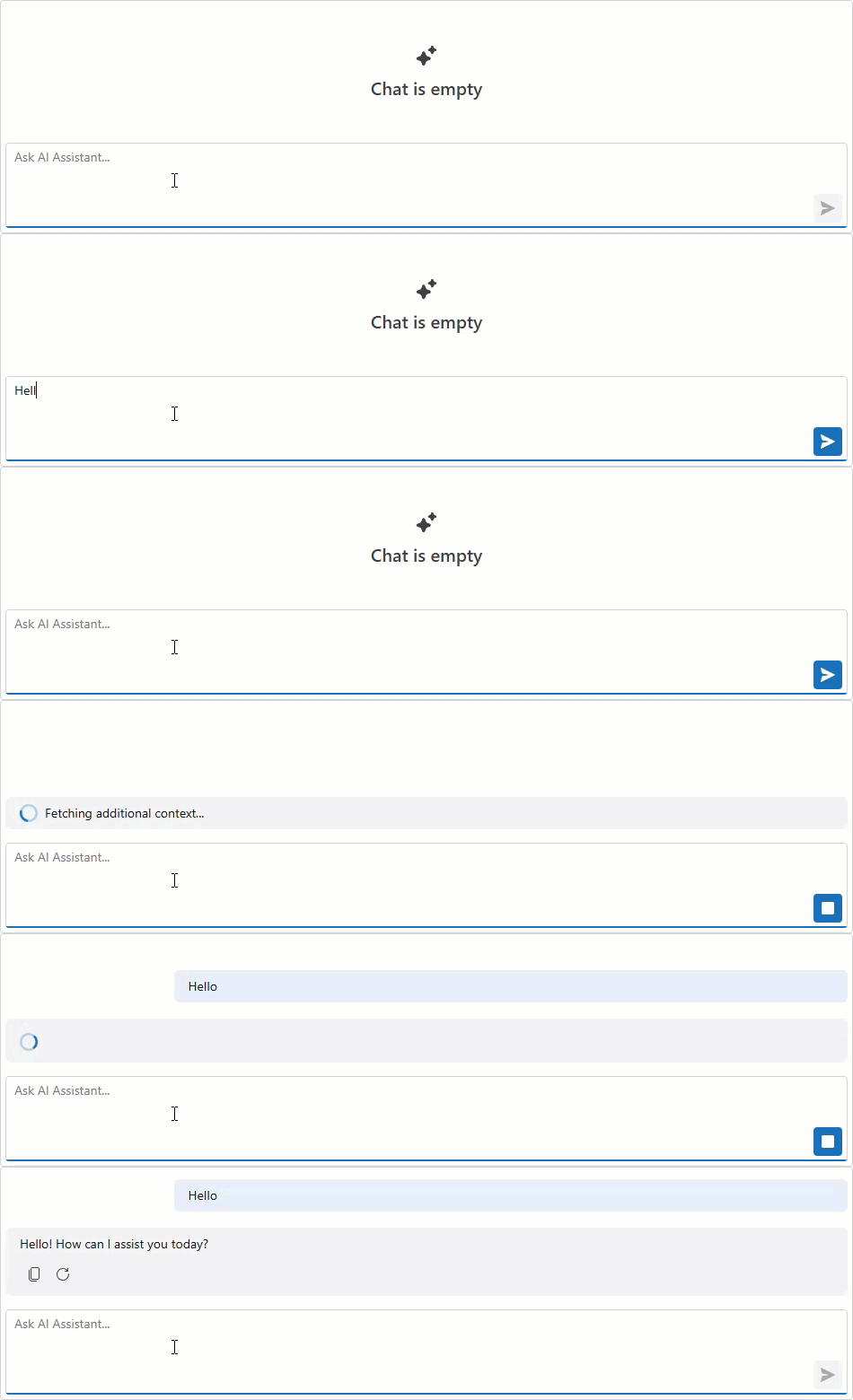
Display a Loading Indicator During Long Operations
If your handler needs to call an external service or prepare additional context before the message is sent, use ShowLoadingIndicatorAsync and HideLoadingIndicatorAsync to display progress in the chat UI.
<DxAIChat MessageSending="OnMessageSending" />

@code {
    async Task OnMessageSending(MessageSendingEventArgs args) {
        await args.Chat.ShowLoadingIndicatorAsync("Fetching additional context...");
        await Task.Delay(2000);
        await args.Chat.HideLoadingIndicatorAsync();
    }
}
Post-process Model Responses
Use DxAIChat.ResponseReceived when you need to inspect or adjust AI responses after the provider returns them. This event is useful for logging, filtering, and post-processing multi-part responses.
<DxAIChat ResponseReceived="OnResponseReceived" />

@code {
    private void OnResponseReceived(ResponseReceivedEventArgs args) {
        foreach(var message in args.Messages) {
            Console.WriteLine(message.Text);
        }
    }
}