AI Agent Integration
- 5 minutes to read
AI agents add a layer above the underlying chat client. An agent evaluates incoming messages, applies predefined instructions, and performs the corresponding actions.
The DevExpress Blazor AI Chat supports AI agent integration. You can bind the chat control to an IChatResponseProvider implementation backed by an AI agent. The control then delegates response generation to the agent instead of calling IChatClient directly.
How It Works
The DxAIChat component routes user input to the associated AI agent. The agent processes the input and executes orchestration logic through the Microsoft Agent Framework APIs. After execution completes, the agent returns a response payload to the UI for display.
Prerequisites
Install the following NuGet packages:
- Microsoft.Agents.AI.OpenAI
- Microsoft.Extensions.AI.OpenAI
- AI service provider packages (for example, Azure.AI.OpenAI)
- DevExpress.AIIntegration.Agents
- DevExpress.AIIntegration.Blazor.Chat
- DevExpress.Blazor
Create and Configure an AI Agent
Create an AI agent from an existing chat client. Define clear, task-specific instructions to control agent behavior.
using Azure.AI.OpenAI;
using DevExpress.AIIntegration.Agents;
using Microsoft.Agents.AI;
using Microsoft.Extensions.AI;
using System.ClientModel;

/* ... */

// Create a chat client
var chatClient = new AzureOpenAIClient(azureOpenAiEndpoint, azureOpenAiKey)
    .GetChatClient(azureOpenAiModel)
    .AsIChatClient();
// Create an AI agent with specific instructions
AIAgent agent = chatClient.AsAIAgent(
    name: "PoeticAgent",
    instructions: "You are a poetic assistant. Answer every query in rhyming verses."
);
var builder = WebApplication.CreateBuilder(args);
// Register the agent as a default AI service
builder.Services.AddSingleton(agent.AsIChatResponseProvider());
builder.Services.AddDevExpressAI();
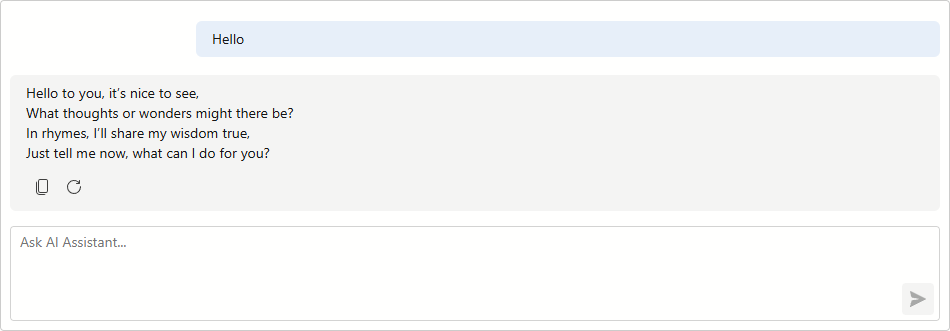
Display Agent Responses in the Chat
Add the DxAIChat component to the page.
<DxAIChat />
Persist Conversation History
Use this approach when users need to continue an existing conversation after the application restarts. Persist both chat messages and the underlying agent session to keep the visible chat history and the agent’s internal context synchronized.
The following example persists chat message history to a JSON file and restores it on application startup.
The example implements the following tasks:
- Defines an
AIAgentStatefulStorehelper class that serializes and deserializes theAgentSessionobject to a JSON file. - Registers the agent in the service collection and restores the saved session during first access.
- Overrides
OnClosingto persist chat messages and agent session state to disk before the application exits. - Overrides
OnLoadto load saved messages from disk and restore the conversation in the chat control.
Stateful Store Manager
Create a class that manages the persistence of an agent’s session state between application runs.
public class AIAgentStatefulStore
{
    readonly AIAgent agent;
    // Persists the agent session state between application runs
    readonly string statefulSessionFilePath = Path.Combine(
        AppDomain.CurrentDomain.BaseDirectory,
        "stateful_session.json");
    AgentSession statefulSession = null;

    internal AIAgentStatefulStore(AIAgent agent) {
        ArgumentNullException.ThrowIfNull(agent);
        this.agent = agent;
    }

    internal AgentSession GetOrRestoreSession() {
        // Return the cached session if already initialized
        if(statefulSession != null)
            return statefulSession;
        // Load from disk if a saved session exists; otherwise create a new session
        JsonElement? storedSession = LoadJsonElement(statefulSessionFilePath);
        statefulSession = storedSession.HasValue
            ? agent.DeserializeSessionAsync(storedSession.Value).AsTask().GetAwaiter().GetResult()
            : agent.CreateSessionAsync().AsTask().GetAwaiter().GetResult();

        return statefulSession;
    }

    internal void SaveSession() {
        if(statefulSession == null)
            return;
        // Serialize the agent session to JSON and persist it to disk
        JsonElement sessionJson = agent.SerializeSessionAsync(statefulSession).GetAwaiter().GetResult();
        SaveJsonElement(sessionJson, statefulSessionFilePath);
    }

    static void SaveJsonElement(JsonElement element, string filePath) {
        string json = element.GetRawText();
        string tmp = filePath + ".tmp";

        File.WriteAllText(tmp, json, new UTF8Encoding(encoderShouldEmitUTF8Identifier: false));

        if(File.Exists(filePath))
            File.Replace(tmp, filePath, destinationBackupFileName: null);
        else
            File.Move(tmp, filePath);
    }

    static JsonElement? LoadJsonElement(string filePath) {
        if(!File.Exists(filePath))
            return null;

        string json = File.ReadAllText(filePath);
        try {
            using var doc = JsonDocument.Parse(json);
            return doc.RootElement.Clone();
        }
        catch(JsonException) {
            return null;
        }
    }
}
Create and Configure a Stateful AI Agent
Register an AI agent based on an existing chat client and create a stateful store to manage the agent session between application runs:
// Create a chat client
var chatClient = new AzureOpenAIClient(azureOpenAiEndpoint, azureOpenAiKey)
    .GetChatClient(azureOpenAiModel)
    .AsIChatClient();
// Create an AI agent with specific instructions
AIAgent agent = chatClient.AsAIAgent(
    name: "PoeticAgent",
    instructions: "You are a poetic assistant. Answer every query in rhyming verses."
);
// Create a stateful store to manage the agent session between application runs
var statefulStore = new AIAgentStatefulStore(agent);
var builder = WebApplication.CreateBuilder(args);
// Register the agent as a default AI service
builder.Services.AddSingleton(agent.AsIChatResponseProvider(statefulStore.GetOrRestoreSession()));
// Register the store so pages can inject it to call SaveSession
builder.Services.AddSingleton(statefulStore);
// Add DevExpress Blazor and AI services
builder.Services.AddDevExpressAI();
builder.Services.AddDevExpressBlazor();
Add an AI Chat Component
Add a DxAIChat component to the page and handle its lifecycle events to restore saved messages, persist new responses, and save the agent session when the component is disposed.
<DxAIChat Initialized="ChatInitialized" ResponseReceived="ResponseReceived" />

@code {
    static readonly string statefulMessagesFilePath = Path.Combine(
        AppDomain.CurrentDomain.BaseDirectory,
        @"C:\Resources\stateful_messages.json");

    IAIChat chat;

    void ChatInitialized(IAIChat chat) {
        this.chat = chat;
        List<BlazorChatMessage> messages = LoadMessages();
        if(messages.Count > 0)
            chat.LoadMessages(messages);
    }

    void ResponseReceived(ResponseReceivedEventArgs args) {
        SaveMessages(chat.SaveMessages());
    }

    public ValueTask DisposeAsync() {
        StateStore.SaveSession();
        return ValueTask.CompletedTask;
    }

    void SaveMessages(IEnumerable<BlazorChatMessage> messages) {
        List<StoredChatMessage> storedMessages = messages
            .Select(StoredChatMessage.Create)
            .ToList();

        using FileStream stream = File.Create(statefulMessagesFilePath);
        JsonSerializer.Serialize(stream, storedMessages);
    }

    List<BlazorChatMessage> LoadMessages() {
        if(!File.Exists(statefulMessagesFilePath))
            return new List<BlazorChatMessage>();

        try {
            using FileStream stream = File.OpenRead(statefulMessagesFilePath);
            List<StoredChatMessage> storedMessages = JsonSerializer
                .Deserialize<List<StoredChatMessage>>(stream)
                ?? new List<StoredChatMessage>();
            return storedMessages.Select(x => x.ToBlazorChatMessage()).ToList();
        }
        catch {
            return new List<BlazorChatMessage>();
        }
    }

    sealed record StoredChatMessage(ChatRole Role, string Content, List<StoredChatFile> Files, bool Typing)
    {
        internal static StoredChatMessage Create(BlazorChatMessage message) {
            ArgumentNullException.ThrowIfNull(message);
            return new StoredChatMessage(
                ToChatRole(message.Role),
                message.Text,
                message.Files.Select(StoredChatFile.Create).ToList(),
                message.Typing);
        }

        internal BlazorChatMessage ToBlazorChatMessage() {
            BlazorChatMessage message = new(
                Role,
                Content,
                Files.Select(x => x.ToUploadFileInfo()).ToList()) {
                Typing = Typing
            };
            return message;
        }

        static ChatRole ToChatRole(ChatMessageRole role) {
            return role switch {
                ChatMessageRole.User => ChatRole.User,
                ChatMessageRole.Assistant => ChatRole.Assistant,
                ChatMessageRole.System => ChatRole.System,
                ChatMessageRole.Tool => ChatRole.Tool,
                _ => throw new InvalidOperationException($"Unsupported chat role '{role}'.")
            };
        }
    }

    sealed record StoredChatFile(string Name, string Type, decimal Size, byte[] Data, string Guid)
    {
        internal static StoredChatFile Create(AIChatUploadFileInfo file) {
            ArgumentNullException.ThrowIfNull(file);
            return new StoredChatFile(file.Name, file.Type, file.Size, file.Data.ToArray(), file.Guid);
        }

        internal AIChatUploadFileInfo ToUploadFileInfo() {
            return new AIChatUploadFileInfo(Name, Type, Size, new ReadOnlyMemory<byte>(Data), Guid);
        }
    }
}