Chat with Your Own Data
- 5 minutes to read
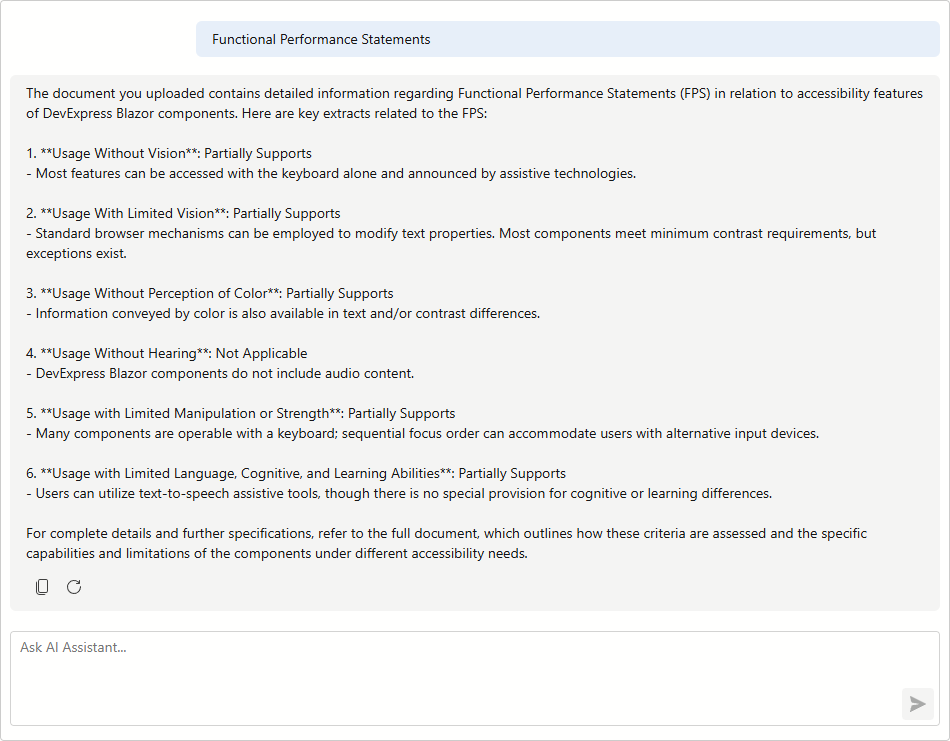
When integrating the DevExpress Blazor AI Chat with an AI Assistant API (for example, the OpenAI Responses API or Azure AI Projects), you can configure the control to work with external data sources, such as text files or PDF documents.
Use an additional document as a context source to give the assistant relevant background information. The AI service parses the document, extracts semantic information, and uses it to generate more relevant responses.
OpenAI Responses API
The OpenAI Responses API provides a unified way to build stateful AI agents that use tools and external data sources. In this example, the API creates an assistant that analyzes a user-supplied PDF file.
Install NuGet Packages
Install the following packages:
- Azure.AI.OpenAI (version 2.9.0-beta.1)
- Microsoft.Agents.AI.OpenAI
- DevExpress.AIIntegration.Agents
- DevExpress.AIIntegration.Blazor.Chat
- DevExpress.Blazor
Create an Assistant
OpenAIResponsesCreator creates an AI agent that can process and analyze a document (the agent is exposed as an IChatResponseProvider).
#pragma warning disable OPENAI001

public class OpenAIResponsesCreator
{
    readonly ResponsesClient responsesClient;
    readonly OpenAIFileClient fileClient;
    readonly VectorStoreClient vectorStoreClient;
    readonly string deployment;

    public OpenAIResponsesCreator(OpenAIClient client, string deployment) {
        responsesClient = client.GetResponsesClient();
        fileClient = client.GetOpenAIFileClient();
        vectorStoreClient = client.GetVectorStoreClient();
        this.deployment = deployment;
    }

    public IChatResponseProvider Build(
        string instructions,
        OpenAIResponsesFileInfo fileInfo,
        bool useFileSearchTool = true,
        CancellationToken ct = default) {
        fileInfo.Data.Position = 0;

        OpenAIFile file = null;
        VectorStore vectorStore = null;

        try {
            try {
                ClientResult<OpenAIFile> fileResponse = fileClient.UploadFile(
                    fileInfo.Data,
                    fileInfo.FileName,
                    FileUploadPurpose.Assistants,
                    ct);
                file = fileResponse.Value;
            }
            finally {
                fileInfo.Data.Dispose();
            }

            // Create a vector store for file search.
            if(useFileSearchTool) {
                var vectorStoreOptions = new VectorStoreCreationOptions() {
                    ExpirationPolicy = new VectorStoreExpirationPolicy(
                        VectorStoreExpirationAnchor.LastActiveAt,
                        1)
                };
                vectorStore = vectorStoreClient.CreateVectorStore(vectorStoreOptions, ct).Value;
                vectorStoreClient.AddFileToVectorStore(vectorStore.Id, file.Id, ct);
            }

            // Create a tools list.
            var tools = new List<AITool>();

            if(useFileSearchTool && vectorStore != null) {
                var fileSearchTool = new HostedFileSearchTool {
                    Inputs = [new HostedVectorStoreContent(vectorStore.Id)]
                };
                tools.Add(fileSearchTool);
            }

            var codeInterpreterTool = new HostedCodeInterpreterTool {
                Inputs = [new HostedFileContent(file.Id)]
            };
            tools.Add(codeInterpreterTool);

            // Create an AI agent.
            var aiAgent = responsesClient.AsAIAgent(
                instructions: instructions,
                tools: tools,
                name: $"Responses Agent {Guid.NewGuid()}",
                model: deployment
            );

            var session = aiAgent.CreateSessionAsync(ct);
            return aiAgent.AsIChatResponseProvider(session.Result);
        }
        catch {
            if(vectorStore != null) {
                TryDeleteVectorStore(vectorStore.Id, ct);
            }
            if(file != null) {
                TryDeleteFile(file.Id, ct);
            }
            throw;
        }
    }

    void TryDeleteVectorStore(string vectorStoreId, CancellationToken ct) {
        try {
            vectorStoreClient.DeleteVectorStore(vectorStoreId, ct);
        }
        catch {
            // Best-effort cleanup only; preserve the original exception.
        }
    }

    void TryDeleteFile(string fileId, CancellationToken ct) {
        try {
            fileClient.DeleteFile(fileId, ct);
        }
        catch {
            // Best-effort cleanup only; preserve the original exception.
        }
    }
}
public record OpenAIResponsesFileInfo(string FileName, Stream Data);

#pragma warning restore OPENAI001
Warning
The OpenAI.Responses API is for evaluation purposes only and is subject to change or removal in a future update. The #pragma warning directive suppresses the OPENAI001 diagnostic.
Register the Response Provider
Register the keyed response provider and define assistant behavior.
internal const string ResponsesAPIChatResponseProviderServiceKey = "ChatResponseProvider-ResponsesApi";
internal const string Instructions = "As a PDF Analysis Expert, you assist users by...";
internal const string PdfFileName = @"C:\Resources\ACR-DevExpress-Blazor.pdf";

public static void Main(string[] args) {
    /* ... */
    // Create a chat client
    var chatClient = new AzureOpenAIClient(
        new Uri(azureOpenAiEndpoint),
        new ApiKeyCredential(azureOpenAiKey)
    );
    var builder = WebApplication.CreateBuilder(args);
    // Register a keyed IChatResponseProvider service that uses the Responses API to analyze a PDF file
    builder.Services.AddKeyedScoped(ResponsesAPIChatResponseProviderServiceKey,
        (serviceProvider, _) => {
            var responseCreator = new OpenAIResponsesCreator(chatClient, azureOpenAiModel);
            Stream fileData = new FileStream(PdfFileName, FileMode.Open);
            var fileInfo = new OpenAIResponsesFileInfo(PdfFileName, fileData);
            return responseCreator.Build(Instructions, fileInfo);
        }
    );
    // Register DevExpress AI services
    builder.Services.AddDevExpressAI();
    // Register Razor Components services with interactive server components support
    builder.Services.AddDevExpressBlazor();
    /* ... */
    app.Run();
}
Configure AI Chat
Bind the keyed response provider to the AI chat component through the ChatResponseProviderServiceKey property.
<DxAIChat ChatResponseProviderServiceKey="@Program.ResponsesAPIChatResponseProviderServiceKey" />
Azure AI Projects
The following example uses the Azure AI Projects API to analyze a PDF file:
Install NuGet Packages
Install the following packages:
- Azure.AI.Projects (version 2..0.0)
- Microsoft.Agents.AI.OpenAI
- DevExpress.AIIntegration.Agents
- DevExpress.AIIntegration.Blazor.Chat
- DevExpress.Blazor
Create an Azure AI Projects Agent
internal static class AzureAIProjectsAgentCreator
{
    const string AgentName = "AssistantTestAgent";
    const string VectorStoreName = "RestaurantMenuVectorStore";
    const string Model = "gpt-5.4-mini";
    // Replace "YOUR_ENDPOINT" with the actual endpoint URL of your Azure AI Project.
    const string FoundryProjectEndpointSampleValue = "YOUR_ENDPOINT";
    #region Instructions
    const string Instructions = "As a PDF Analysis Expert, you assist users by...";
    #endregion
    #pragma warning disable OPENAI001
    internal static IChatResponseProvider Create() {
        AIProjectClient projectClient = new(
            new Uri(FoundryProjectEndpointSampleValue),
            new VisualStudioCredential()
        );
        var agents = projectClient.AgentAdministrationClient.GetAgents();
        CreateOrUpdateAgent(projectClient);
        var responseClient = projectClient.ProjectOpenAIClient.GetProjectResponsesClient();
        IChatClient chatClient = responseClient.AsIChatClient();
        var chatOptions = new ChatOptions {
            RawRepresentationFactory = _ => {
                CreateResponseOptions options = new() {
                    Agent = new AgentReference(AgentName)
                };
                return options;
            }
        };
        return chatClient.AsIChatResponseProvider(chatOptions);
    }

    static void CreateOrUpdateAgent(AIProjectClient projectClient) {
        var agents = projectClient.AgentAdministrationClient.GetAgents();
        var existingAgent = agents.FirstOrDefault(a => a.Name == AgentName);
        if(existingAgent != null) {
            projectClient.AgentAdministrationClient.DeleteAgent(existingAgent.Id);
        }
        string vectorStoreId = CreateVectorStore(projectClient);
        var agentDefinition = new DeclarativeAgentDefinition(Model) {
            Instructions = Instructions,
            Tools = {
                ResponseTool.CreateFileSearchTool([vectorStoreId])
            }
        };
        var options = new ProjectsAgentVersionCreationOptions(agentDefinition);
        projectClient.AgentAdministrationClient.CreateAgentVersion(AgentName, options);
    }

    static string CreateVectorStore(AIProjectClient projectClient) {
        var fileClient = projectClient.ProjectOpenAIClient.GetOpenAIFileClient();
        var vectorStoreClient = projectClient.ProjectOpenAIClient.GetVectorStoreClient();
        using Stream pdfStream = GetEmbeddedResourceStream();
        var uploadedFile = fileClient.UploadFile(
            pdfStream,
            "RestaurantMenu.pdf",
            FileUploadPurpose.Assistants
        );
        var creationOptions = new VectorStoreCreationOptions {
            Name = VectorStoreName
        };
        var vectorStore = vectorStoreClient.CreateVectorStore(creationOptions);
        vectorStoreClient.AddFileToVectorStore(vectorStore.Value.Id, uploadedFile.Value.Id);
        return vectorStore.Value.Id;
    }

    static Stream GetEmbeddedResourceStream() {
        const string fileName = "RestaurantMenu.pdf";
        Stream stream = new FileStream(fileName, FileMode.Open);
        if(stream is null) {
            throw new InvalidOperationException($"'{fileName}' doesn't exist.");
        }
        return stream;
    }
    #pragma warning restore OPENAI001
}
Register AI Services
var builder = WebApplication.CreateBuilder(args);
builder.Services.AddSingleton(AzureAIProjectsAgentCreator.Create());
// Register DevExpress AI services
builder.Services.AddDevExpressAI();
// Register Razor Components services with interactive server components support
builder.Services.AddDevExpressBlazor();