AI Tool Calling
- 3 minutes to read
The DevExpress AI Chat component supports AI tools: methods annotated with metadata that describes the tool’s purpose, input parameters, and optional target object.
At runtime, the AI service selects a relevant function based on chat context and the capabilities of the configured AI model. If the model does not support tool calling, or if no function is relevant, the service returns a regular text response.
We added an AI tool calling layer that extends capabilities available in Microsoft.Extensions.AI libraries:
- Target-aware tools
- Tools can operate on specific object instances, such as UI controls, pages, data services, or business objects. The API resolves target objects at runtime based on context and descriptions. Flexible tool contexts Tools can be grouped into contexts that you can dynamically activate, deactivate, or remove based on application state or user workflow.
- Seamless integration with the AI Chat component
- The DevExpress Blazor AI Chat component discovers and merges tools from all registered contexts and manages tool selection, target resolution, parameter binding, and invocation.
The following code snippet registers DevExpress AI services, defines a contextual AI tool, and integrates an AI tool calling pipeline into an application:
@using DevExpress.AIIntegration.Blazor.Chat
@using DevExpress.AIIntegration.Tools
@inject AIToolsContextContainer container

<DxAIChat />
<DxGrid @ref="grid">
    <!-- ... -->
</DxGrid>

@code {
    DxGrid grid;
    AIToolsContext context;

    protected override void OnAfterRender(bool firstRender) {
        if (firstRender) {
            context = new AIToolsContextBuilder()
                .WithToolMethods(ExpandGroups)
                .Build();
            container.Add(context);
        }
    }
}
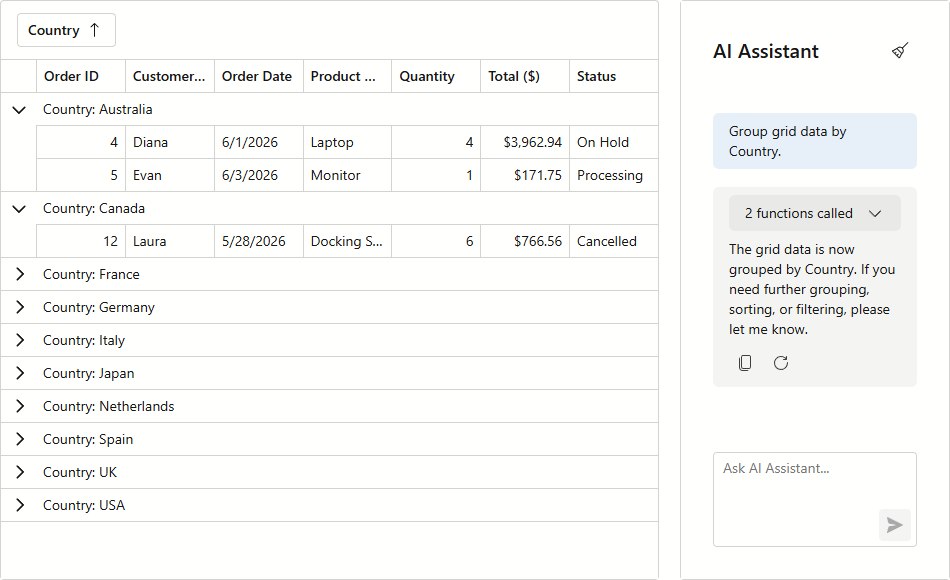
Refer to the Tool Calling help topic for additional information.
Show Tool Call Details in the Chat UI
DevExpress AI Chat can display information about tools invoked during a conversation. This helps users understand how the assistant produced a result and helps developers test and troubleshoot tool execution.
Use the DxAIChat.IncludeFunctionCallInfo property to display basic tool call details in the chat UI. The component displays the invoked tool name, arguments, and return value in assistant responses.
For more control over how this information appears, use the DxAIChat.FunctionCallInfoContentTemplate property. This template allows you to customize the appearance of tool call details without altering the main message content.
Use the built-in display option to inspect tool execution during development. Use a custom template to align tool call information with your application’s visual style or user experience requirements.