DxGridListEditor Class
List Editor that can be used in XAF ASP.NET Core Blazor applications to display List Views in a UI.
Namespace: DevExpress.ExpressApp.Blazor.Editors
Assembly: DevExpress.ExpressApp.Blazor.v25.2.dll
NuGet Package: DevExpress.ExpressApp.Blazor
Declaration
Remarks
List Views use List Editors to display object collections in a UI. The DxGridListEditor displays data in a table:
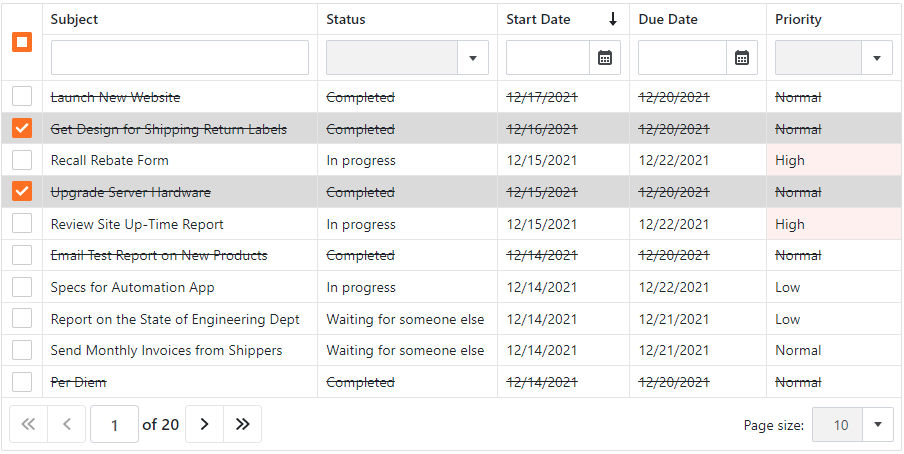
To display object collections, the DxGridListEditor uses an instance of the DxGrid class.
Features include:
- Client and Server mode for XPO and EF Core
- Data editing
- Protected content placeholders for secured data rows
- Property editors as cell templates
- Grouping, sorting, and filtering
- Group and total summaries
- Save layout settings in the Application Model
- Selection API
- Context-dependent menu toolbar
- Conditional appearance for cells
- Column resizing
- Column chooser
- ServerView, InstantFeedbackView, InstantFeedback, and DataView data access modes
- PDF export
- Virtual scrolling
Enable the DxGridListEditor
The DxGridListEditor is enabled by default for v22.1+ projects.
DxGridListEditor in a Project Upgraded from Older Versions
If you updated your project from v21.2 or earlier, do the following:
Open the MySolution\Blazor.Server\Model.xafml file. In the Model Editor, go to ApplicationName | Views. Set the
DefaultListEditorproperty toDevExpress.ExpressApp.Blazor.Editors.DxGridListEditor.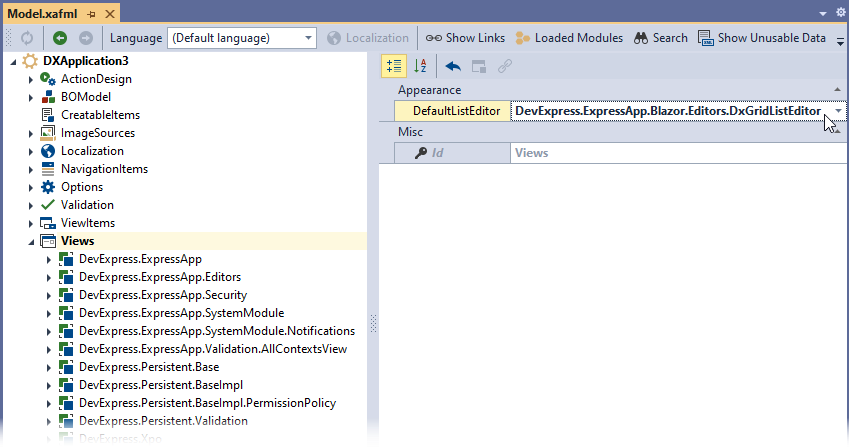
If you enabled the
DxGridListEditormanually in v21.2, remove the corresponding code from your application. To see this code, use the selector at the top of this page to switch to the V21.2 documentation version.If you edited
DxGridListEditormodel properties, update your code according to the following tutorial: How to: Access the Grid Component in a List View.
Limitations
DxGridListEditordoes not support Batch Edit in Server data access mode.DxGridListEditordoes not support Queryable data access mode.